

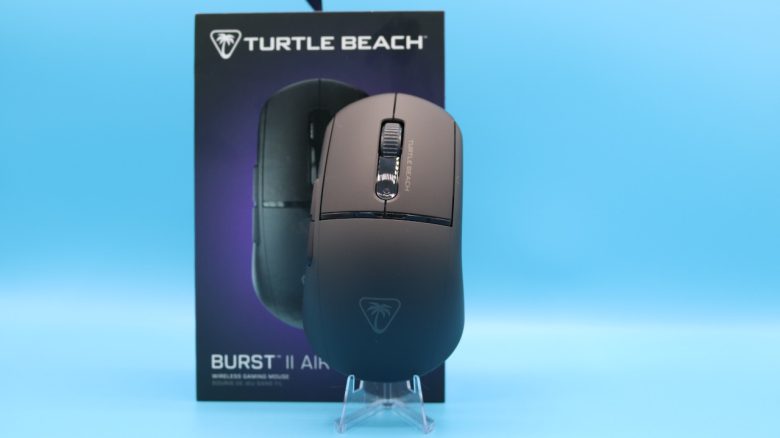
Weighing in at 47 grams, the Turtle Beach Burst II Air is one of the lightest gaming mice currently available. But what does the model offer aside from its lightweight? MeinMMO editor Benedikt Schlotmann has tested the mouse and explains whether the model is worth it.
47 grams. That’s about the weight of a half a chocolate bar or a large chocolate candy bar today. Or the Turtle Beach Burst II Air, which also weighs only 47 grams, making it one of the lightest gaming mice you can find on the market today. Even the popular G Pro X 2 Superlight from Logitech (for the test) weighs a whole lot more at 63 grams.
In the following test, I took a look at the Burst II Air from Turtle Beach. However, I just couldn’t get used to its ergonomics in my daily use.
The test at a glance:
- Scope of delivery, design, and build
- Processing
- Software
- Weight, ergonomics, and battery life
- Mouse buttons, scroll wheel, and sensor
- Conclusion
Who has tested it?
At MeinMMO, I have been testing hardware for our readers since 2019. Besides the PC and the PS5, I am now also using the Steam Deck.
Our review unit was provided to us by the manufacturer.

Benedikt Schlotmann
Hardware Editor MeinMMO
Details
| Sensor | Owl-Eye sensor (Pixart) |
| Resolution | Up to 26,000 DPI |
| Switches | Optical Titan switches |
| Buttons | 5 buttons |
| Design | Black mouse without RGB |
| Glide feet | 4 |
| Cable | Removable 2.0 m USB-C cable |
| Weight | 47 grams |
| Price (MSRP) | 99.99 Euros |
Scope of delivery, design, and build
What does the scope of delivery look like? Besides the gaming mouse, the package includes a wireless USB transmitter, a USB-C-to-A cable, and additional mouse feet and optional grip tape.
How is the mouse built? You can purchase the mouse in different colors, I am using the black model in the test.
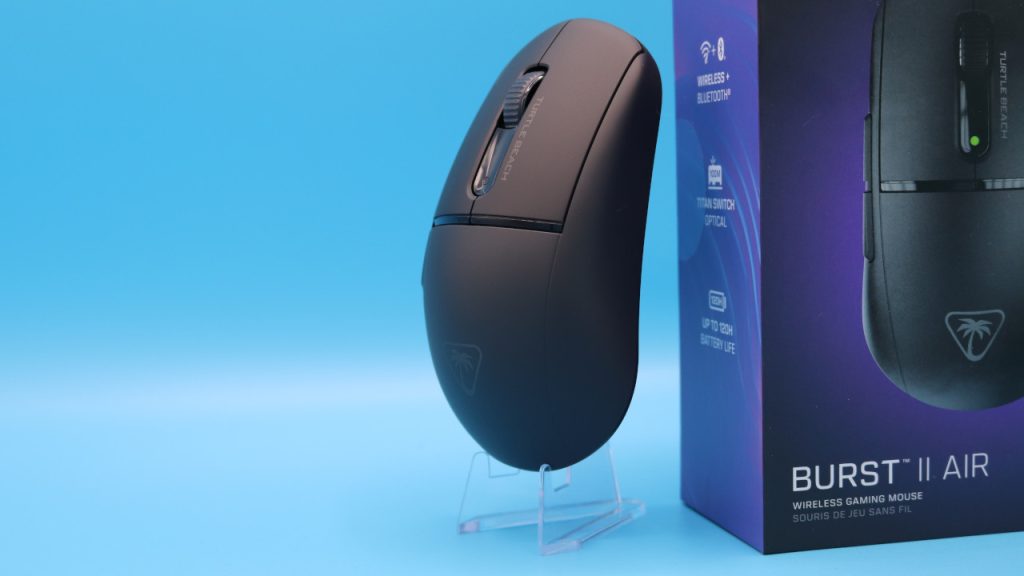
- On the top of the mouse are the main buttons with the scroll wheel in between. There are no other buttons on top of the mouse.
- Underneath the mouse, there is a space to store the USB transmitter and a switch to toggle between wireless and Bluetooth. There are no additional buttons.
- On the left side, there are two additional buttons in the thumb area.
- At the far front left of the mouse, in front of the thumb buttons, there is a tiny button. In shooter mice, this is often referred to as a sniper button; Turtle Beach calls this button the DPI button.
The underside is designed like a honeycomb pattern. The big problem after just a few days: the underside collects dust and dirt and especially cat hair. The gaps underneath the mouse are so large that dust, dirt, and hair can easily enter the inner casing of the mouse. No household is likely to be completely dust-free.
What is special? The entire mouse relies on a very subdued design. Turtle Beach entirely forgoes RGB or other gimmicks.

Processing
The Burst II Air features a plastic shell. Due to its low weight (47 grams), the mouse sounds very hollow. However, during the pressure and shake test, there are no sounds or sensations. Even the scroll wheel stays where it is supposed to be. The USB-C port of the mouse is broad enough so that you can also use external USB cables for charging the mouse.
The underside of the mouse is, as explained above, partially open to reduce weight. The opening is partly covered by black and white striped cardboard, but the area is never completely closed. This allows dirt, grime, and hair to enter the mouse. I cannot yet say how this will impact the durability of the mouse in the long term.

Software
Turtle Beach now uses the software “Swarm II” for all devices. The software is clear and all important functions can be found via a large overview within the software. Most settings in the software are more or less explained in tooltips, sufficient for an introduction.
Updates for the mouse can be installed quickly and easily through Swarm II. Everything works swiftly and flawlessly.

Weight, ergonomics, and battery life
The weight: At 47 grams, the gaming mouse is unusually light. That’s about the weight of a larger chocolate bar like Cachet or Cote D’Or, which also weigh 47 grams.
A very light shooter mouse is the Razer Viper v3 Pro, which weighs 55 grams. Even the Lamzu Atlantis Mini that colleague Dariusz tested for you weighs 49 grams, which is two grams more.
The ergonomics: I have very large hands with a size of 19 centimeters. But I must honestly say: I do not find the mouse comfortable for everyday use. For a lightweight mouse aimed primarily at shooter players, it feels too wide towards the back, making it uncomfortable to grip.
Additionally, when I grip or hold the mouse, the wide side presses heavily on the area between my palm and thumb. This becomes uncomfortable over time, as the thumb does not rest comfortably. Other mice handle this much more pleasantly overall.
As a result, my pinky finger on my right hand cramps over time, making it very uncomfortable after several hours. However, for smaller hands, this problem might not be as pronounced.
In comparison: The G309 from Logitech has a slimmer design but is similarly sized, resting much more comfortably in hand and allowing for a much more relaxed grip. And the pinky does not cramp.

Another thing that really bothers me is the additional button at the very front of the Burst II Air: I previously had to complain about the sniper button placed too far forward on the Razer Basilisk V3 Pro 35K (for the test). And the Burst II Air takes this idea to the extreme. The little button, referred to by the manufacturer as the DPI button, is not only extremely far forward but also so small that it’s almost unreachable, even in an uncomfortable position. Who on earth came up with the idea to place the button there?
It becomes truly absurd when you try to reach the button while holding the mouse in a claw grip or fingertip grip. That is practically impossible.

Battery life: The manufacturer states that the battery life is around 120 hours. Because the mouse forgoes all gimmicks like RGB, it surprisingly comes close to the stated time in everyday use, at least when using the mouse via the wireless adapter.
The mouse buttons, scroll wheel, and sensor
The mouse buttons: Under the buttons are optical Titan switches. Turtle Beach uses these switches in all newer mice, including the Kone II Air (for the test). The click feels satisfying and robust, but the sound is very dull and hollow. This is a distinct contrast to other mice that predominantly sound high and sharp.
You can listen to the Burst II compared to the G309 from Logitech:
The scroll wheel: The scroll wheel has always been something of a weakness in mice from Roccat and Turtle Beach. However, the scroll wheel on the Burst II Air is impressive: the rotation is stiff and thus precisely usable for steps. You won’t get a free-spinning scroll wheel here.
Sensor: The Burst II Air contains an Owl-Eye sensor, which is a Pixart derivative, meaning a collaboration. Turtle Beach also implements this sensor in all newer mice. My experience is that the sensor is very accurate and precise when used wired. However, precision suffers when you use the mouse wirelessly. This is particularly evident during practical tests of the sensor curves. Razer and Logitech offer significantly better wireless models.
Conclusion: Very light, but quite uncomfortable
Who is the mouse suitable for? Are you looking for an extremely lightweight mouse without frills? Then with the Burst II Air, you get exactly that more or less. The battery life is optimal, the sensor varies between excellent (wired) and decent (wireless), but the ergonomics leave much to be desired with my large hands. Even after several weeks, I still can’t get used to the ergonomics and prefer heavier but more comfortable alternatives.
What alternatives are available?
- Logitech’s G309 is my recommendation for under 70 Euros: good haptics, pleasant ergonomics, and a long battery life.
- The Nyfter Nyf 22 remains a brilliant insider tip for me if you are looking for a lightweight mouse that you can fully customize.
- The HyperX Pulsefire Haste (2) is also a recommendation for under 100 Euros. The sensor is not as good as the competition’s, but you get excellent ergonomics and decent battery life.
More gaming mice on MeinMMO: If you are looking for more recommended gaming mice, then check out our buying guide on MeinMMO. Here you will find the best gaming mice you can currently buy: The best gaming mice for shooters that you can currently buy

Your opinion is important to us!
Do you like the article? Then let us know!