


Lost Ark is a massive MMORPG. There is something to do and learn around every corner. When you play with multiple characters, it can quickly become confusing. MeinMMO author Mark Sellner has selected five useful tools for you that simplify daily life in Lost Ark.

What kind of list is this? There are now a variety of practical tools for the MMORPG Lost Ark. But which ones are actually worth it? MeinMMO author Mark Sellner has spent over 1,700 hours in the game and reveals which aids he regularly relies on.
Since we don’t have an official API in our version of Lost Ark, meaning an interface to transport data from your account out of the game, some of the tools still require a bit of work to set up correctly. However, they are all legal, and there is no risk of getting banned.
We intentionally leave out the brilliant world map from Papunika here, since we have already presented it to you in detail in a separate article. If you haven’t used it yet, it is probably the most important tool for Lost Ark.
1. BynnArk – The all-rounder with a weakness
What kind of tool is this? BynnArk comes into play, especially when you have many characters and want to maintain an overview. You can list your characters there, add daily tasks, and check them off.
At the same time, BynnArk also offers further comfort features, like a timer for specific events and an alarm before they happen. You can tell the tool that character X wants to farm event Y, and then you will receive a timely notification on the website.
The tool also provides general functions, such as various calculators for auction house chances, raids, or in Mari’s Shop. You can calculate at a glance how much gold you need daily for specific activities and items.
Where is the tool used? BynnArk is perfect to keep open all the time. I personally actively play 16 characters, and without this tool, it would often be difficult to keep track of which character still has specific tasks to do.
Moreover, specific events, daily quests, rapport, and even the bonus you have for Chaos Dungeons and Guardian Raids can be easily monitored. Thanks to BynnArk, I know at all times what I still have to do and could do, without having to log into the characters myself.
In addition, the tool provides me with a satisfying effect when I can check off my tasks on the to-do list. BynnArk is definitely one of the best tools for the MMORPG.
The biggest weakness: Unfortunately, the tool also comes with a significant weakness, namely the user interface. Since BynnArk was already used in Korea, not all translations are complete and correct, even though there is now an English version of the site.
However, you will still be thrown into the deep end, as you first have to set everything up yourself. This process is not very intuitive and is associated with some stumbling blocks again. Those who do not genuinely want to use the tool will probably give up relatively quickly.
But there are also aids for this. In this video, Lost Ark YouTuber SenderFN shows you in German how to set up and use BynnArk correctly:
2. Lost Ark Timer – When the compass in the game is not enough
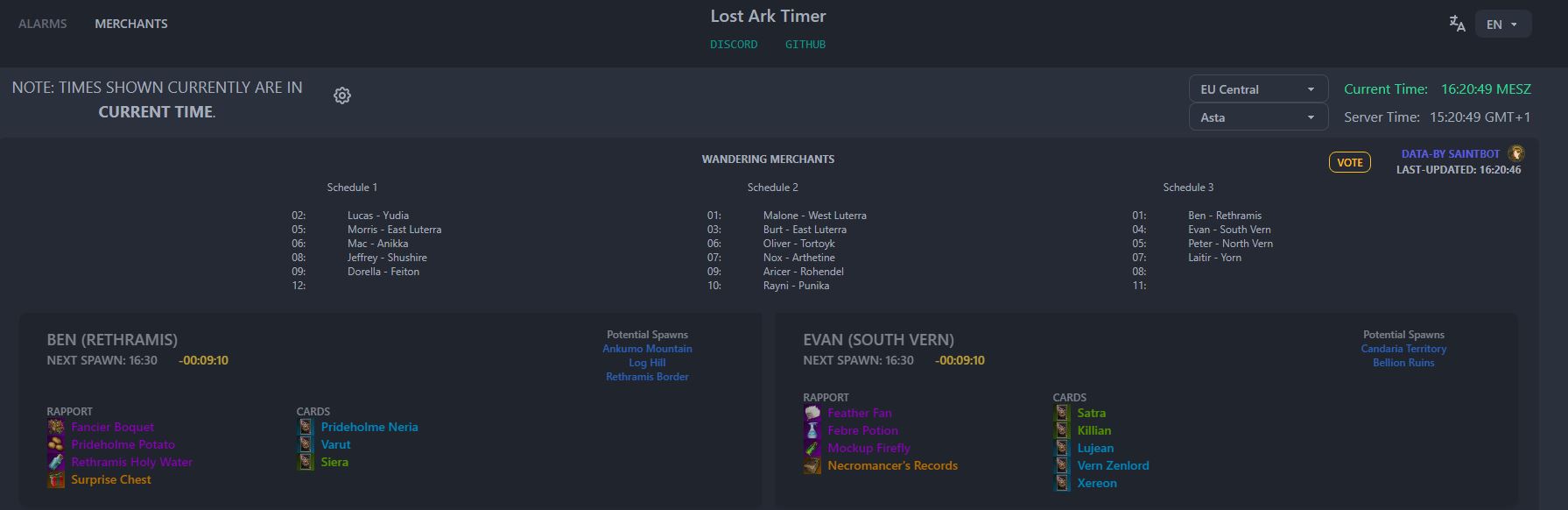
What kind of tool is this? The Lost Ark Timer comes quite close to the compass in the game, only it is designed more clearly and offers a few more functions that are missing in the game itself. You can rely on the tool not only for events but also for the traveling merchants in Lost Ark.
Fundamentally, the tool offers two important functions:
- You can set an alarm for specific events
- You can keep an eye on the traveling merchants
The whole comes with an appealing user interface when using the Lost Ark Timer and is very intuitive to operate. However, if you do not want to have another website opened all the time for these functions, the timer is also available as a practical Discord bot for your server.
How do you use the tool correctly? During your first visit to the site, it is essential that you adjust your server in the top right corner of the timer. Otherwise, the tool can quickly become confusing and output the wrong numbers. After that, you can navigate between the alarms and the merchants in the top bar.
With the alarms, similar to the in-game compass, you can see when which events are upcoming. The timer shows you the times in your local time, reducing confusion. The gray numbers show the time according to the server time, the green times are in your time zone, and the yellow times are countdowns to the next event.
For the traveling merchants, the system is similar. Here you can see for each possible merchant when he will spawn next, what he has, and where he could potentially be. Then you just need to wait for the right time and check the various locations, which goes by very quickly.
Also, make sure that you have set the correct server.
3. Tooki App – For the number junkies and theory crafters
What kind of tool is this? The Tooki App currently has four different functions and is mainly aimed at players who enjoy dealing with numbers. However, Tooki is also useful if you just want to save gold.
In this summary, I only want to refer to 3 of the 4 functions. The 4th is a simple way to create and check off daily tasks, which BynnArk can do much more clearly for you. However, the other 3 are interesting:
- Mari vs Market Calculator
- Upgrade Material Calculator
- Gear Checker
What is the Mari vs. Market Calculator? In Lost Ark, there is the famous Mari’s Secret Shop. There you can buy new items for blue crystals every 6 hours, one of the real money currencies of Lost Ark. However, you can also buy these blue crystals for gold, and this is where the Tooki calculator comes into play.
When you open it, you enter the current gold price for blue crystals at the top. The tool then calculates how much gold you would pay per piece for the depicted items if you buy them from Mari for crystals. You can then compare whether it is cheaper to shop at Mari for crystals or in the market for gold. A useful tool for not-so-full pockets.
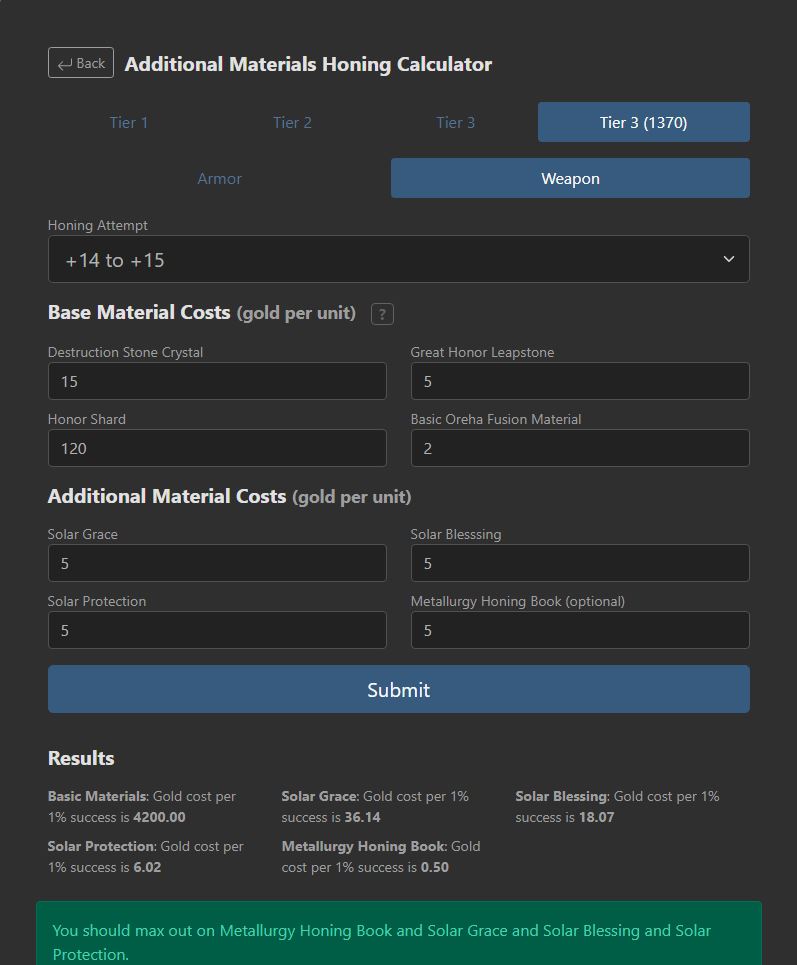
What is the Upgrade Material Calculator? This function of Tooki helps you improve your equipment as cost-effectively as possible. First, you need to select and specify which item you are dealing with. Then, you fill in the variables and prices that the tool requires of you. For example, how expensive your next attempt is and how much gold an item costs to improve the chance of upgrading.
Once you have filled everything out, click on the big button “Submit”. Tooki will now show you whether it is worth buying materials to increase the chance of success or if it is cheaper to just try it out. The tool is a bit cumbersome to use, but it can save you a lot of gold in the long run.
What is the Gear Checker? This function of Tooki helps you find out if you have dropped something valuable or not. This way, with a little effort, you can prevent yourself from recycling a lot of gold.
To do this, look at the drop you just received. Now fill in the values of the item in the Gear Checker. The stats and both engravings are important here. Once you have completed all 4, a single click on “Check Gear” is enough.
The tool will now show you for which classes and builds the selected item is relevant. The more classes this applies to, the more valuable your item could potentially be. Especially if you do not have many builds in mind, the Gear Checker is a lifesaver for your gold purse.
Engraving Checker: Also useful, but not large enough to constitute its own point, is the Engraving Checker from loa-todo. Here you can comfortably build your build and quickly see at a glance which stones, equipment, and books you need to achieve what you want.

4. Refinement Optimizer – When the stones become too expensive
What kind of tool is this? The Lost Ark Ability Stone Refinement Optimizer has a very long and complicated name but serves a simple and great function. It helps you grind your ability stones as successfully as possible.
Because this can often become a farce and is inadequately explained in the game. How exactly do you grind your gemstones now? What do the percentage indications mean, and how the hell do I reach the values I want on my stone?
This tool is the answer to each of these questions. It becomes more important the higher you rise in gear score since later stones also cost pheons and thus become correspondingly expensive. Ideally, you want to use as few stones as possible to achieve the desired result.
How does it work? The Refinement Optimizer is incredibly easy to use. You use it in parallel while grinding in the game and best open it before starting to work on the stone. Now you only need to choose how many slots your ability stone has at the top. The standard is set to 8, but there are indeed stones with more and fewer slots.
Subsequently, you select which of the two engravings on the stone is more important to you in the category “Weights”. If the numbers confuse you, you can also select a pre-made preset that focuses the tool on engraving 1 or aims to collect as few negative effects as possible.
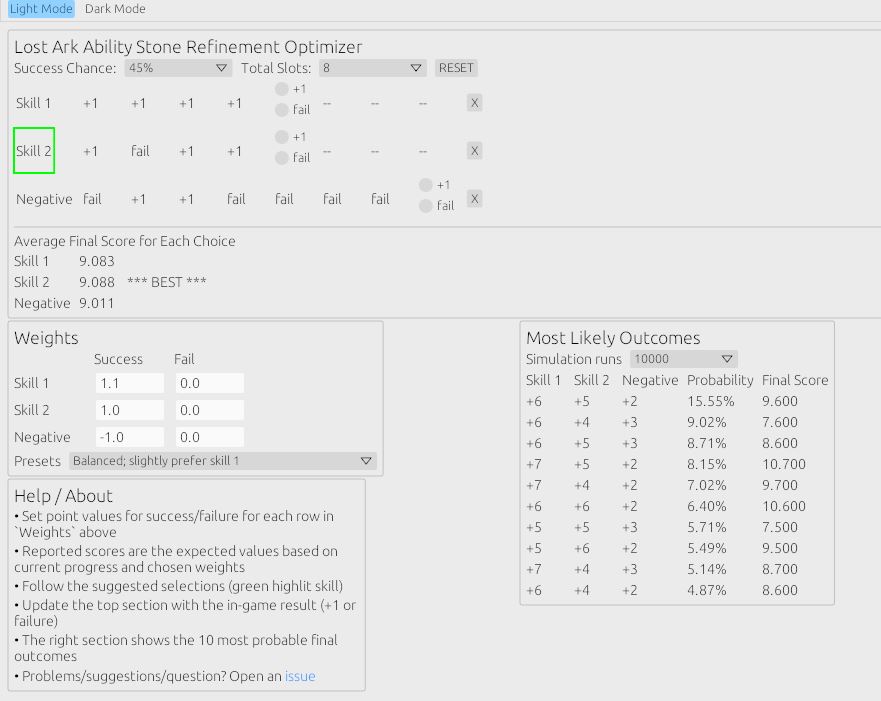
The tool then shows you which engraving you should click on next with the help of a green frame or the note BEST in the row below. You then do the same in the game and enter the result with “+1” or “fail” in the Optimizer. The tool will tell you which engraving you should click on next. Repeat the process until the stone is finished.
In the lower right corner of the Optimizer, you will also find a display that updates with each click. It tells you at any time what the probable final result of your stone will be.

5. Reputation & Rapport Tracker – When you easily lose track
What kind of tool is this? Strictly speaking, the Lost Ark Reputation & Rapport Tracker is not really a tool, but just a Google Sheet. Nevertheless, I used the page daily to keep track of my progress. Although I am now done with all rapports and reputations, I still want to introduce you to the tool.
In principle, this function is also possible through the BynnArk tool, but I personally find the Google Sheet of the tracker here more appealing and easier to use. After all, I like to open another page more each day. The sheet helps you keep an eye on how far you are with your reputation missions and NPC rapports. It also shows you which rewards are still waiting for you.
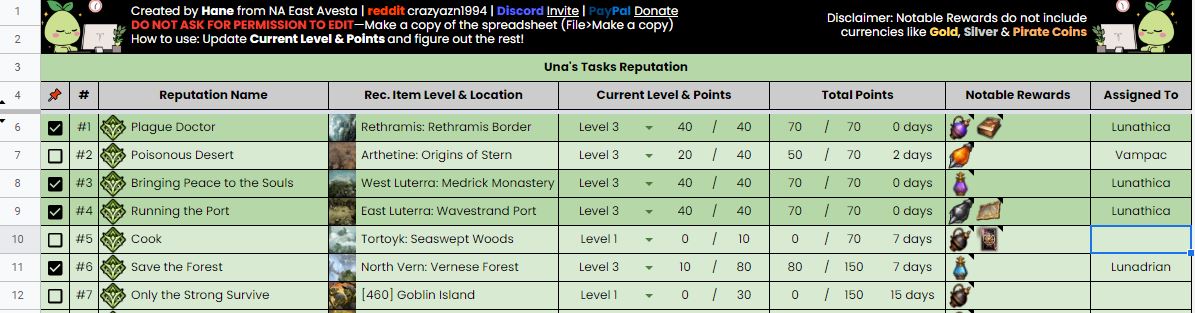
How do you use the tool? To use the tracker itself, you need to go to “File” at the top of the table and then create a copy for yourself. You cannot edit the actual table.
Once you have created your own copy, you first have a bit of work to do. Because now you have to enter how far you are with which tasks. You do this on the reputation page as well as on the pink-marked rapport page. Once you have filled everything out, you can see at a glance what you should do next.
Additionally, you have an overview of the required gear score, how many days you need to complete your goal, and what rewards await you. This helps especially in deciding which task you want to focus on next.
What is the downside? Compared to the other tools on this list, you have to fill and update the tracker relatively manually. Here, less occurs automatically than, for example, with BynnArk or Tooki. Nevertheless, I personally find the tracker simply clearer than the view of the other tools or even that in the game.
6. Lost Merchants – Always in the right place at the right time
What kind of tool is this? At Lost Merchants it is a great community project that can help you in many places in the game even in the long term. It is used to scout and track traveling merchants.
The principle is quite simple. The tool tracks by itself when the next traveling merchant appears in which area. If a player finds it, he reports it on Lost Merchants and selects from a simple, prepared list what the merchant has available for purchase.
Once he sends it, the merchant, his location, and his goods are shared on the site for everyone. As a user, you can then set alarms only for specific items, such as the legendary Wei card or legendary rapport items.

How do you use the tool? Getting started with Lost Merchants is straightforward. You open the site, select your region and server, and you are mostly ready for action. Now you just need to sensitize the tool for the items you want.
To do this, click on “Settings” in the top selection bar. Here you see each individual merchant and the possible items he could have. Just click on the little speaker next to the items, and you will receive a notification as soon as they become available for purchase.
Additionally, you can set what type of notification you want to receive further up. I personally use a relatively loud sound notification so that I can run the page in the background without opening it and still not miss anything.
If you want to contribute and have found a merchant, you can simply click “Suggest Location” and inform other users where he is and what he has. But be careful – To prevent too many false reports, you cannot report legendary items without logging in with your Discord account on the site.
What is the downside? The downside is essentially that the site relies on player input. Therefore, it often happens at night that not all merchants are found. Additionally, there are occasionally false reports.
However, Lost Merchants is prepared for this. Through a simple upvote and downvote procedure, you can point out false entries. If this happens often enough, the site will retract them.
7. Maxroll’s One Page Cheat Sheet – Perfectly prepared for every raid
What kind of tool is this? Maxroll is a go-to place for most Lost Ark players. The site offers helpful tips for almost any situation but is often not very clear. The “One Page Cheat Sheet” is, however, a true source of clarity and is thus a must for every player in the endgame.
It shows you all the essential mechanics of all major raid bosses on just one page and requires minimal navigation, so with a second monitor, you can quickly click around on the page even during the fight.
However, it should be noted that the cheat sheet does not adequately explain the mechanics. It helps you briefly if you are not 100% sure about one of the boss mechanics.
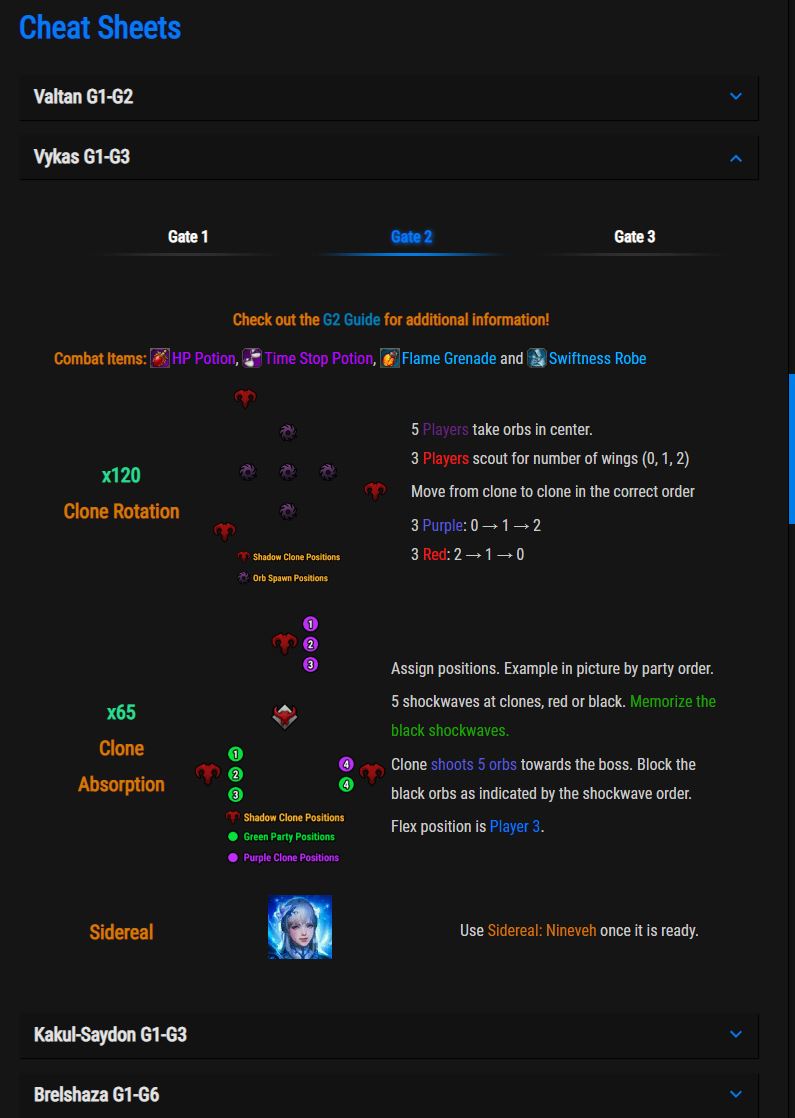
How do you use the tool? You open the site, select the corresponding boss you want to tackle, and that’s it for the usage instructions. The cheat sheet quickly shows you what items you need to bring and at how many health points which mechanic starts.
Additionally, it provides a quickly digestible rundown of the individual mechanics. These overviews are designed to be brief and visually memorable, so often a quick glance at the second monitor or phone during the boss is enough to know what’s next.
Moreover, detailed guides are linked directly for each gate if you want to refresh them before a fight. The “One Page Cheat Sheet” is thus brilliant for raid beginners, but even after hundreds of raids, I still often keep the page open.
Equally brilliant is Maxroll’s “Kakul Bingo” tool. However, it is so specific that we only briefly mention it here and do not list it as a separate point. In the third phase of the boss Kakul-Saydon, you must play bingo during the fight to defeat him.
On Maxroll’s interactive bingo board, you can click where the first two fields appear when the fight begins. Then the tool tells you precisely where you should best place the next bingo bombs.
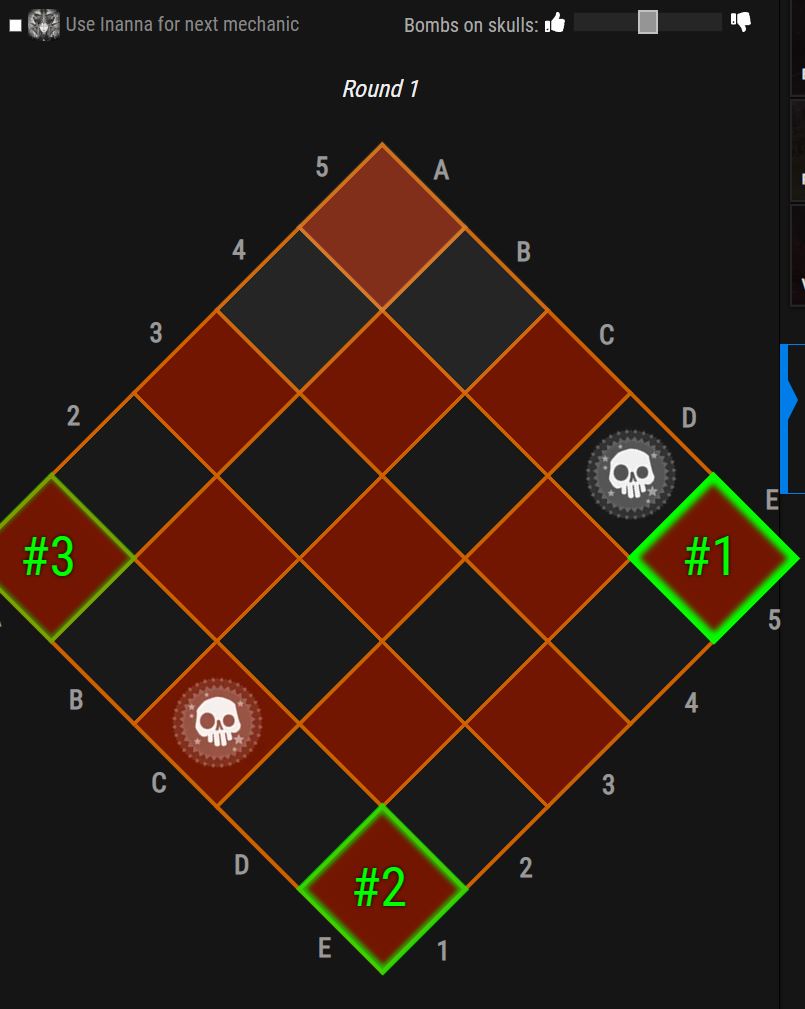
What is the downside? You absolutely need a second monitor or a phone that is always on for the cheat sheet and for the bingo tool. This can often be cumbersome to handle. Additionally, you need to already know the mechanics of the bosses.
If you only use the cheat sheet as preparation for a raid, you may find yourself on the floor faster than you can place the next bingo field. Both tools help even experienced players when a mechanic is not yet 100% settled.
What do you think of this list? Were we able to show you a new tool that you didn’t know about and whose function you find useful? Do you perhaps use other websites to enhance your experience? If so, which ones?
Feel free to let us know in the comments how you personally play Lost Ark. We look forward to your opinion.

Your opinion is important to us!
Do you like the article? Then let us know!