

Windows 11 is set to officially launch in 2021. MeinMMO presents 5 things you should know about Windows 11.
At some point in 2021, Windows 11 will be released and eventually replace Windows 10. Microsoft promises new features and several improvements for the transition.
But what is actually important and what should every user know who is considering switching to Windows 11 at the end of 2021?
MeinMMO presents 5 things you should know about the new operating system.
Windows 10 and Windows 11 are very similar
If you compare Windows 10 with the upcoming new Windows 11, you will quickly notice that many things seem familiar at first glance.
In previous Windows versions, Microsoft often completely overhauled the operating system. There were significant changes from Windows XP to Vista, which were then reduced when transitioning from Vista to 7.
There were also noticeable differences when switching from Windows 7 to Windows 8. The differences from 8 to 10 were then much smaller in terms of design.
With Windows 11, these adjustments are overall limited. Although Microsoft has made some adjustments, especially in design, and added some features, many users coming from Windows 10 should find themselves comfortable in Windows 11 relatively quickly.
The Windows 11 upgrade is free at release
Microsoft provides the upgrade to Windows 11 for free to all users who already have Windows 10. At the Windows 11 release, which is set to take place sometime in winter 2021, you can download the upgrade for free.
How do I update Windows? You do not need any additional software, as you can upgrade to Windows 11 directly through the update menu. It feels rather like a somewhat larger Windows update.
The only requirement is that your system must meet the minimum requirements for Windows 11. You can read about the minimum requirements here in our overview article:
Windows 11 requires Trusted Platform Module 2.0 (TPM)
What is TPM? TPM stands for Trusted Platform Module. This module is often integrated as a small chip on your motherboard and is responsible for various security tasks:
- The chip signs digital certificates and checks if something changes in the system
- The chip stores hashes among other things and detects when the firmware is tampered with.
- The Windows Defender features Device Guard and Credential Guard also rely on TPM, as do biometric identification options.
Where can I find TPM? TPM may already be integrated on your motherboard, be enabled as a device, or be integrated in a special form (fTPM) in your processor. Particularly new processors support this security standard in the form of firmware-TPMs.
However, these features are often disabled, which is why a BIOS or UEFI update is often necessary to activate the function.
What module do I have? Open the run menu with the Windows + R key combination and enter devmgmt.msc. This will land you in the device manager. Here you look for the entry “Security devices,” which is located quite far down. If “Trusted Platform Module 2.0” is listed here, you are in the clear and can install Windows 11 without any issues.
Some old processors only support TPM 1.2, which is not sufficient for installing Windows 11. In principle, it is still possible to circumvent the requirement for TPM 2.0 using unofficial methods. Whether this will still be possible in the official version, we cannot say. However, modifying your system always carries risks and can make your system unstable.
Can old hardware be upgraded? Particularly old hardware either does not support TPM 2.0 or you do not have a chip on your motherboard.
Some motherboards also offer the possibility to retrofit TPM using a TPM header module. However, there must be a corresponding slot (header) available on your motherboard, and each slot looks different, as there is no universal standard.
What does Windows 11 need TPM for? Microsoft has not yet explained why Windows 11 requires a TPM. Currently, TPM is mainly used for drive encryption with BitLocker in the Pro and Enterprise versions of Windows. Windows also uses a TPM for device encryption. These are mainly features that most regular consumers will likely never use.
On Windows 11, you can use Android apps
In the future you will be able to use Android apps on Windows 11. You can install them directly through the Microsoft Store, where the official Amazon AppStore is integrated. An integration of the Google PlayStore is not yet planned.
Users who primarily game and work on their PC and occasionally use an app on their smartphone may eventually also use their apps directly on their PC or tablet computer with Windows 11.
You can use and arrange many windows simultaneously
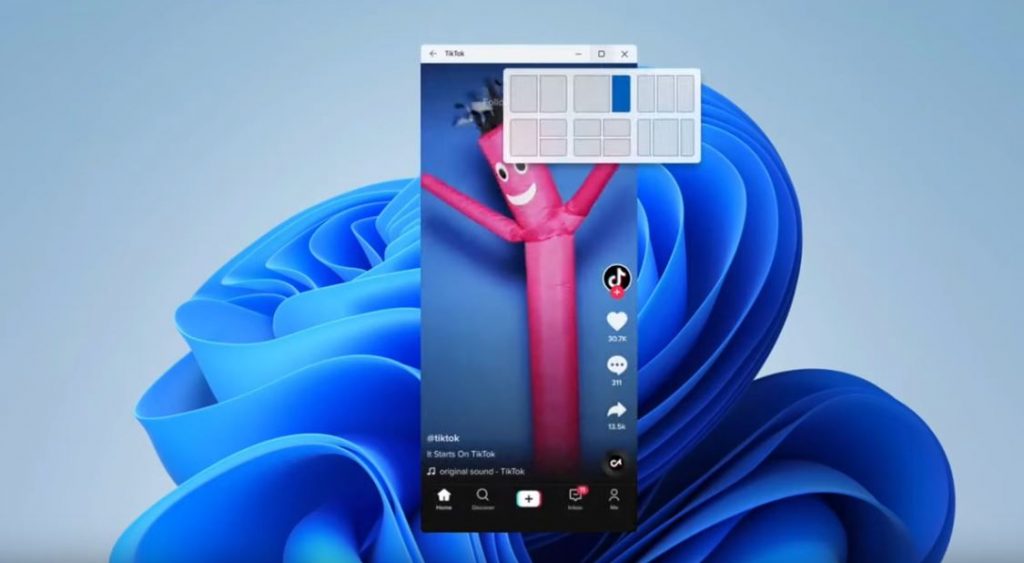
Windows 11 aims to make it significantly easier for you to work with multiple windows, user interfaces, or monitors in the future. This is especially good news for users who work with two or more monitors. There is a new way to arrange windows on the desktop. Through the taskbar, you can directly access your assigned windows.
Windows 11 also remembers how you arranged your windows. If a series of windows are open on two monitors and you put your computer in standby or disconnect the second monitor, Windows should remember the layout of your windows as soon as you restart the PC or reconnect the monitor.
Windows 11 is getting many new gaming features
With Windows 11, Microsoft is adding several new features that are meant to be particularly interesting for gamers:
- Auto-HDR is intended to provide prettier graphics and especially better lighting in the game.
- DirectStorage is aimed at shorter loading times, but requires compatible hardware.
- Xbox Cloud Gaming is also officially included with Windows 11.
You can already use this feature with Windows 10: Microsoft has explained in its official blog that “DirectStorage” is set to come to Windows 10. However, this is not quite as powerful a version. If you want to use DirectStorage to the fullest extent, you still need Windows 11.
Microsoft has also released the open beta for Xbox Cloud Gaming. This is particularly beneficial for those who could not buy a fast graphics card but still want to play with decent details. From Windows 11 onwards, the cloud service will be properly integrated into Windows.

Your opinion is important to us!
Do you like the article? Then let us know!