In Fortnite: Battle Royale, players were accompanied by Deadpool for weeks. Now you can even play a mini-game of his, which is quite hidden. We will show you where to find and play it.
What is this mini-game? You will find a small game where you have to accompany Deadpool while skiing. You control him and make sure he doesn’t hit any obstacles.
The time of day changes constantly, and you even have to look in the dark to ensure he safely rides down the mountain. In the meantime, evil Peelys with red eyes and sharp teeth are chasing you.
Here you will find the hidden game
Where do you need to search? First, you need to go to the battle pass menu, where you will find yourself in the agent headquarters. There you will see a golden ventilation shaft. You must click on it to enter Deadpool’s secret room.
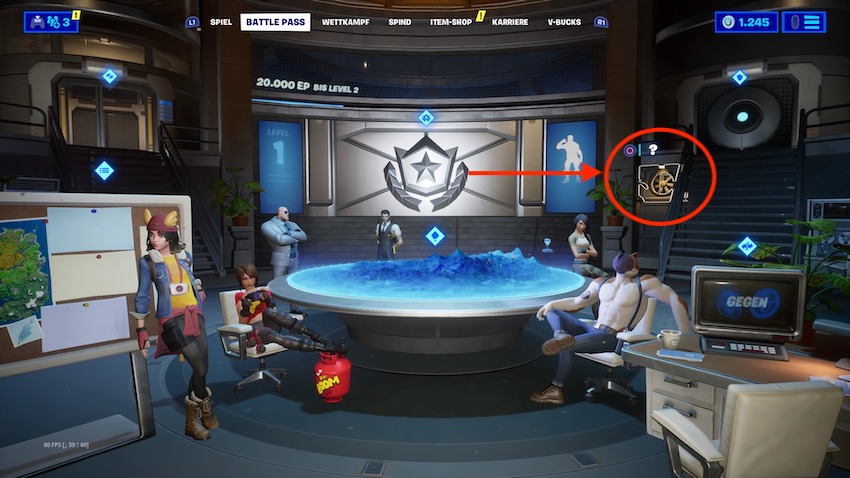
Once you reach the secret room, click on the computer as if you were opening the challenges to unlock the Deadpool skin.
However, you do not need the challenges here and must close them again so that Deadpool’s computer desktop becomes visible.
On the left side, you will find a few folders and at the very bottom, a Deadpool icon that you must click on. On the PS4, you need to press the triangle button. On the Xbox One, that would probably be the Y button.
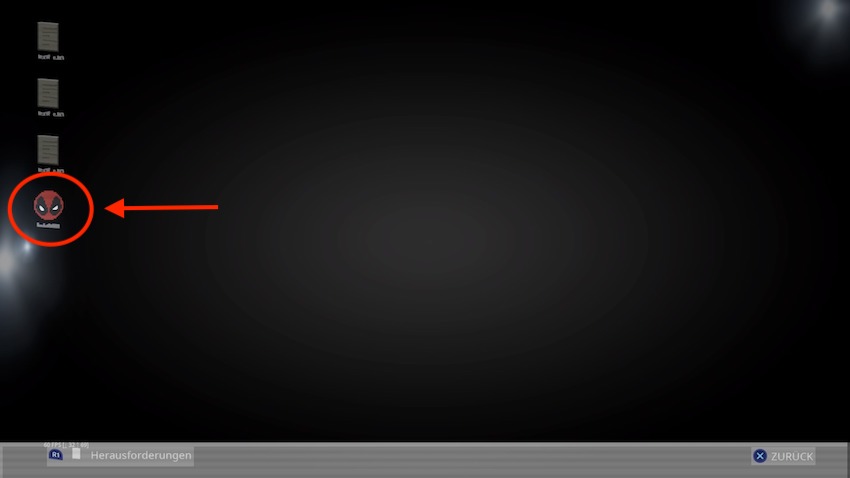
The game will open shortly, and after a brief countdown, you can start right away. Control Deadpool safely down without hitting the obstacles or being caught by evil Peelys.
If you prefer to watch the tutorial or the game itself in video form, you can do that here:
However, you will not only find Deadpool in his secret hideout but also on the Fortnite map, and you can even fight against him. So if you prefer to see Deadpool directly in the game, you should check out the yacht, which changed after the Deadpool event. He is throwing a huge party there.