

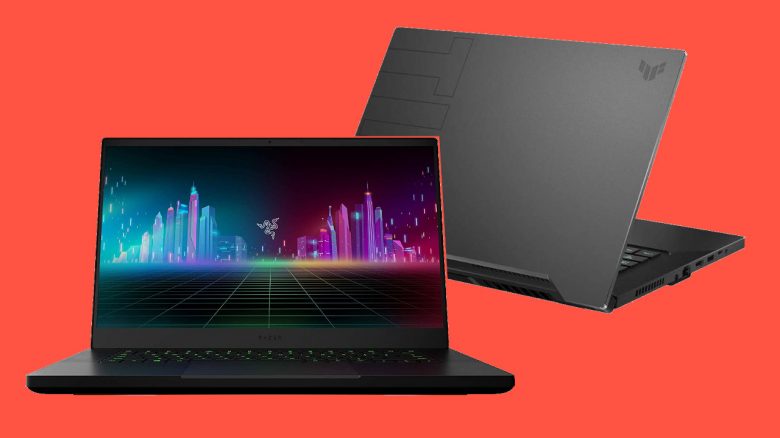
7 important criteria when buying a gaming laptop
What is important when buying a gaming laptop? In this section, we want to present 6 important criteria that you should consider when buying a gaming laptop.
Display:
- You can get gaming laptops in sizes from 13 inches to 17 inches.
- 15-inch models are usually a bit cheaper than 17-inch models and take up less space on the desk. However, 17-inch models can display more details due to their larger screen. If you want to be mobile, the smaller version is recommended since 17-inch models require more space and have a higher weight.
- Note that the installed monitors also have different refresh rates (Hz). In the following section, we will explain what to look for.
- You should also keep an eye on laptops with QHD screens. QHD displays are often cheaper and equipped with more functions than many 4K monitors, yet the picture quality is hardly worse.
Pay attention to brightness: When choosing a laptop, also consider the brightness. The brighter a screen is, the less you will struggle with incoming light. Ensure that the device supports at least 300 nits. Nits describe the luminance of the display. If the display is too bright, you can always adjust it manually to what works best for you.
Pay attention to the aspect ratio: Consider the aspect ratio of your laptop. Currently, both 16:9 and 16:10 are options.
16:10 is a few pixels taller than 16:9, but is better suited for work since you have more screen space. This results in a significant gain in efficiency for tasks such as handling large tables, browsing, typing texts, or photo editing.
Why the Hz number of the monitor matters: High Hz numbers are important for shooters and other fast-paced games. At high frame rates, the image appears smoother and more fluid. Higher Hz numbers are a significant criterion, especially in competitive gaming. For casual gamers, 240 Hz hardly matters since not all games support such high Hz numbers.
While you can still find gaming laptops with 60 Hz in the budget range, for a bit more money you can already purchase devices with 144 Hz or even 240 Hz. In general, a higher Hz number is better than a lower one. In a YouTube video by “The Tech Chap,” you can see the difference between 60 Hz and 144 Hz:
However, you must also ensure that the installed graphics card can fully utilize the monitor. A weaker GTX 1650 cannot manage full details at 144 Hz with Full HD. You will then need to be prepared to forgo details.
- For 144 Hz, a minimum of a GTX 1660 Ti or RTX 3060 is recommended.
- For 240 Hz or 4K at 60 Hz, a minimum of an RTX 2070, RTX 3070, or even RTX 3080 is recommended.
Processor:
- Generally, you will not find models with outdated processors under the label “gaming laptops.” Most processors are suitable for a smooth gaming experience.
- Ideally, aim for at least an i5 processor for Intel. For AMD, the Ryzen 5000 series already offers an excellent alternative. Here, at least a Ryzen 5 should be prioritized.
- Nowadays, you can also find gaming laptops with Ryzen 5000 and an RTX 3080.
Graphics card:
- Gaming laptops with a GTX 1650 are at the lower performance range. If you are a casual gamer and do not prioritize the best graphics, you can consider these devices. For those who play Fortnite and games with low graphic requirements, this performance is sufficient. Ray tracing or DLSS support is not available with this graphics card.
- With the GTX 1660 Ti and faster variants, you can play almost all modern titles at high settings. With these models, you will already benefit from higher FPS numbers – if your screen allows it. Ray tracing or DLSS support is also not offered with this graphics card.
- The mobile variations of the Nvidia GeForce RTX 2060, RTX 2070, and RTX 2080 provide sufficient performance for maximum details and high frame rates. The new RTX-3000 mobile graphics chips are similarly powerful, but the prices are often above 1000 euros.
- If you want to game on your laptop at 4K resolution with mostly maximum details, you should look for an RTX 3080.
- If you want to benefit from modern technologies such as DLSS or ray tracing, you definitely need a graphics card from the RTX 2000 or RTX 3000 series. This includes the RTX 2060, 2070, 2080, and 3060, 3070, and 3080. DLSS is a real performance factor for gaming and should not be underestimated.
Additionally, when it comes to graphics cards, you need to look a bit closer, as many Nvidia graphics cards come with an extra:
- “Super” usually describes a slightly faster version of the normal version
- “Ti” stands for a faster variant of the normal version. The RTX 3060 Ti, for example, is faster than the RTX 3060.
- “Max-Q” indicates a graphics chip optimized for efficiency. Graphics cards with this designation are weaker in terms of performance. An RTX 3080 with “Max-Q” ranks more at the level of an RTX 3070.
- Modern laptop graphics cards are indicated in watts and TDP, rather than marked with “Max-Q.” The range starts from 60 watts and goes to 150 watts. However, you will only find 150-watt GPUs in thick and heavy notebooks. The performance of the graphics chip depends on the performance and the cooling of the laptop. You need to be very careful with the watt specifications, as you will otherwise end up with a GeForce RTX 3080 laptop GPU rated at the performance level of a GeForce RTX 3070 laptop GPU, which ranks lower in the desktop comparison.
Cooling:
- Good cooling reduces wear on your hardware. Good cooling also prevents you from gaming on a hot keyboard since the hardware sits directly under the laptop’s keyboard. This is different for a desktop PC.
- Good cooling is quiet and unobtrusive. Inexpensive devices often save in this area, resulting in devices that can become very loud under load.
- When it comes to cooling, you should also pay attention to the installed components: A notebook with a powerful RTX 2080 will run significantly hotter under load than a notebook with a GTX 1650. While devices in a series usually offer similar build quality, they can differ significantly in heat development.
- Take your time to carefully check reviews and pay attention to noise and heat levels. Websites like Notebookcheck are great for this, as they provide comprehensive coverage of the devices.
Interfaces and connections:
- HDMI, USB, LAN, and headphone jacks should be included with every gaming notebook. A card reader can also be useful, but can also be added as an adapter via USB.
- Thunderbolt connectors are particularly interesting, as they can transfer large amounts of data quickly. External graphics cards (known as eGPUs) can be connected through them.
- USB-C is also a valuable addition to your gaming laptop, as it is a versatile connector that allows simultaneous transmission of power, data, video, and audio signals. This plays an important role in HDMI and DisplayPort.
Additional hardware/features:
- If you want to game with the laptop, at least 16 GB of RAM should be installed. If you want to be future-proof, you should even consider 32 GB.
- 8 GB is usually installed in budget laptops. For laptops with only 8 GB of RAM, you should ensure that you can replace or upgrade the RAM.
- Make sure that the installed RAM is not soldered. If the RAM is soldered, you will not have the option to replace it or you will lose performance and possibly even the warranty of the device when changing it.
- Ideally, your device should already have at least a large SSD installed. An SSD should be included in your laptop. Ideally, you have one SSD for your operating system, programs, and important games, and an additional HDD for extra data and further games.
- A free slot for an additional hard drive is desirable but not mandatory; however, it makes any potential upgrades easier.
Weight:
- If you travel a lot or want to change your workplace or visit friends, pay attention to the weight of your gaming laptop.
- Slim, thin, and light notebooks weigh from 2 to 2.5 kg. You can easily transport these.
- With the Asus Zephyrus G14, you even get a device that weighs just 1.6 kg, and the Asus ROG Flow X13 even weighs only 1.3 kg (via Notebookcheck.com).
- More than 2.5 kg is only conditionally suitable for mobile use. You also need to make sure that this weight does not yet include the power supply unit.
Which gaming laptop should I buy?
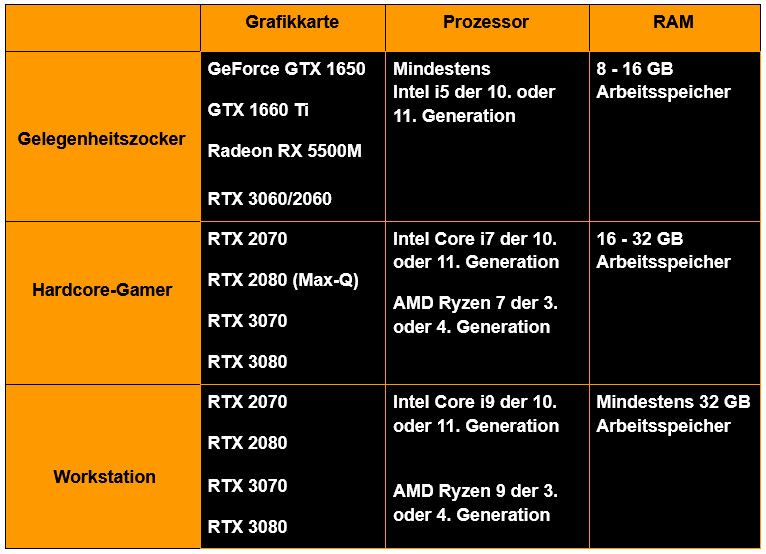
As a casual gamer, you should look for a laptop with at least a GTX 1650. With this, you can play modern titles at high details. For processors, you are safe with Ryzen 5 or Intel i5. However, with a GTX 1650, you can neither use DLSS nor ray tracing; for that, you will need at least an RTX 3060 or RTX 2060. These graphics cards are also more expensive than a GTX 1650.
As hardcore gamers, you can opt for a gaming laptop with RTX 3080 or RTX 3070/2070. This will give you plenty of performance, sufficient for high resolutions and maximum details. We also recommend 17-inch models and particularly high Hz numbers (144 Hz or 240 Hz) if you want to game competitively.
If you do not just want to work but also use your device as a workstation for resource-intensive applications, you should invest in a fast graphics card (RTX 3080, RTX 3070, or an RTX 2000 variant) along with a powerful processor. With an i9 and Ryzen 9, you will get the fastest mobile processors available. These processors provide sufficient power for demanding, CPU-intensive tasks like image or video editing.
If you are mainly looking for a device for mobile use, pay special attention to the weight and battery life of the device. In the mobile sector, GTX 1650 or GTX 1660 (Ti) are particularly recommended, as they provide sufficient performance for gaming and also fit into comparatively light notebooks. An interesting option for mobile use is the Asus ROG Zephyrus G14, which allows you to connect an external graphics card via Thunderbolt.
If you prefer to buy a desktop PC, there are also some things to consider. The case is particularly important, and we explain what you need to pay attention to:
That’s why you shouldn’t overlook the case when building a PC

Your opinion is important to us!
Do you like the article? Then let us know!