

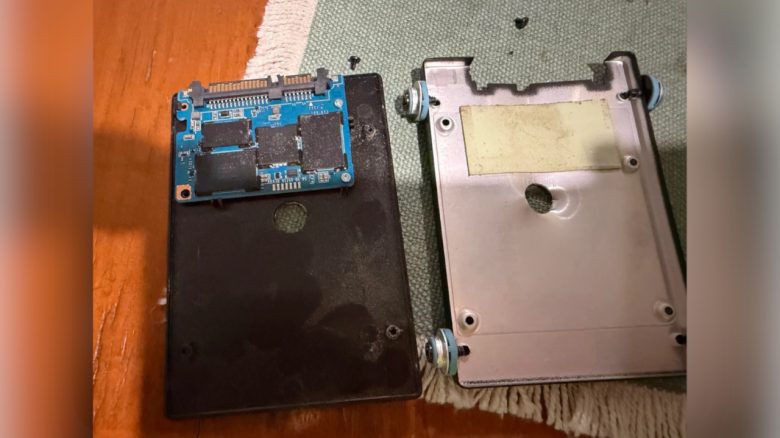
A user wants to destroy their old SSD, but they drill the hole in the wrong place. Generally, it is safer to open the SSD first or securely delete the data directly on the PC.
A user reports on Reddit that an employee of theirs wanted to destroy the company’s storage media containing important data. This often includes sensitive data such as emails, photos, videos, documents, saved passwords, and account information that one does not want to throw away. In doubt, a user might find the old SSD in the trash along with the stored data.
To destroy the data, the employee drilled through the old SSD with a drill in this way to destroy it. The problem: While drilling, they missed the SSD’s circuit board and only damaged the housing of the SSD. The SSD and the data were not harmed by this.
Drilling through old storage media multiple times or simply opening it once beforehand
For hard drives (HDDs), it is generally sufficient to drill through the disk inside multiple times. This destroys the data storage, making data recovery almost impossible.
For an SSD, one must specifically damage the circuit board with the memory. Household SSDs, which you can buy at retail stores or on Amazon, are usually housed in a plastic casing secured with a handful of screws. Often, a screwdriver is enough for you to access the SSD’s circuit board and subsequently destroy it.
Instead of physical destruction, one should usually delete their data directly: For HDDs, multiple overwriting with random data or special programs that perform the deletion are recommended. For SSDs, a so-called “Secure Erase” is the recommended way to irretrievably delete data. Afterwards, the deleted SSD can still be destroyed or resold.



People often forget to delete their private data from storage devices. In one case, this didn’t end well, as the finder was not particularly pleased with the contents of the previous owner’s hard drive: Player finds old computer on the roadside: Discovers at home that the owner unfortunately did not delete their hard drive

Your opinion is important to us!
Do you like the article? Then let us know!