

With chat emotes, you will soon be able to tip your favorite streamers.
In a Twitch stream, there have only been a few ways to tip the streamer or make donations. The 2 most popular ways are the subscription feature or sending a donation via PayPal or other payment methods. With the new cheering function, you will soon be able to tip streamers through chat emotes and support them.
This is how cheering works on Twitch.TV

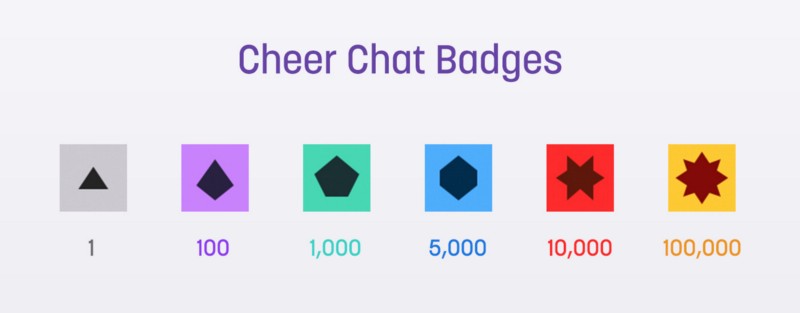
A so-called cheer is a chat message that requires “bits” and is displayed as an animated emote in the chat of the Twitch channel. You can either spend the purchasable bits individually, all at once, or any amount in between. Spending many bits at once creates a different emote than when you spend a few.
You can insert these bits anywhere in a chat message by typing “cheer” followed by the number of bits you want to donate. Example: “cheer42” or “cheer9999”. To show over time how much you have supported a Twitch channel with cheers, you receive a badge next to your name in chat – similar to what is already known from TwitchTurbo or subscribers.
Update: Prices of Bits
- 100 Bits = 1.40$
- 500 Bits = 7.00$
- 1500 Bits = 19.95$
- 5000 Bits = 64.40$
- 10000 Bits = 126.00$
- 25000 Bits = 308.00$
Cheering beta has now started
The test phase of the new tipping option has already started on some channels of major Twitch partners. These include channels such as Trick2G, Lirik, Ellohime, Nightblue3 or MANvsGAME. To try out the feature, you must first top up your bits. You can do this on the bits icon in the chat area next to the emotes and buy your bits using Amazon Payments. Amazon Payments is currently the only payment option for the new bits – more payment methods and support for additional currencies are already in planning. You can find more information about cheering on the official blog page of Twitch.TV.
Also Interesting: TwitchTV sues viewer bot developers!

Your opinion is important to us!
Do you like the article? Then let us know!