A user wants to install an optical drive in his gaming PC. However, due to its design, the case does not provide enough space for it. The user solves this problem in a simple yet brilliant way.
Newer PC cases are primarily one thing: stylish. However, closed designs can also bring problems. For example, when one wants to expand their computer with certain components.
In the case of a Reddit user, his Corsair case became his downfall. While older PC cases usually offered multiple bays for optical drives, his model is not designed for that at all. In a similar case, the PC case was also the reason a gamer had to get creative.
Since external drives are too expensive for him, he opts for a more affordable DIY solution with a drive that is actually meant to be installed internally. You can find everything about his simple yet brilliant idea in this post.
DIY solution costs 100 euros less
Why did the user have to get creative? The Reddit user hunter-man needed an optical drive in his gaming PC. However, his Corsair PC case is designed in such a way that no 5.25-inch drive can be installed in the front.
The entire front is closed off and is occupied by 3 fans behind it. There simply is no suitable mounting slot. There are also creative tinkerers who design cases to meet their requirements, for instance, in the form of an old printer.
In his search for a suitable external drive in standard 5.25-inch design, he found suitable models for about 170 euros. He was able to save a lot of money by choosing an internal drive that he wanted to mount outside of his computer.
The selected drive from HP, an adapter, and the mounting materials cost him just over 70 euros in total. This way, he was able to save 100 euros compared to a fully-fledged external drive.
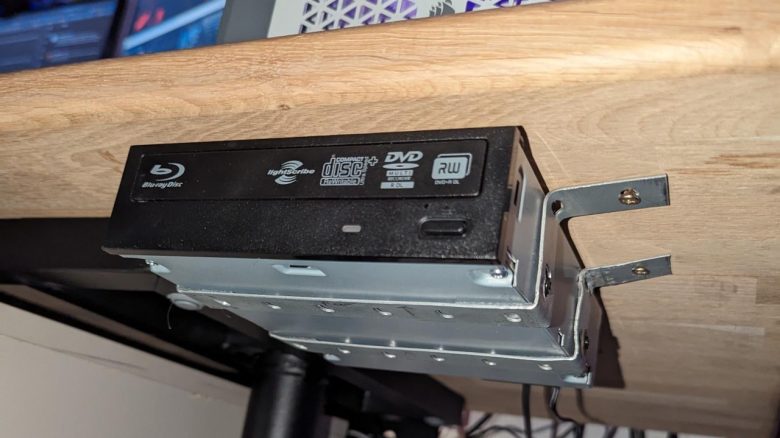
How did hunter-man fasten the drive? To quickly access the optical drive, the user chose to mount it underneath the desk surface just behind the front edge of the table.
For fastening, he used 2 flat steel rails. He slightly modified and angled them. This way, he could fully encase the optical drive with the rails. 4 screws in the underside of the tabletop and 4 screws in the drive keep everything fixed in place. To prevent vibrations and shocks on the desk, he additionally installed rubber stoppers between the tabletop and the drive.



How was the drive connected? Since the HP model is actually designed for internal installation, the user had to resort to a SATA-to-USB adapter. He plugged the side with the SATA interface into the drive. He connected the extended USB cable to his PC. Thanks to an additional power supply for the adapter, powering the drive was not a problem.
Such adapters can also be used to connect removed hard drives to the computer via USB. Depending on the form factor and power requirements, the additional power supply of the adapter is then connected.
| Preview | Product | Rating | Price | |
|---|---|---|---|---|

|
WAVLINK USB 3.0 zu SATA III Festplatte Adapter Kabel, USB A 3.0 auf SATA Adapter mit 12V/2A... | Zu Amazon |
*Affiliate-Links. Wir erhalten bei einem Kauf eine kleine Provision von Amazon. Vielen Dank für Eure Unterstützung!
Were there any other options for a drive? Yes, there were. Initially, he had tried to connect an existing external USB slim drive in compact size to his gaming PC. The attempt failed because the USB extension cable could not transmit enough power to the drive. Additionally, the drive did not recognize some of his DVDs and Blu-rays.
Have you also had problems installing components because your case was unsuitable at the time? And did you also get creative like the user with an optical drive?