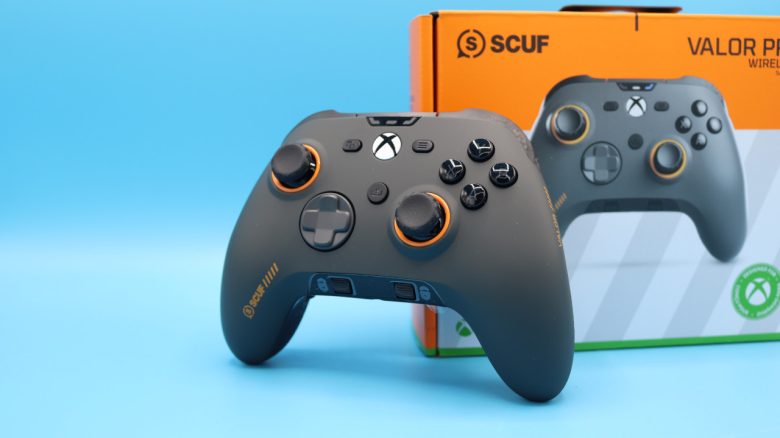
Scuf Gaming has launched a new controller for Xbox and PC, the Valor Pro Wireless. MeinMMO editor Benedikt Schlotmann tested the controller and explains whether he can recommend the model.
Scuf Gaming has introduced the Valor Pro, a new controller aimed at both Xbox and PC gamers. The controller starts at a recommended retail price of 209.99 Euros in Germany. That’s not exactly cheap and is considerably more expensive than Microsoft’s Elite Series V2.
I took a closer look at the controller in a test and explain how it performed in everyday use.
Product in Test, Quick Overview:
- Contents, Design and Build
- Processing
- Software
- Ergonomics, Weight and Battery Life
- Gameplay
- Conclusion
Who tested it?
Benedikt is a tech editor at MeinMMO and has been testing hardware for readers for many years. He tests mice, keyboards, headphones, and pretty much everything you can use with a computer, console, or other devices.
The model was provided to us by the manufacturer for testing.

Benedikt Schlotmann
Hardware Editor MeinMMO
Here you’ll find the technical details in a table (click to expand):
| Design/Interface | Wired (USB-C), Bluetooth or wireless connection |
| Button Type | TMR sticks, mechanical buttons |
| Programmable Buttons | Yes (via software) |
| Lighting | No |
| Compatibility | PC, Xbox Series X|S, Xbox One |
| Contents | Controller, USB-C cable, wireless adapter and additional thumbsticks |
| Special Features | TMR sticks, back buttons and audio control directly via the controller |
| Price (RRP) | 209.99 Euros |
Contents, Design and Build
Positive: similar ergonomics to official Xbox controller, extra buttons | Negative: no protective case included | Neutral: –
What is included? The package includes the controller, a USB charging cable, the wireless adapter, and two additional thumbstick caps, which allow you to adjust the height of the sticks. An additional transport case, like the one that comes with the Elite Series 2, is not included, which is a bit unfortunate given the high price. An official protective case can be purchased for around 15 Euros.
Design and Build: The build of the Valor Pro Wireless is almost identical to that of the official Xbox controller: buttons and sticks are asymmetrically arranged. In terms of size, there’s not much difference between the standard Xbox controller and the Valor Pro Wireless either.
However, the situation is different when you turn the controller around: the Valor Pro Wireless features additional back buttons and the ability to adjust the trigger depth. Additionally, with the SCUF controller, you can remove the cover and replace it with your own. Anyone who has held a Scuf controller before will know this.

Processing
Positive: TMR sticks, replaceable thumbsticks | Negative: Semi-open backside is prone to dirt and breakage | Neutral: permanently installed battery
Scuf uses TMR (True Magnetic Response) thumbsticks in their controller. These magnetic sticks have the advantage of wearing much less and don’t lead to the dreaded stick drift often seen on the Nintendo Switch. The sticks can be replaced, by the way, you can find instructions directly at Scuf Gaming, but unfortunately, a printed version is not included in the package.
The battery in the Scuf Valor Pro Wireless is permanently installed, a fact that you should be aware of, but this is not a major issue for me personally.

What I don’t like is the build of the back buttons. The outer buttons are firmly integrated into the chassis of the controller. If these buttons break after heavy use, they cannot be replaced without having to throw away the controller.
Another point: dirt can get into the controller through the gap between the controller and back button. This is a real problem, especially in a household with pets, because cat hair finds its way into every gap.
The Xbox Elite 2 at least uses removable paddles that leave no room for dust intrusion.

Software
Positive: All important features are well adjustable | Negative: Unintuitive menu navigation | Neutral: Software only usable in full-screen mode; available only through the MS Store; not optimized for WQHD and higher
The controller relies on the “Valor Pro Companion App.” As of now (Status: 2.12.25), the app can only be installed on PC through the official Microsoft Store. Currently, there is no alternative.
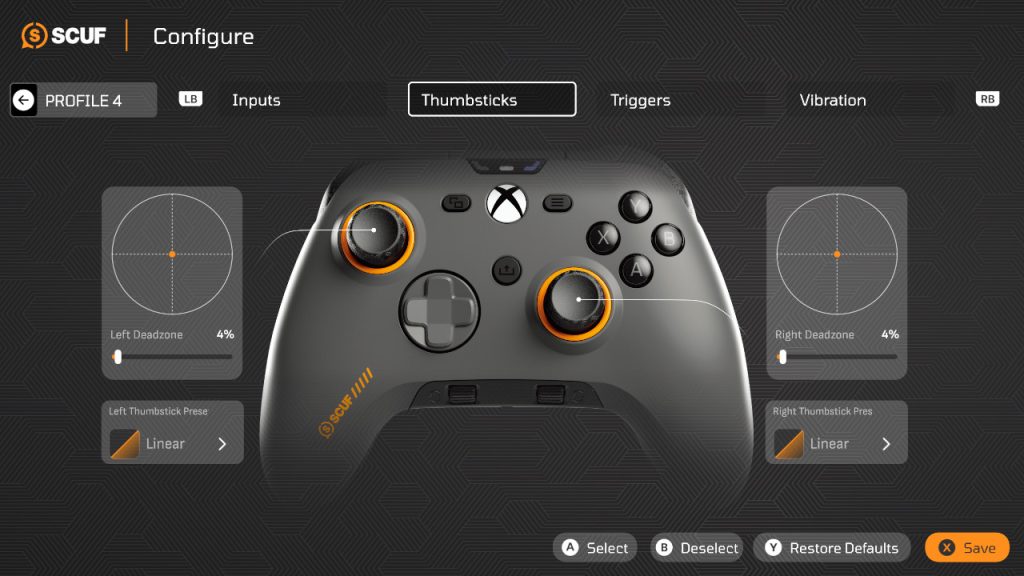
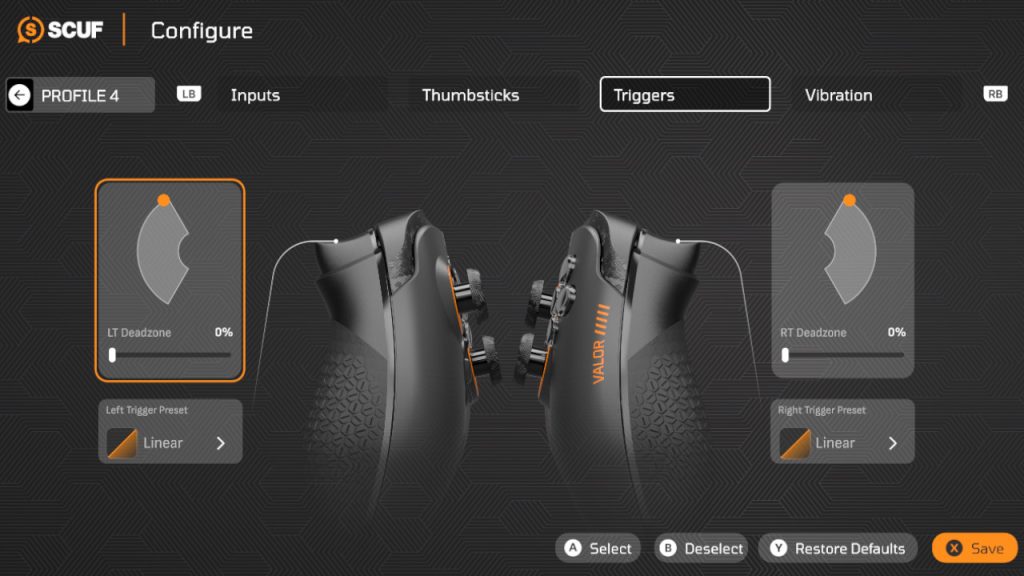
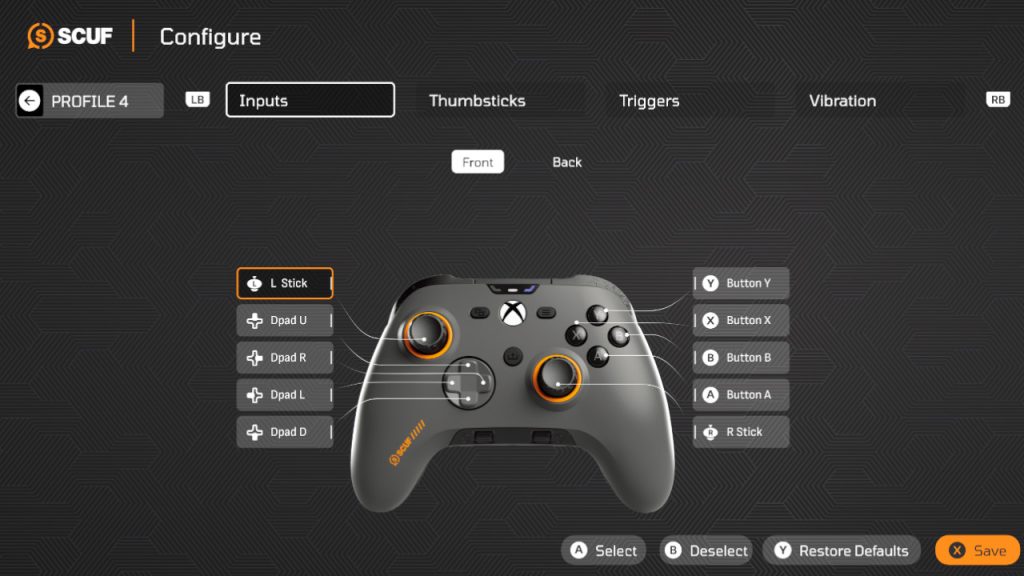
The app starts in full-screen mode, and a smaller view is not available; minimizing the window is also not possible. Either full screen or off. For software on a PC, this is inadequate. Also annoying: the controller is only recognized by the PC through the software when you set the controller to Xbox mode. The software also points this out to you.
By the way, these issues do not exist on the Xbox. On PC, the software always feels a bit like a cheap port from the Xbox.
The basic settings, however, are clear and easy to understand. Profiles can be saved and switched when needed.

However, the software controls do not feel particularly intuitive: Normally, you would press “B” on the Xbox controller to exit a menu. Here, you have to consciously press “X” because that’s how it’s designated in the menu. When switching profiles, you also have to manually select through the inputs and cannot confirm or switch back as you would normally with “B” and “A” on the Xbox controller.
Ergonomics and Weight
Positive: easily accessible back buttons, comfortable triggers, same size as Xbox controller | Negative: inner back buttons are too centrally placed | Neutral: weight
How heavy is the controller? The Scuf Valor Pro Wireless weighs 292 grams on my kitchen scale, making it heavier than most controllers I use daily:
- The official Xbox controller weighs 274 grams with the battery inserted, making it somewhat lighter in comparison.
- The TurtleBeach Stealth Ultra, my favorite on PC, weighs 256 grams.
- The Xbox Elite 2 Wireless Controller, on the other hand, is significantly heavier at 345 grams and weighs another 15 grams more when all four paddles are used.
I usually keep the controller on my lap while I play, operating the device with my hands. From this perspective, I didn’t notice the extra 20 grams compared to the standard controller significantly. However, if you play for many hours a day, the additional 20 to 30 grams can become noticeable very quickly.

Ergonomics: Since the layout of the Valor Pro Wireless does not differ significantly from the standard Xbox layout, the ergonomics are not much different either. If you like the standard Xbox controller, you will also feel comfortable here, despite the higher weight.
The outer back buttons integrated into the chassis are very easy to reach with your middle fingers in everyday use and are pretty comfortable. The inner back buttons are almost too centrally placed for me, but I can still reach them with some stretching.
Gameplay
Positive: good grip due to rubber coating, back buttons, triggers, ergonomics | Negative: mushy XABY buttons | Neutral: weight and thumbsticks
How does it play? I have played mainly Where Winds Meet and EA FC: 24/26 with the controller in the past days and weeks. So games that are designed for good controller control.
First of all, you get more or less the same gameplay that you would get from any other Xbox controller: the same layout, similar weight, pretty much everything is similar at first glance. But in the end, it’s the details that provide actual advantages in everyday situations. I think it’s great to control the volume directly via the controller, the back buttons are at the right grip height for my hands, and the triggers feel nicely clicky.
What I find unfortunate, however, is that the XABY buttons do not have a clear, tactile pressure point like, for example, the Stealth Ultra from TurtleBeach. As a result, the buttons do not feel precise when pressed but somewhat mushy.
The predecessor was criticized, among other things, for having too slippery thumbsticks. I can’t fully relate to this criticism; in everyday use, I find good grip on the sticks. However, if I start to sweat and have very moist hands, then not only do the sticks get slippery.

Conclusion
Who is the controller suitable for? With a recommended retail price of 209.99 Euros, the controller is not exactly cheap and is priced above interesting alternatives like the Razer Wolverine V3 Pro (around 180 Euro market price) and the TurtleBeach Stealth Ultra (around 140 Euro market price).
If you are looking for an Xbox controller with meaningful improvements and don’t mind issues like the software or less accessories than the competition, then you’ll get an Xbox controller with sensible, very good upgrades. If you have pets in your household, the build of the back buttons could also become a long-term problem.
Since the software is still in beta, some of the issues may also be resolved in the future.
Alternatives:
- The Wolverine V3 Pro is now under 200 Euros; here you get a comfortable controller with good battery life. However, the Synapse software can be annoying on PC.
- TurtleBeach Stealth Ultra: Great haptics with hall effect sticks and clicky XABY buttons, currently my favorite on PC. The market price is between 130 and 150 Euros.
- Xbox Elite Series V2: Criticized by many, it still offers an enormous range of accessories and many settings and is well usable on PC and Xbox. Priced between 120 and 140 Euros, without additional accessories available for around 100 Euros.
You can also find more controllers in our purchase guide for controllers for PC and Xbox. Here you’ll find controllers that are also suitable for PC and console gamers, at least if you want to play on Xbox.