As in the story of Red Dead Redemption 2, there is also a fast travel in the online mode Red Dead Online. We will describe where to find and use it here.
The online mode of Red Dead Redemption 2 has recently entered beta and features fast travel just like the single-player mode. Unlike in the story, however, you do not have to unlock it. We have compiled where you can find fast travel and how to use it.
How to use fast travel in Red Dead Online
Unlinke in the single-player mode, fast travel in Red Dead Online is available from the beginning. However, there are some things you should keep in mind.
Where can you fast travel? You can find a form of fast travel via a signpost in the world. Interact with it to call up fast travel.
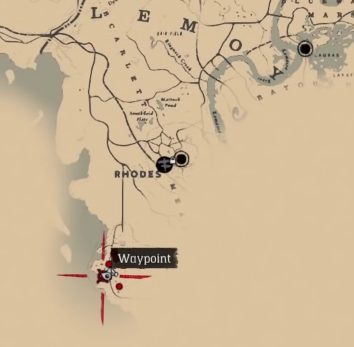
The fast travel signposts in RDO have the same icon as the stagecoach in single-player mode. The icon will also be displayed on the map, but you must be relatively close to the signpost for it to appear.
Select your destination: Simply interact with the signpost, and you will see the places you can travel to. The further you are from the respective location, the more expensive your travel will be. We show you how to quickly make money in Red Dead Online here.
Once you have selected your destination, you will be brought to the signpost at that location. After reaching rank 65 in the online mode, you can even set up a signpost at your camp.
Beware: If you still have pelts or carcasses on your horse, they will disappear when using fast travel.

These are the places you can fast travel to
Currently, there are 16 places where you can use fast travel, including your camp:
- Your Camp
- Tumbleweed
- Armadillo
- MacFarlane’s Ranch
- Manzanita Post
- Blackwater
- Strawberry
- Valentine
- Colter
- Rhodes
- Wapiti
- Van Horn
- Annesburg
- Lagras
- Saint Denis
- Emerald Station
Fast travel in the menu: Red Dead Online also offers another form of fast travel that you can simply access in the menu. Under the option “Online”, you can easily transport yourself to another area.
You have the choice between various free roam areas, such as “Free Roam West Elizabeth” or “Free Roam Lemoyne”. If you take this route, you will leave your current online lobby and be assigned to a new one.
So if you are planning specific activities with other players, this method may not be suitable for you. Here we have summarized how you can play RDO with your friends.