With the Blackwidow V4 Pro (75 %), Razer offers a high-priced high-end keyboard for gamers. But is the high price worth it? MeinMMO editor Benedikt Schlotmann tested the gaming keyboard.
For just under 400 euros, I could fly to Turkey for a week (via urlaubspiraten.de). Or for the same price, buy Razer’s Blackwidow V4 Pro (75). I have to put 350 euros on the table for the keyboard, even 400 euros with German keycaps from a third-party manufacturer. If I want to travel with my partner, I could even buy two keyboards.
Enough about vacation, the question still remains, what do I get for so much money when I put nearly 400 euros on the table for a gaming keyboard? For this reason, I tested the keyboard. At first glance, it appears to be a really good gaming keyboard, although one flaw annoys me nonetheless.
Test Overview
- Contents, design, and assembly
- Processing
- Software
- Ergonomics
- In practice: Keys and volume
- Conclusion
Who tested this?
I am the Tech Editor at MeinMMO and I test hardware for our readers. Gaming mice, in particular, are among my absolute favorites. In addition to the PS5, I also play on my Steam Deck and my Switch.
Transparency Note: The model was provided to us by the manufacturer as a test sample.

Benedikt Schlotmann
Hardware Editor MeinMMO
Here you will find the technical details as a table (click to expand):
| Design/Interface | Wired, Bluetooth or wireless connection; 75-% design |
| Key Type | Mechanical, tactile switches (Razer, Orange 3rd generation) in German layout; PBT keycaps |
| Programmable Keys | Yes |
| Illumination | Yes |
| Compatibility | PC |
| Contents | Keyboard, wrist rest, wireless adapter, a USB cable (A to C) tool to change keycaps and switches |
| Special Features | 75-% keyboard with OLED display, ISO layout with QWERTY keys |
| Price (RRP) | 349.99 euros |
Contents, design, and assembly
What does the package include? In the box, besides the keyboard, there is a wrist rest, a wireless adapter, a USB cable (A to C), and a tool to change keycaps and switches. Therefore, I cannot complain about the package contents.
| Preview | Product | Rating | Price | |
|---|---|---|---|---|

|
Razer BlackWidow V4 Pro 75% - Kabellose Hotswap-Gaming-Tastatur - OLED-Display (Command Dial,... | Zu Amazon |
*Affiliate-Links. Wir erhalten bei einem Kauf eine kleine Provision von Amazon. Vielen Dank für Eure Unterstützung!
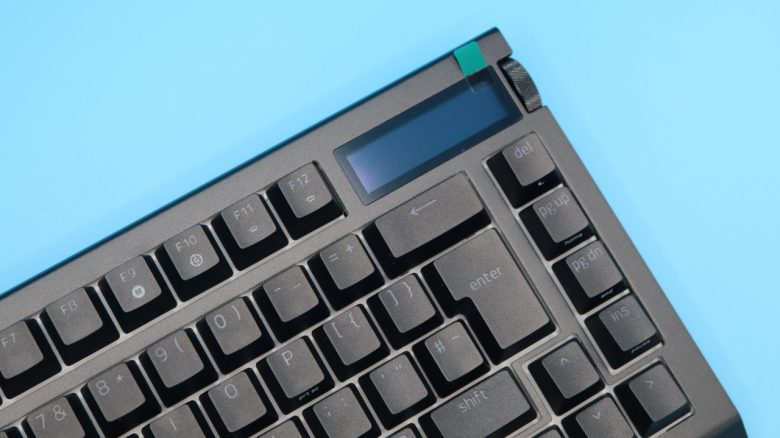
How is the keyboard built? The keyboard features an official 75 % design. This means that the keyboard has no numpad and the arrow keys are slightly integrated into the letter block. The keyboard also provides function keys (F1 – F12) and a few additional special keys on the right edge.
At the top right, there is also an OLED display and a dial. The OLED display can “only” be used in a single color. A wrist rest can be magnetically docked to the keyboard body.

What does the keyboard look like? The keyboard comes in a black design. Razer opts for subtle RGB illumination on the outer edges of the keyboard case, and the keys themselves are also illuminated. The illumination can be completely turned off at any time. The design, by the way, is very understated.
PBT keycaps in the German layout (ISO-DE) start at 35 euros on Amazon and from other manufacturers.
Processing
Razer relies on a combination of plastic and aluminum for its Blackwidow V4 Pro. As a result, it feels premium and also lies comparatively heavy on my desk. You also get many features that you would expect from a high-quality and high-priced keyboard:
The keyboard uses hot-swappable switches and double-shot PBT keycaps. However, the built-in battery is not swappable, but that is rather uncommon for gaming keyboards.
However, I have another issue with my model: When I turn the keyboard’s illumination to 100 %, I hear a soft but noticeable whine. And that is truly uncomfortable over time. It is only at about 30 % that the whine is hardly noticeable anymore.

Typically, this indicates a defective capacitor or a damaged coil in the keyboard, which can only be fixed by replacing the keyboard or the damaged part. For a keyboard costing more than 300 euros, in my opinion, this is unacceptable and should not occur. In the best case, I’ve only received a defective model, and the error does not occur in other models. I have informed Razer about the problem with my model.
Software
For the software, the Blackwidow V4 Pro relies on “Razer Synapse.” The software is very extensive and requires some familiarization. It is annoying that Razer always prompts me to please log in. I can skip this as well, but it is still annoying.
A few more words about “Synapse 4.0”: Yes, the software feels faster than “Synapse 3.0”, but it takes up about the same amount of space in memory. It is annoying that I have to scroll down far for many settings. This reminds me of PC games that have taken over the console menus.

However, the problem is that many features, like the “Commander Dial”, are heavily dependent on the software. If you want to fully utilize the keyboard, you definitely need the software. However, some functions of the OLED display are already integrated into the keyboard and work without software.
Ergonomics
The keyboard is significantly shorter than a comparable full-size keyboard due to its slim design. The advantage is that you can position the mouse much closer to your body. This makes a 75%-design keyboard much more ergonomic.
Another plus point: A wrist rest is included in the package, and it is necessary because even at its lowest point, the keyboard is about 3 mm high. The wrist rest is pleasantly soft, but for the first few days has a strange smell that eventually disappears. For me, it was a little uncomfortable. The wrist rest is definitely very comfortable.

The Keys
Under the keycaps of my keyboard are “Razer Orange” switches of the third generation. These are tactile switches, which means that you can feel every keystroke clearly. Each key has a distinct pressure point.
In everyday life, the keyboard feels really good. This may partly be due to the good PBT keycaps, whose rough surface simply feels better. On the other hand, it is certainly mainly due to the tactile switches, which simply feel satisfyingly precise. Except for the rattling spacebar.

How loud is the keyboard? The switches are almost silent. This is also due to the very good insulation that Razer has built into the keyboard. The keycaps themselves, or the typing, can be heard clearly. Particularly loud are the space and backspace keys, which sound especially “poppy”. The main keys sound about as loud as typing on a typewriter. So a very soft and high clicking sound.
Below, I recorded the sound of Razer’s keyboard while typing. You can also listen to two other keyboards for direct comparison.
Conclusion: Good gaming keyboard for a high price
Is the keyboard worth it? With a suggested retail price of 349.99 euros, the keyboard is very expensive and outprices many keyboards from the competition. Just to take the example from the beginning: For that money, you could also have a one-week vacation on your own.
By the way, the tactile switches are not particularly current because magnetic HE switches are significantly faster, and you can already get keyboards with HE technology for between 200 and 250 euros. If you want wireless technology, you will also quickly approach 300 or 400 euros.
| Preview | Product | Rating | Price | |
|---|---|---|---|---|
|
|
Razer BlackWidow V4 Pro 75% - Kabellose Hotswap-Gaming-Tastatur - OLED-Display (Command Dial,... | Zu Amazon |
*Affiliate-Links. Wir erhalten bei einem Kauf eine kleine Provision von Amazon. Vielen Dank für Eure Unterstützung!
What alternatives are there?
- With the Glorious GMMK3 HE (75 %), you get a very good keyboard in the same size (75 %), but for 100 euros cheaper and with more modern HE switches.
- With the Mod007B-HE from Akku, you also get a keyboard with modern HE switches. Unfortunately, the software is underdeveloped.
More gaming keyboards: Are you looking for more recommendations in the peripheral area? Then be sure to check out the following buying guide on MeinMMO. Here we explain which keyboards are currently worth buying: The best gaming keyboards you can currently buy