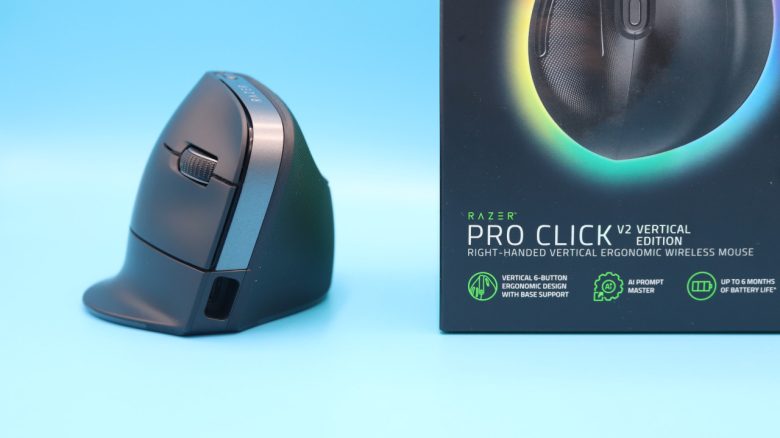
Razer has introduced its first vertical mouse, the Pro Click V2 Vertical Edition, which is intended for both office and gaming. MeinMMO editor Benedikt Schlotmann has used the mouse in everyday situations.
What device is this about? Razer’s Pro Click V2 Vertical Edition is a new vertical mouse. The Pro Click V2 is available in two different versions: a regular asymmetrical right-handed mouse or a vertical variant for right-handed users.
Unlike Logitech and other manufacturers that focus primarily on office and productivity, Razer also aims to appeal to gamers. Razer states on its website regarding its new vertical mouse: “Work and play all day without fatigue,” clearly targeting not only those wanting to work but also those who wish to play with the vertical mouse.
The test overview:
- Contents, design and construction
- Build quality
- Software
- Weight, ergonomics and battery life
- Mouse buttons, scroll wheel, and sensor
- Conclusion
Who tested it?
I currently own over 20 gaming mice and have tested over 15 keyboards. Personally, I also own more than 10 sets of in-ear headphones. At MeinMMO, I have been testing hardware for our readers since 2019. Besides the PC and the PS5, I am also using the Steam Deck.
Our review sample was provided to us by the manufacturer.

Benedikt Schlotmann
Hardware Editor MeinMMO
Details
| Sensor | Pixart 3995 (Razer Focus Pro Sensor) |
| Resolution | Up to 30,000 DPI |
| Switches | Mechanical switches rated for up to 60 million clicks |
| Buttons | 5 buttons |
| Design | Black mouse with subtle RGB lighting at the bottom |
| Gliding feet | 2 |
| Cable | USB cable (Type-A to Type-C), 1.2 m, for charging and wired use |
| Weight | 150 grams |
| Price (MSRP) | 129.99 Euro (Vertical), 109.99 Euro (Standard) |
Contents, design and construction
What does the package include? Besides the gaming mouse, the box contains a manual, some stickers, a USB cable (Type A to Type C), and a wireless receiver. You can use the mouse via wireless, Bluetooth, or even in wired mode.

- Vertikales ergonomisches Design mit 6 Tasten und Handballenstütze - Für eine entspannte, natürliche Handposition: Das angewinkelte Design ist wie zu einem natürlichen Händeschütteln geformt und fördert so die bequemste Handposition für längere Nutzung - Die Basisstütze hebt dein Handgelenk leicht an, um bei der Bewegung die Reibung zu verringern.
- KI-Prompt-Assistent - Um deine Produktivität zu steigern: Mit nur einem Klick kannst du Texte zusammenfassen, E-Mails entwerfen und noch viel mehr - Schalte leistungsstarke Tastenkürzel per Razer Synapse 4 frei und optimiere deinen Workflow sofort für KI-Tools.
- Bis zu 6 Monate Akku-Laufzeit - Mit einer einzigen Akkuladung: Dank einem effizienten, lange haltenden Akku bist du bis zu 6 Monate (unter Standardtestbedingungen) bereit für Gaming und kreatives Arbeiten ohne Unterbrechung - Mithilfe eines im Lieferumfang enthaltenen USB-C-Kabels hast du die Maus schon nach 5 Minuten wieder für 3 Arbeitstage Einsatz aufgeladen.
- 5-Wege-Mehrgeräte-Konnektivität - Nahtloser Einsatz an deinem PC, Laptop, Tablet und noch vielem mehr: Maximiere deine Effizienz und steuere dein komplettes Setup mit nur einer Maus - verbinde bis zu 5 Geräte über HyperSpeed Wireless, Bluetooth (3 Hosts) oder kabelgebunden.
- 18 Zonen-Beleuchtung und vollständiger Underglow - Powered by Razer Chroma RGB: Aktiviere reaktives RGB für deine Benachrichtigungen mit Plugins, die im Chroma Workshop verfügbar sind - Passe jede Zone mit 16,8 Millionen Farben an und erlebe eine noch intensivere Immersion mit über 300 integrierten Spielen.
*Affiliate-Links. Wir erhalten bei einem Kauf eine kleine Provision von Amazon. Vielen Dank für Eure Unterstützung!
How is the mouse built? The mouse is available in a black version. There are currently no other colors:
- The mouse is vertically oriented, resulting in the mouse being angled to the right. The thumb area is higher, while the standard mouse buttons are located on the right side.
- On the right side, beside the mouse buttons, there is only the scroll wheel.
- On the top of the mouse, within the grasping hand, there is a button that allows you to adjust the DPI.
- On the underside, there is a switch to toggle between Wireless and Wired. Additionally, there’s another button to switch between Hyperspeed (Razer’s wireless mode) and Bluetooth. You can also store the mouse’s wireless receiver on the underside.
- The interior of the mouse is not accessible. The battery is permanently installed inside.
What is special? The main feature is undoubtedly the vertical orientation of the mouse. You don’t get a standard symmetric or asymmetric mouse but one that is angled. The advantage of verticality: You can grip the mouse like normal, reducing the risk of developing a so-called “tennis elbow”: vertical mice are said to help prevent RSI (Repetitive Strain Injury) or Carpal Tunnel Syndrome (CTS).
As I use a vertical mouse regularly in daily life, specifically the Logitech Lift, I can confirm the significant advantages of a vertical mouse in daily life and say that working in the office is a real relief. In the following test, you will see my, now quite worn out, Logitech Lift frequently in comparison.

Build Quality
Razer’s Pro Click V2 Vertical Edition feels very robust and hefty, due to both the casing and the high weight of the mouse.
However, the mouse feet on the underside appear less premium. They are very thin and wear out significantly after just a few weeks on a mousepad. Also disappointing: The battery is integrated and cannot be replaced.
Software
The Razer Pro Click V2 Vertical Edition uses Razer Synapse 4.0 as its software. Through this, the mouse can be extensively configured. For example, you can create custom shortcuts for each program, which will then be recognized. If you open Photoshop, you will use different shortcuts than when you are using Google Chrome.
Overall, this works quite well, but the auto-switching is confusing when you have multiple programs with their own shortcuts open.
Razer Synapse 4.0 feels overall quite overloaded and consumes significant PC resources in the background. It takes almost 500 MB of RAM, which is occupied. The software offers a lot of features, but you have to first find the basic functionalities for the mouse at the top right via the 9-point menu.

Weight, ergonomics, and battery life
The weight: The weight is a significant issue with the Razer Pro Click V2 Vertical Edition. The mouse is simply too heavy for everyday use. Just to compare:
- The Logitech Lift, which I use daily in the office, weighs about 130 grams on the scale, including installed battery.
- The Razer Pro Click V2 Vertical Edition, however, weighs 150 grams, making it 20 grams heavier.
- In general, gaming mice tend to be lighter: shooting mice now weigh between 50 and 60 grams, and general-purpose mice are around 100 grams.
And you can really feel the high weight in daily life. For instance, if you want to move the mouse just using one hand on the table. Or if you need to move the mouse a lot across the table. The 150 grams feel almost like a real block in such cases.

The ergonomics: I have very large hands measuring 19 centimeters. The Razer Pro Click V2 Vertical Edition is built higher compared to other vertical mice, which allows you to fully utilize the 71-degree angle. With other mice, like my Logitech Lift, the tilt is lower. The Logitech Lift only has a tilt of 57 degrees.
The optimal tilt is said to be between 45 and 60 degrees, with some mice offering adjustable continuous tilts between 35 and 70 degrees. Ultimately, it’s a question of what feels more comfortable to you. My recommendation, if you have the opportunity: Test the mouse in the store if possible.
What bothers me about the ergonomics are the thumb buttons. Especially the lower button is positioned so awkwardly that I regularly trigger it when grasping the mouse. My solution to the problem was to simply disable the button through the software. However, this is not a permanent solution.
Battery life: The manufacturer claims the battery life is around 6 months, and the Razer Pro Click V2 Vertical Edition is said to last three days after just five minutes of charging. The battery life is a strong point of the mouse, and it hasn’t let me down in everyday use.

The mouse buttons, scroll wheel, and sensor
The mouse buttons: The clicks feel solid and powerful. Each click feels precise because you can feel every click under your fingers. However, the clicks are quite audible. In my Logitech Lift, the clicks are almost silent, but the tactile feedback under the fingers is a bit mushy overall.
The scroll wheel: The scroll wheel is soft but provides good feedback that is noticeably felt in everyday use. A quick scroll through the wheel is not possible.
Sensor: With Razer’s “Focus Pro” sensor, you get an excellent sensor with the highest precision and high resolution. This is also the crucial difference to other vertical mice. Currently, no other vertical mouse has a better sensor.

Gaming with the vertical mouse: Many vertical mice share a common problem: the technology inside is often lacking and mainly geared towards pure office users. The Logitech Lift also has a more budget-friendly sensor (Logitech Advanced Optical Tracking) that only resolves up to 4,000 DPI and has minimal acceleration. This is adequate for casual building games, but for fast-paced shooters, the sensor cannot keep up, resulting in overall mushy clicks.
The Razer Pro Click V2 Vertical Edition takes a different approach and delivers gaming-capable technology inside: the mouse buttons provide satisfying clicks, and the sensor can also be found in gaming mice like the DeathAdder V3 Pro. Essentially, this would be the perfect foundation for a gaming mouse.
If it weren’t for the high weight: The Pro Click V2 Vertical Edition is also very suitable for slower games, but in fast-paced shooters, you quickly notice that you have to push 150 grams around, which is not enjoyable in the long run. Playing with a high-end sensor in Anno 1800 also feels like wasted potential.
Even for someone like me, who has played for years with the Logitech G502 or the Roccat Kone Aimo Remastered, both weighing about 120 to 130 grams, the Pro Click V2 Vertical is ultimately just too heavy. In the end, I resorted to a lighter mouse, like the Logitech G309 (review) or the Glorious Model O- (review).

Conclusion: Excellent technology hampered by high weight
Who is the mouse suitable for? With the Razer Pro Click V2 Vertical Edition, you get a vertical mouse that is suitable not only for the office but also for gaming – at least in some instances. In games requiring minimal or slow movements, like a building game, the Pro Click V2 feels really good. For fast shooters or action-packed titles, the vertical mouse from Razer is simply too heavy.
- Vertikales ergonomisches Design mit 6 Tasten und Handballenstütze - Für eine entspannte, natürliche Handposition: Das angewinkelte Design ist wie zu einem natürlichen Händeschütteln geformt und fördert so die bequemste Handposition für längere Nutzung - Die Basisstütze hebt dein Handgelenk leicht an, um bei der Bewegung die Reibung zu verringern.
- KI-Prompt-Assistent - Um deine Produktivität zu steigern: Mit nur einem Klick kannst du Texte zusammenfassen, E-Mails entwerfen und noch viel mehr - Schalte leistungsstarke Tastenkürzel per Razer Synapse 4 frei und optimiere deinen Workflow sofort für KI-Tools.
- Bis zu 6 Monate Akku-Laufzeit - Mit einer einzigen Akkuladung: Dank einem effizienten, lange haltenden Akku bist du bis zu 6 Monate (unter Standardtestbedingungen) bereit für Gaming und kreatives Arbeiten ohne Unterbrechung - Mithilfe eines im Lieferumfang enthaltenen USB-C-Kabels hast du die Maus schon nach 5 Minuten wieder für 3 Arbeitstage Einsatz aufgeladen.
- 5-Wege-Mehrgeräte-Konnektivität - Nahtloser Einsatz an deinem PC, Laptop, Tablet und noch vielem mehr: Maximiere deine Effizienz und steuere dein komplettes Setup mit nur einer Maus - verbinde bis zu 5 Geräte über HyperSpeed Wireless, Bluetooth (3 Hosts) oder kabelgebunden.
- 18 Zonen-Beleuchtung und vollständiger Underglow - Powered by Razer Chroma RGB: Aktiviere reaktives RGB für deine Benachrichtigungen mit Plugins, die im Chroma Workshop verfügbar sind - Passe jede Zone mit 16,8 Millionen Farben an und erlebe eine noch intensivere Immersion mit über 300 integrierten Spielen.
*Affiliate-Links. Wir erhalten bei einem Kauf eine kleine Provision von Amazon. Vielen Dank für Eure Unterstützung!
What alternatives are there?
- The Logitech Lift weighs 130 grams (including battery), feels a bit more ergonomic, but has significantly inferior technology and is therefore more of a true office mouse. However, it is entirely sufficient for everyday use and is often available for 50 Euros.
- With CSL, Trust, and Anker, you will also find plenty of cheaper manufacturers in the vertical segment. The devices differ mainly in battery life; otherwise, the technology is very similar. However, they are generally not suitable for serious gaming.
More gaming mice on MeinMMO: If you are looking for more recommended gaming mice, check out our buying guide on MeinMMO. Here you can find the best gaming mice currently available: The best gaming mice for shooters that you can buy right now