


Having problems with Pokemon Go? These bugs are already on the developers’ radar.
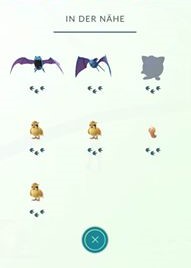

Update: Meanwhile, there is also a disturbance with the “Nearby” function. Three footprints are always displayed. The number of footprints actually indicates the distance of the respective Pokémon:
Original report:
In the new Pokemon Go, which has only recently been released, there are a few bugs and error messages that currently make the game “unstable”. Developer Niantic Inc. has updated the list of known issues on their official website.
List of known issues including help:
Besides audio and GPS problems, Pokemon Go demands a lot of power from the battery. Twitter user ℃améron Davis” says he has never seen a game that drains the phone battery as much as Pokemon Go. He loses 10% battery on his iPhone 6s while playing in 20 minutes – Even though the charger is plugged in! Other bugs automatically reset your progress, so you are back to level 1.
The complete list of bugs and errors:
“You already own this item” error message (Only Android)
- If you lose your internet connection while purchasing PokeCoins in the shop, you may receive the error message “You already own this item”. To fix this error, you need to turn your phone off and then on again.
Trainer progress is temporarily set to level 1:
- You may have created 2 “Pokemon Go” accounts – one via Google and one in the Pokemon Trainer Club. This happens if you choose one method to log into the game first, and then later use another method. To fix this error, you need to log out of the menu and then log in with the original login method.
Distorted sound:
- In some situations, the sound of Pokemon Go may be delayed or distorted. This usually happens when the device is connected to a Bluetooth speaker. The developers are currently working on a solution to the problem.
High battery usage:
- Some devices experience the problem that the battery is excessively drained during prolonged play. The developers are currently working on a solution to this issue.
GPS signal not found / My location is shaking or deviating:
- Make sure that the location/GPS function is turned on and set to “High Accuracy”. The developers are always working to improve the GPS function. The performance of this function strongly depends on the phone model and its signal strength. You should also check if GPS is activated on your smartphone.
“This item is not available in your country” error message when downloading the app:
- Check in your iOS settings or the settings of your Google Wallet if you have indicated a country where Pokemon Go is available. If that doesn’t help, you should contact iOS Support or Google Play Support.
Parsing error:
- On some devices, a parsing error may occur that prevents you from installing the app. Make sure you have Android version 4.4 installed. If so, re-downloading the APK file may help.
Recommended: 5 tips for new Pokémon trainers!

Your opinion is important to us!
Do you like the article? Then let us know!