

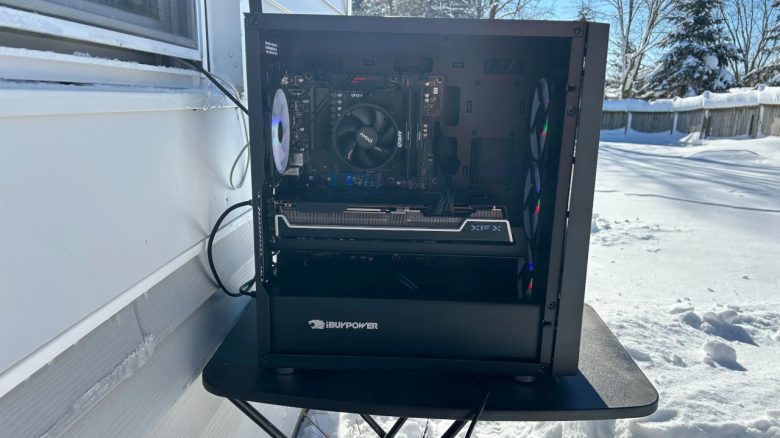
A player uses the icy temperatures of winter to cool his hardware. The reactions from the community could not be more different. Some find the idea funny, while others consider it a really bad idea.
The player posted several pictures on reddit and explained that he had placed his gaming PC outside in the cold air of frigid Wisconsin.
- He placed his computer on a small table to keep it from coming into contact with the wet snow.
- He removed the side panel to allow the cold air to blow into the PC. At the time of the pictures, he was experiencing temperatures of -4 °C.
Although he does not mention his hardware configuration, he likely only has AMD hardware installed: The CPU cooler is the standard cooler from AMD and the graphics card is from XFX, which only produces AMD graphics cards.
The results are, by the way, impressive if the values he states are correct: “I saw about a 30 °C to 40 °C drop in temperature for the GPU and CPU under load.”
Nevertheless, the entire action causes a lot of head-shaking among users. Many believe that he could permanently damage his hardware. For example, someone comments under the thread: “That’s the dumbest thing I’ve seen so far this year.”
Humidity only becomes a problem when the PC is back in the apartment
How dangerous is this for the hardware? The main criticism of the situation presented is that water could condense in the computer and thereby damage the hardware in the long term.
However, condensation should be almost impossible here because water condenses on objects that are much colder than the air and not vice versa. In the case of the gaming PC, the air is always likely to be colder than the gaming PC. Some even speculate that the air inside the PC outdoors must be drier than it would be if the PC were indoors.
Additionally, cold air can carry much less moisture than warm air. Cold air becomes completely saturated with fewer water molecules than warm or hot air. And as soon as the saturation point of the air is reached, condensation occurs.

How did it end up? The player explained that he eventually brought his PC back inside. Here, moisture actually collected because warm, humid air meets a cold computer. And moisture forms immediately here. You can observe this in winter when moisture forms on windows.
For this reason, the owner first had to clean his gaming PC and remove the moisture:
It was damn humid when I came back inside. I let it warm up under a fan and removed all the condensation before I turned it back on. Luckily, the air is so dry that it evaporates quickly.
If he hadn’t done that, he probably would have damaged the hardware with a short circuit.
By the way, we would strongly advise you against placing your expensive hardware in the current cold and snow. Especially when it is snowing, moisture can get inside your PC. And there are easier ways to cool your PC without putting your expensive hardware at risk.


Other users have also come up with the idea of cooling their hardware with cold air. One particularly ingenious idea was to simply place the PC on the balcony in the icy air. But this “solution” is being heavily debated:

Your opinion is important to us!
Do you like the article? Then let us know!