A player buys a new gaming monitor. But he can’t really use the upgrade because he forgot an important setting. He had to admit this now, two years later.
A player reports on Reddit that he bought a new monitor two years ago that offers 200 Hz and thus supports 200 FPS. But it was not until two years later that he noticed he had forgotten an important setting.
He explains himself in a post under his original post:
The difference is so great that I can’t believe I played with 60 Hz for so long; the gameplay is so smooth now.
Important setting in Windows unlocks higher FPS numbers
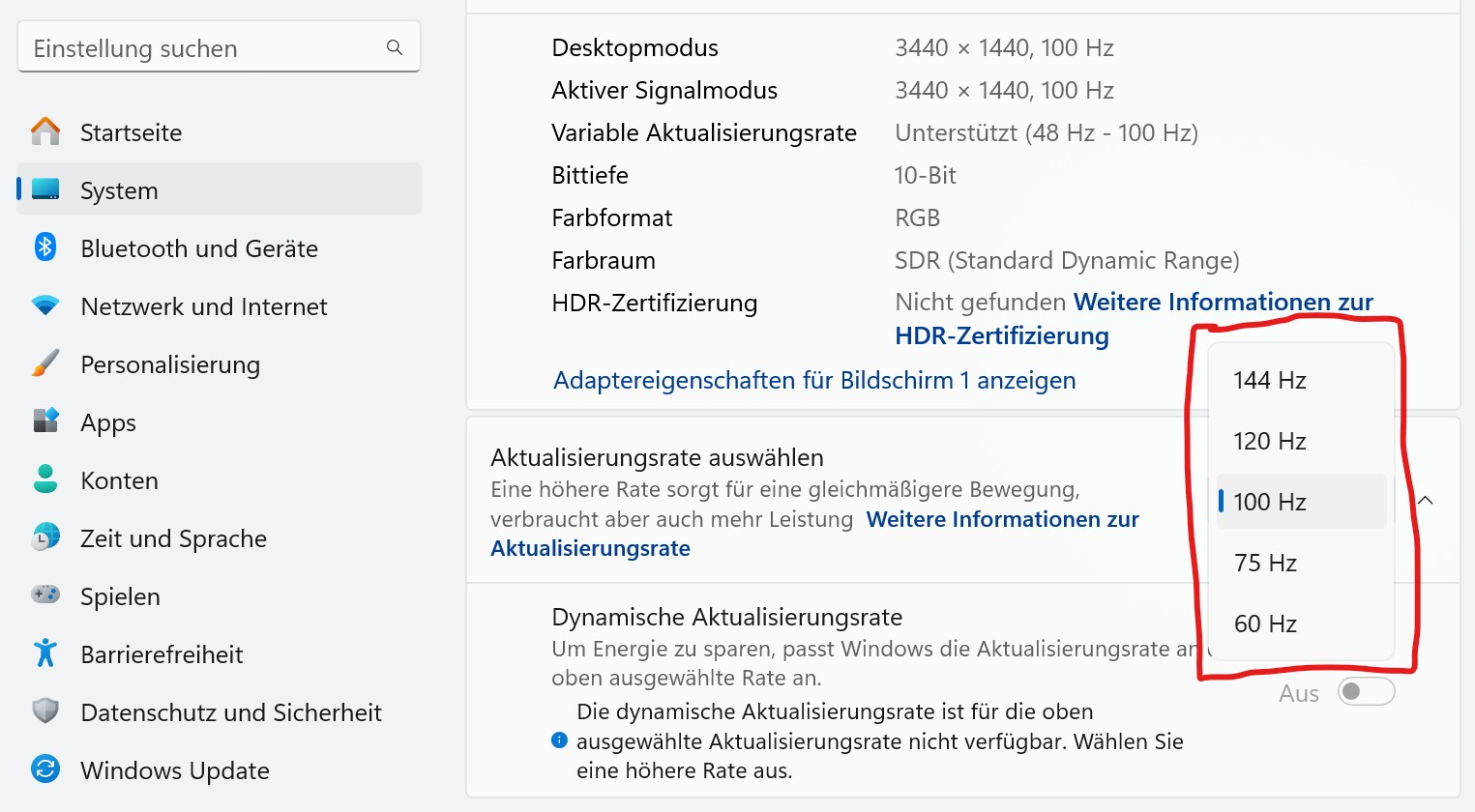
What exactly did the player forget? When connecting a monitor with a high refresh rate to a computer, one must specify in the settings which refresh rate the system should use. By default, it is set to 60 Hz. This setting cannot be made on the monitor itself.
Where do I find the setting? In Windows, you find the setting in the menu. You select “System”, then “Display” and then choose the “Advanced Display” option. In the “Select refresh rate” section, you can then choose the appropriate Hertz value.
Higher FPS rate in games feels better but doesn’t necessarily make you better
What is the advantage? 120 or even 240 Hz FPS feel significantly smoother than 60 FPS, as the player explains. In a test to determine whether higher FPS numbers make a player better, it was found that players deliver better performance. But, and this should be clear to everyone: On average, competitive players benefit more than casual players who are already better at aiming.
Are there also disadvantages? High Hertz and thus FPS numbers require correspondingly fast hardware. If you want to play in 4K resolution at 240 Hz, you need significantly more power than if you want to play in Full HD at 240 Hz. An entry-level graphics card, such as an RTX 4060 or RX 7600, is no longer sufficient for high settings.
Your selected titles also play an important role: The more demanding a game is, the more power you need if you want to achieve high FPS numbers. A game like Counterstrike generally requires less power for high FPS numbers, whereas a game like Cyberpunk 2077 requires different hardware for a stable 120 FPS rate.



Another player also had to realize what an upgrade can result in. Because the temperatures in his gaming PC were too high, especially his CPU was a problem. None of the solutions worked, only an upgrade for 15 euros was the decisive solution. He himself can’t believe what a difference the upgrade makes: A player upgraded his gaming PC and is surprised what a single upgrade for 15 euros can do