

Whether gaming, image and video editing, office work, or watching videos. A monitor is essential for that. However, each application area has different requirements for the device.
TN, MVA, PVA, IPS, TFT, LED, and 4k or Ultra HD are just some of the terms one encounters when choosing a monitor. They are also often used as a substitute for televisions, as they now offer the same functions thanks to HDMI or Display Port. Special variants like 3D devices or curved monitors are also available. For better understanding, we explain relevant technical terms – for example, we also address the difference between Hertz and FPS. Finally, as usual, there are the purchase recommendations.
It is perfectly understandable that one eventually loses track of what all of this means. For this reason, this article will deal with exactly this topic.
[toc]
The Panel: TN, VA, and IPS
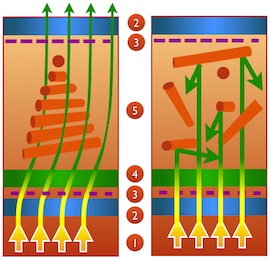
The panel contains liquid crystals, which rearrange through electricity. Depending on the arrangement, they only let certain colors through. This creates the image we see. Many possible techniques are available, including: TN (twisted nematic), MVA (multi-domain vertical alignment), S-PVA (patterned vertical alignment), and S-IPS (in-plane switching).
TN is the most widespread, as it is both inexpensive to manufacture and has a very good response time. Furthermore, its power consumption is low. However, the downside is that one should only look at the device from the front. From the side, changes in contrast and color can be noticed.
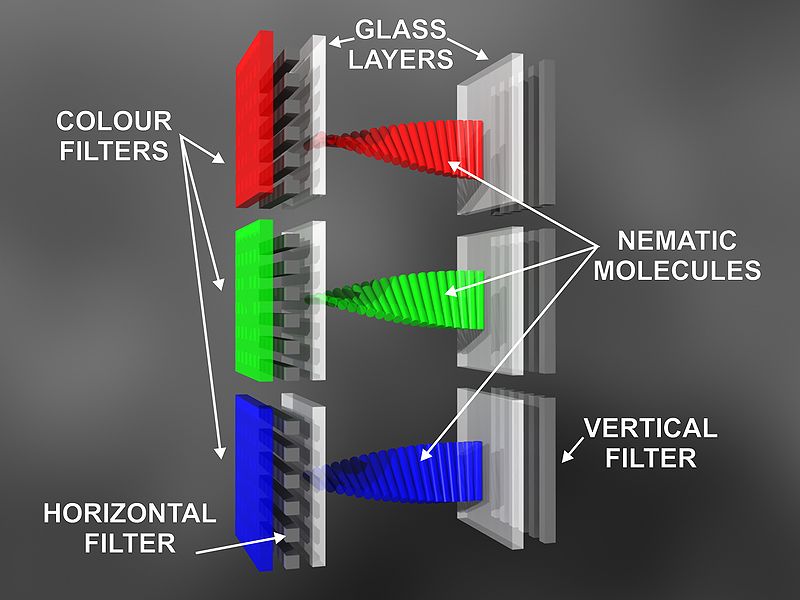
The panel consists of two crossed polarizers, with the liquid crystals in between. The incoming light from the backlight is now linearly polarized. This means: the direction and vibration of the light are largely constant. Thus, it can no longer pass through the second polarizer, as it is rotated by 90°.
Without voltage, the liquid crystals are arranged in a screw shape and “twist” the light. As a result, everything passes through the second polarizer, and the spot appears white. Under voltage, the crystals align vertically. The higher the voltage, the less light can escape, making the area increasingly darker. The only question remaining is how the colors are displayed. A pixel consists of 3 subpixels that use color filters for the basic colors red, green, and blue. Mixing these colors creates additional colors.
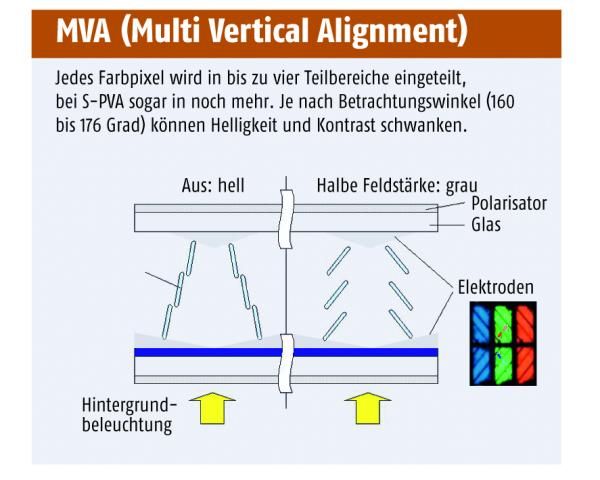
MVA panels offer a very good viewing angle and better contrast values. However, their response time is worse. Therefore, this variant is suitable for image editing but not for gaming. Furthermore, their power consumption is significantly higher as they require strong backlighting.
There are some technical similarities to the TN panels. There are still two polarizers and liquid crystals that twist when under voltage. However, their neutral position is already vertical. This means that without voltage, no light passes through, and the spot appears black. The second difference is that the pixels are subdivided into 3 more subpixels, achieving the advantages mentioned earlier. Additionally, there is S-MVA, which achieves a better response time through eight instead of three additional subpixels.
S-PVA has largely replaced regular PVA panels today. They represent a consistent further development of the (M)VA technology. They offer the same advantages, and their response time is significantly better. In return, their power consumption is even higher. Technically, there are hardly any differences.
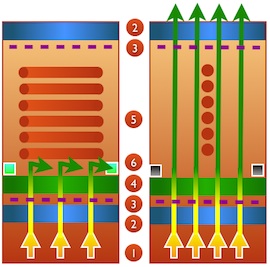
S-IPS is superior to TN devices in many aspects. Colors are represented more intensely, and the viewing angle is wider. Their response time is slightly less but better than VA panels. In contrast, it is the other way around: better than TN, worse than VA. Their power consumption is higher than that of all other devices. The same applies to the price. In the mid-price range, S-IPS will be inferior to S-PVA panels. In the higher range, however, one can definitely consider them, depending on personal preferences.
As the name suggests, the liquid crystals are not screw-shaped but aligned in a plane. The polarizers are no longer crossed. Under voltage, the crystals lie parallel and horizontally, thus absorbing all light. The less power supply there is, the more the crystals rotate by 90° and allow more light to pass through.
The Backlight: LCD, TFT, LED, and OLED
When choosing a screen, one eventually confronts these three common abbreviations: LCD (liquid crystal display), TFT (thin-film transistor), and LED (light-emitting diode). Since LC stands for liquid crystals, only this method has been discussed in the previous text. TFT is a special variant of the LCD. They have now adapted so that there is no difference between them. In LED, light-emitting diodes are used instead of fluorescent tubes, which are smaller and more energy-efficient. However, since more modern LCD/TFT displays are equipped with light-emitting diodes, they are increasingly similar.
Thus, these three terms are usually only relevant for older devices. More important is the position of the lighting. If it is installed at the edge, this area shines particularly bright while it gets darker towards the center.
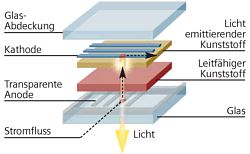
In contrast, OLED (organic light-emitting diode) works differently. Between two electrodes lies a luminescent layer. Under voltage, electrons and defect electrons (positive charge carriers) move towards each other and recombine to form an exciton. This releases photons, generating light. For this to be visible, one of the electrodes must be transparent. Devices with OLED displays are more energy-efficient, have higher contrast, are cheaper to produce, and have significantly better response times. However, their greatest disadvantage is their short lifespan.
The Connection: VGA, DVI, HDMI, and Display Port
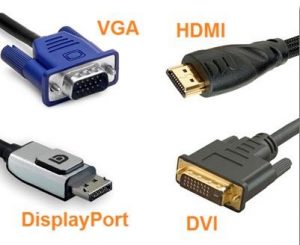
VGA is the analog connection and reduces image quality. The graphics card outputs a digital format, which has to be converted into analog because of VGA. The monitor then converts the analog back into the digital version. To save this trouble, DVI is more sensible, as it is a digital interface. This means that nothing needs to be converted.
HDMI can also be found on some devices. It is also a digital connection that additionally transmits audio signals, allowing these devices to have their own speakers. Accordingly, this connection is often found on modern televisions. The disadvantage of this connection is that it is very small and thus wears out more quickly.
Another option is Display Port. It offers the same functions as HDMI, and additionally allows USB signals to be transmitted. The speed is higher, production is cheaper, and it requires less electronics. This means that even flatter displays are needed. Apple’s Mini Display Port allows larger screens for notebooks.
When it comes to these connections, it is important to ensure the graphics card has such a connector. And one should be able to do without VGA by now.
3D and Curved Monitors

The 3D technology has existed for several years and has been very disappointing. Initially, one needed special glasses. Different images are displayed on the right and left eyes, from which the brain calculates a three-dimensional effect. Nowadays, there are variants without glasses, but these require an exact viewing angle, similar to Nintendo’s 3DS devices.
Currently, the disadvantages outweigh the advantages. Glasses absorb some light, the graphics card has to calculate everything twice, and the devices are very dependent on viewing angles. Problems may also arise in games, especially shooters. You see two crosshairs, and while software can generate a 3D crosshair from it, it may be considered cheating by the game, leading to bans. Additionally, the quality is not particularly good even with many devices. For this reason, 3D technology is currently just a gimmick.
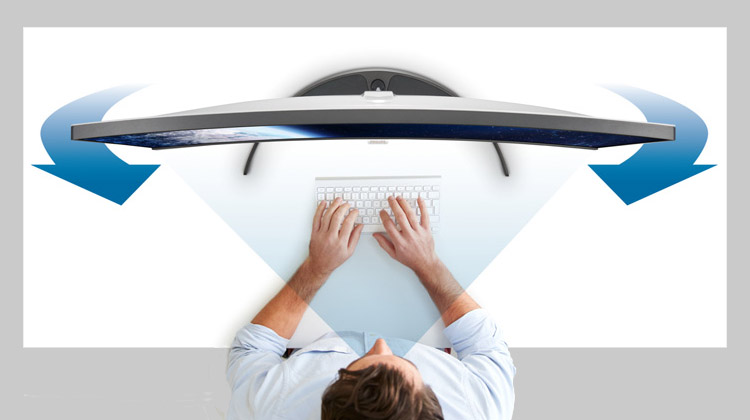
Critically, curved monitors were received when they appeared. They are primarily aimed at relieving eye strain and improving spatial perception. You can find additional pros and cons in this article: Curved Technology: Is it Worth it to Invest in Curved PC Monitors?
On page 2, we will discuss response time, input lag, resolution, and refresh rate, among other things.

Your opinion is important to us!
Do you like the article? Then let us know!