

Whether it’s an expensive gaming mouse or an ergonomic one for office work, there are several things to consider when purchasing a mouse.
Cheap mice are as abundant as sand on the beach, and a model for €15 can also be found among our recommendations at the end of the article. With more expensive devices, it is definitely worthwhile to take a look at the manufacturer’s name. It’s important not to be blinded by the name. For example, Roccat offers high-quality devices, often at a better price than Razer.
Of course, there are also wireless variants that fortunately hardly differ from wired ones. And ergonomic models are also available. This article aims to help determine what kind of mouse one actually needs and wants to own. What should one consider when buying a mouse?
Ergonomic Mouse
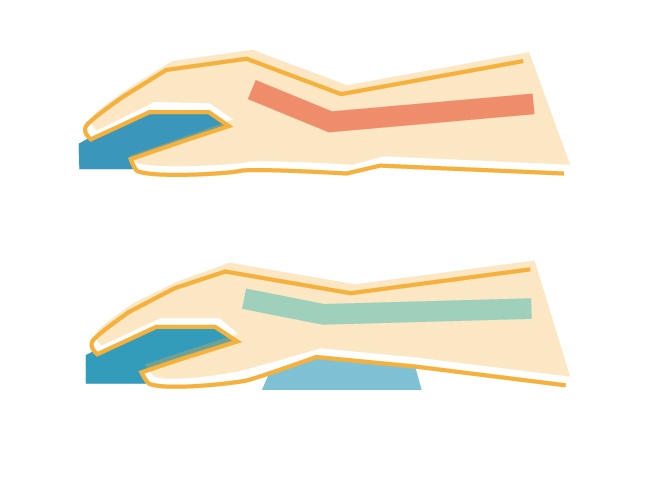
As with keyboards, the conventional mouse causes the wrist to bend too much. Ideally, one should avoid both this bend and controlling the mouse solely with the wrist. Two options help: an ergonomic device or a wrist rest. There isn’t much to say about the latter, except that it should be avoided.
As can be seen in the image, the wrist rest usually presses against the pulse arteries. The absence of the unnatural position of the wrist comes at the cost of obstructing blood flow. Furthermore, it results in using the mouse solely from the wrist rather than the arm.
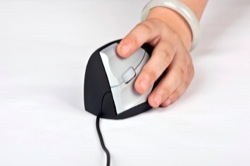
An ergonomic mouse leads to a slight rotation of the forearm and thus to better posture. One can imagine it as if one were writing something with a pen, which also requires a slight rotation of the arm. Accordingly, the appearance of such a device seems rather unusual.
Palm, Claw and Fingertip
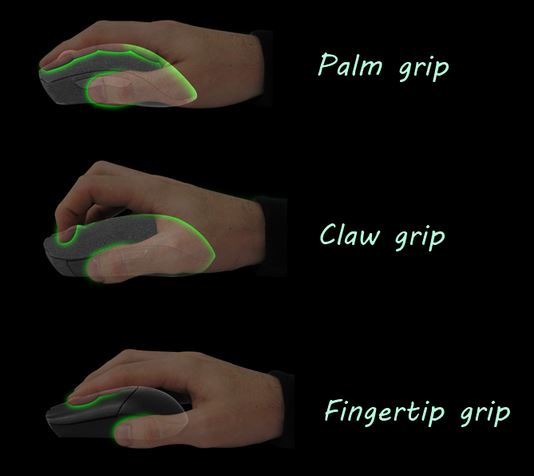
This refers to the three types of grips generally used with a PC mouse. While this usually happens intuitively, it can also be forced depending on the design.
- The Palm grip is the most commonly used. The hand rests entirely on the mouse and encloses it. This achieves maximum flexibility. With this grip, both slow and fast mice can be handled, light and heavy. Control is achieved from the forearm and the wrist. Ideally, the device is large and asymmetrical.
- The Claw grip differs only slightly. Only the fingers touch the buttons, and the mouse is enclosed from the side. The palm itself has little contact with the device. The flexibility is also quite high, but it mainly works from the wrist. However, this grip does not offer any real advantages. It just allows for smaller and symmetrical mice to be used.
- With the Fingertip grip, only the fingers touch the mouse, making it small, light, and symmetrical. Since the fine motor skills of the fingers are better than those of the arm, one can control it more precisely.
Wireless or Wired?
Typically, this decision is not relevant. Wired mice are a few milliseconds faster. However, this only matters in the professional domain of shooters or similar games.
More information can be found in the corresponding sections of the Keyboard Guide.
Laser or LED?
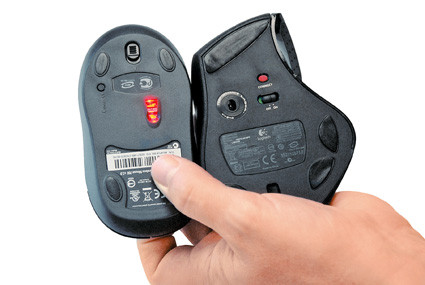
The optical mouse works with a light-emitting diode (LED). It really only operates well on certain surfaces, so usually a mousepad is necessary. For example, one would encounter problems on a glass table. In contrast, it is less susceptible to surface irregularities.
The laser mouse can be considered an advancement. It uses a laser diode, is significantly more precise, and works on many more surfaces. Additionally, it has a lower power consumption. For this reason, the laser is preferable. The LED variant is suitable for office tasks.
Dots per Inch (dpi)
Technically, it is an incorrect term. After all, the PC does not have dots, but pixels. Nevertheless, the value is still reported in dpi for mice.
While the number is important, there are many misunderstandings. More dpi does not mean higher precision. It only increases the speed of the mouse cursor. This does not mean that one can simply change the mouse cursor speed in the Windows settings instead of increasing the dpi. This will only result in Windows skipping pixels, thus reducing precision.
How much dpi one actually needs is something everyone must decide for themselves. Sometimes a high speed is essential, while at other times a slower setting is recommended for better control. Since the value cannot really be increased, except for the aforementioned adjustment in Windows at the cost of precision, one should truly not have a value that is too low. There is no upper limit, as you can reduce the dpi afterwards.
1,600 dpi is a reference value. Anyone opting for 10,000 dpi or more should have a specific reason and not be blinded by the high number.
The Weight
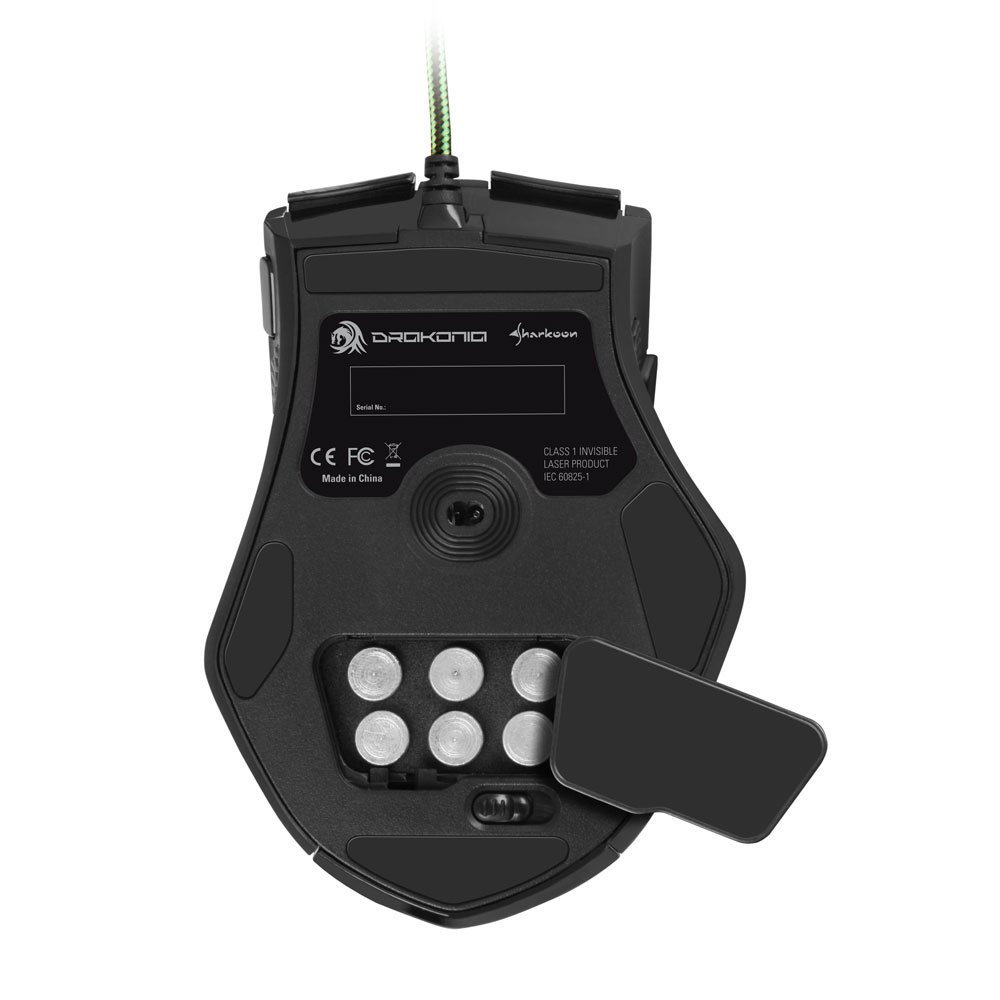
Whether the mouse should be light or heavy is more of a personal decision. Some believe a heavier device can be guided more steadily. Lighter devices can be moved more quickly. A high weight requires more effort and thus increases strain on the hand. From this perspective, devices under 100g are therefore preferred.
Both the size and weight distribution are relevant. This affects which grip one can use. A particularly back-heavy mouse will not be suitable for the fingertip grip. And using tiny notebook mice with the palm grip is not very comfortable.
The Graphics Tablet
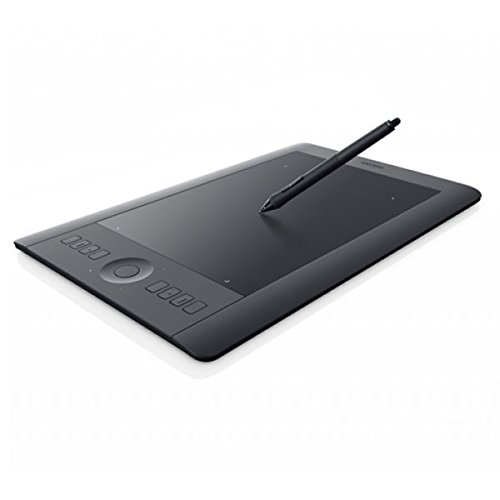
No, this subheading is not here by mistake. A tablet, like the one used for digital art, can serve as an excellent substitute for the PC mouse. A significant advantage is that it is used with a stylus, making it thus ergonomic.
While the tablet is slower, it is also more precise than a mouse could ever be. After all, precision is a fundamental requirement for painting programs and image editing. Only with precision can curved lines or similar be represented. Of course, a graphics tablet is hardly relevant for many games. But for those who don’t need high speed, this may be a tailored alternative.
Purchase Recommendations
As in other articles, this mouse buying guide consists of just a few recommendations. These devices are not suitable for everyone. One should be able to test them beforehand. After all, the size of one’s hand is very decisive. Each mouse has an indication of whether it is suitable for left-handed users.

Sharkoon 1337 Gaming Mousepad
Anyone in need of a mousepad has virtually unlimited choices. Of course, it should be large enough and as non-slip as possible. Both requirements are met by this product.
Gigabyte GM-M6800
For €15, one can’t go wrong here. 1,600 dpi is an average value and sufficient for most. Thanks to its asymmetrical shape, the mouse can be easily used with the palm grip. The only downside is that it is thus designed for right-handed users.
Sharkoon Drakonia Black or Green
A good laser sensor, 11 programmable buttons, multiple weights, and a long lifespan await you with the Sharkoon Drakonia models. The black version is the successor, offering 8,200 dpi instead of 5,000. Both models are recommended here. However, these mice are very large and only suitable for right-handed users. They are among the most popular gaming mice.
Roccat Kova+
Roccat is also a manufacturer of good products. It features 7 buttons that can be double-assigned. This is made possible by the Easy-Shift technology, where one simply holds down a specific button to select the secondary assignment of the others.
This model is a few years old but still stands out for its quality. The 3,200 dpi is more than sufficient. Furthermore, the mouse can be used with both the right and left hands.
Roccat Tyon
8,400 dpi and 14 freely configurable buttons, which are also double-assigned, are offered. Macros and profiles are stored in the internal memory. It is asymmetrical and therefore not suitable for left-handed users.
SteelSeries Sensei Wireless
8,200 dpi, 8 buttons, and a corresponding range of features for the price. This is a wireless mouse that is controlled wirelessly. Additionally, it can be used with both hands.
Hippus HandShoe
This model offers ergonomics, but not much else. No numerous buttons or macros. It is available in 6 models, 3 sizes for right and left hands.
AirObig Quell
2 models, one for each hand. There are no additional features expected here either. And for some hands, it might be too small. But for those who do not like the HandShoe mouse, this provides an alternative.
Roccat Nyth
The new mouse from Roccat targets MMO players. It features 12 customizable thumb buttons that can be exchanged individually. The remaining technical specifications match its price range, making it a better choice than the Tyon. Alternative MMO mice, including the Razer Naga, can also be found here.

Your opinion is important to us!
Do you like the article? Then let us know!