

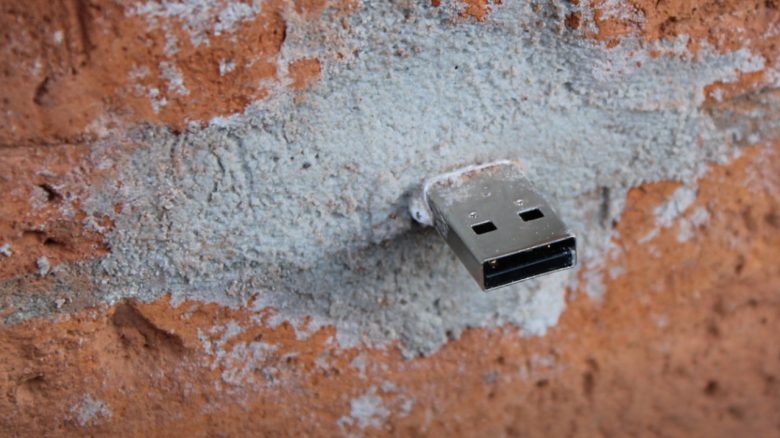
A German artist started an unusual project 14 years ago. He cemented a handful of USB sticks into walls. Today, there are over 400 such “Dead Drops” in Germany. Worldwide, 2,300 data carriers are hidden in walls, creating an offline network.
Cloud storage services are now widespread and are used daily by a large number of people to store or exchange files.
Even 14 years ago, a German artist from Berlin saw a trend that could displace the local storage of data on personal computers.
For this reason, he initiated the “Dead Drops” project, where USB sticks are hidden in public places and made accessible to everyone.
Cemented USB sticks in walls against data in the cloud
What kind of project is this? In 2010, the German artist Aram Bartholl started his unusual project “Dead Drops”. During a stay in New York, he hid 5 USB sticks in various public places.
The data carriers were placed in holes of walls and building walls and cemented securely so they could not be stolen, as happened with the graphics card in a supermarket PC.
Ideally, only the metallic USB connector protrudes, so that it is freely accessible to any user and can be easily connected to a laptop.
A Dead Drop is preferably used in espionage to pass or exchange items or secret information. In doing so, contact between two people is intentionally avoided to protect their identities and clients.
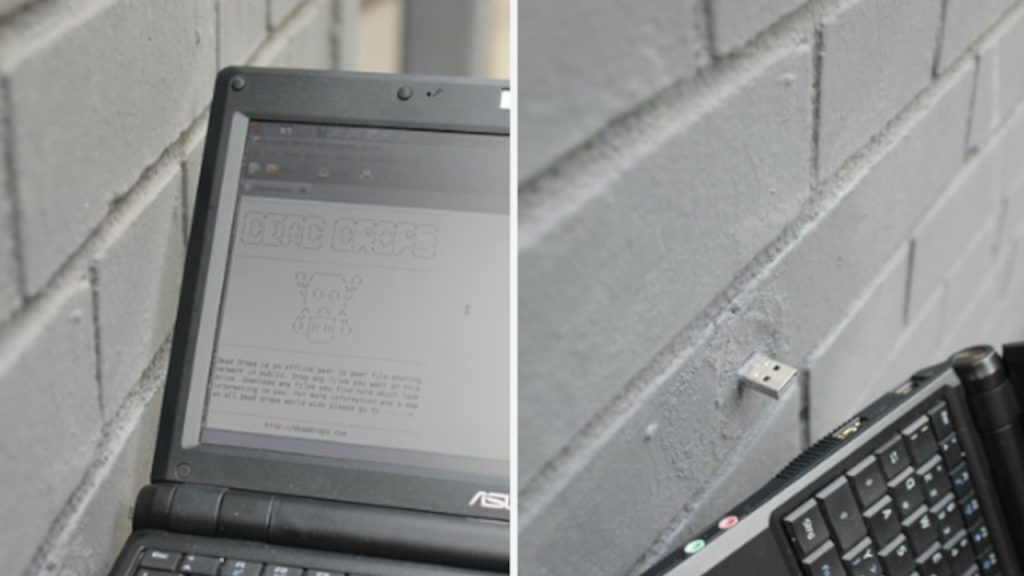
Why did he do it? The idea of the Berlin media artist was, almost 14 years ago, a call against the storage of personal data in the cloud. In his opinion, the significance of online storage was growing at that time compared to local file storage.
According to the manifest on the project’s website:
Free your data for the public in cement! Install your own Dead Drop today! Free your data from the cloud, now!
Many people have followed his call over the years. In a database on the project page, over 400 and 2,300 data carriers worldwide are now listed in Germany, amounting to a total capacity of 72,734 GB.
According to the status of the listed USB sticks, many drives have since become defective or stolen, despite originally being secured with quick cement, as recommended in the guide for creating your own Dead Drop.



Offline network as a virus carrier?
What danger lurks in a Dead Drop? As the data carriers are installed in public spaces, anyone can access them at any time. The USB sticks are intended to be used to make files of all kinds freely accessible and to exchange them.
However, it cannot be ruled out that alongside texts, songs, or self-created programs, malicious software could also be loaded onto the hidden drives. Therefore, if one wants to connect their system with a Dead Drop, some security aspects should be considered to avoid infection.
How can one protect themselves? A connected laptop should have an antivirus program that is updated daily. Additionally, it is advisable to keep the operating system up to date to close any security gaps.
Those who want to be completely safe should use a device that is not used for productive work and on which no important data is stored. A user with limited permissions can prevent malicious software from running secretly in the background.
Malicious software is designed, among other things, to collect personal data from users when they invisibly infect a system. Passwords are also sniffed to steal accesses and cause further damage. Thus, it is even more important to choose a unique password for each website and to make it as complex as possible so that hackers do not have it easy: These are the most popular passwords of 2023 – If your favorite password is on this list, you should change it quickly

Your opinion is important to us!
Do you like the article? Then let us know!