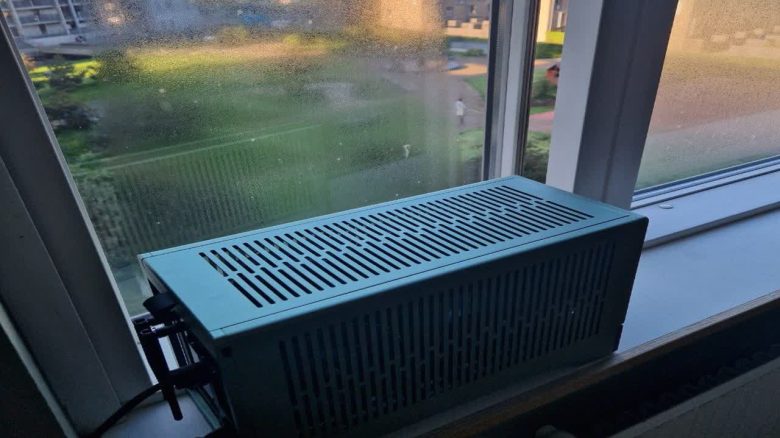
A gamer places his computer by the window to cool it down. The temperatures noticeably drop. However, in the community, his brilliant idea is controversial.
Anyone who wants to game on PC ideally wants to avoid high temperatures inside the machine.
A gamer thought that he could use the fresh air from outside to cool his PC. But the vast majority are appalled.
Can outside air harm the gaming PC?
What exactly is the player doing? The user now shares on reddit that he has placed his gaming PC by the open window for good cooling. The result: the temperatures inside are noticeably better.
What are the reactions like? Pretty negative. Many believe that he would damage his hardware with this action. Because in the worst case, moisture could form inside the system.
Another explains, however, that he doesn’t have to worry just yet:
Physically speaking, condensation cannot form inside the case (or at least it is very unlikely). Condensation forms when hot/moist air meets a cold surface – hot objects do not sweat (when was the last time you saw condensation on a cup of coffee?).
As long as your room doesn’t actually reach 40 °C at 90% relative humidity, everything is fine.
It is much worse that he is probably running the air conditioning visible in the picture and thus wasting a lot of energy in the long run. Because air conditioners work best in closed rooms.
Others advise him to ensure better air circulation inside the PC instead of doing such nonsense.
Another gamer has already come up with the “brilliant” idea of cooling his PC with outside air:

High temperatures: High wear and less performance
What is the problem with heat? High temperatures inside a gaming system fundamentally stress the installed hardware. In particular, thermal paste can dry out, leading to reduced cooling performance.
Normally, at high temperatures, safety measures from manufacturers come into play to prevent anything from happening. But this has another downside: to manage the temperatures, performance is throttled.
Certain components are now designed for high temperatures. The video memory of the RTX 3090 can reach about 105 degrees. The new AMD CPUs of the 7000 series are also designed for temperatures beyond 100 degrees.
In the best case, you should regularly check whether the temperatures in your computer are okay. There are many free tools available to help you with this.



Other players also come up with creative ideas for their gaming systems. For example, one player used an old mailbox in the wall of his house to build in his PC. At the same time, he can use the air from outside for cooling: