

In Fortnite landing hits is not that easy – usually. But on Mobile there is a feature that feels like a cheat.

Playing Fortnite on Mobile is not necessarily easy. It starts with the possibility of actually installing the game: Fortnite has been practically banned from Apple devices since the legal dispute between Epic and Apple, as it was removed from the App Store.
However, through the streaming service GeForce Now, it is once again possible to play Fortnite on iOS devices. You can rely on a comprehensive, freely customizable touch interface that allows you to play the game quite comfortably.
Of course, those who are used to the controller or mouse & keyboard will first need to get used to the touch controls on a tablet or smartphone. But the basic processes are quickly learned.
And then you can also rely on a pretty practical, if not even overly powerful feature. The “auto-fire”.
On Mobile, Fortnite shoots by itself
Here’s the feature: When you start Fortnite in the Mobile version via GeForce Now, you get three options for how you want to fire.
- Tap anywhere – meaning wherever you touch the screen, you will fire
- Custom Button – there is a special fire button
- Auto-Fire – here the weapon just fires automatically when you aim at an opponent.
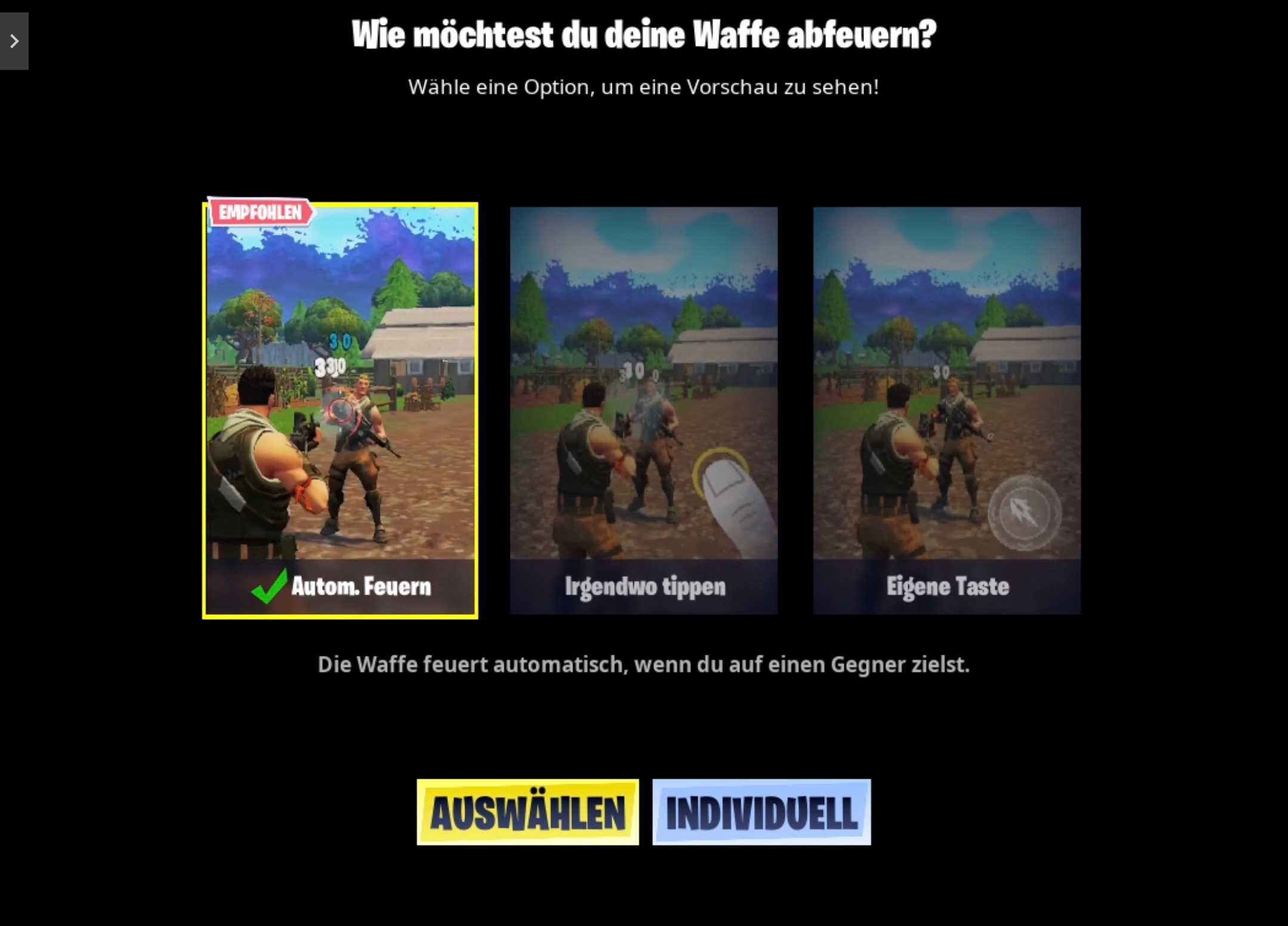
The automatic option is also the one that is displayed as “recommended”. And at least during the test run, it proved to be incredibly useful.
This is how powerful auto-fire is: If you play a few rounds in Fortnite’s no-build mode, which is the variant without building, you quickly realize: Auto-fire is incredibly strong.
Theoretically, you can use weapons like the burst assault rifle or a shotgun and only need to follow the movements of the opponent with your finger. The firing is handled by the automatic – and it hits quite accurately.
The advantage is that you can just focus entirely on not losing sight of the target. Then the opponent actually only has the chance to shoot better in return or to seek cover – otherwise, it’s over.
It also handles situations where you only see small hitboxes of the opponent because they are hiding behind a tree, for example, and hits the small target zone.
You basically save a button – and that is very useful given the sometimes tricky handling of mobile shooters. By the way: The “6-Finger Claw” is great for accessing all the buttons of the touch controls for mobile shooters.
Are there limitations? Yes, there are – otherwise the feature would be too strong overall.
- It does not work with every weapon. For example, it doesn’t work with sniper rifles, which must be fired manually.
- It doesn’t work over endless distances.
- The weapon continues to fire until you lose sight of the target or it is empty. Then you have to reload or switch weapons, which can be tricky on touch. Also, reloading in open combat is always dangerous.
- If the opponent moves too well and quickly, it is harder to keep the target.
- In Fortnite’s build mode, the feature is not as powerful – because players can simply build their own cover to hide.
- For everything else, you have to shoot “manually” – like the new deadly rocks.
Despite these limitations, auto-fire has proven to be incredibly strong – sometimes so much that it almost feels like cheating.
Aiming and hitting with the touch controls is sometimes noticeably easier than with a controller or keyboard & mouse.
What do you think of the feature? Do you find it useful or is it even too powerful for you? Speaking of too powerful: Recently, a tinkerer presented a controller aimbot that no anti-cheat can stop.

Your opinion is important to us!
Do you like the article? Then let us know!