

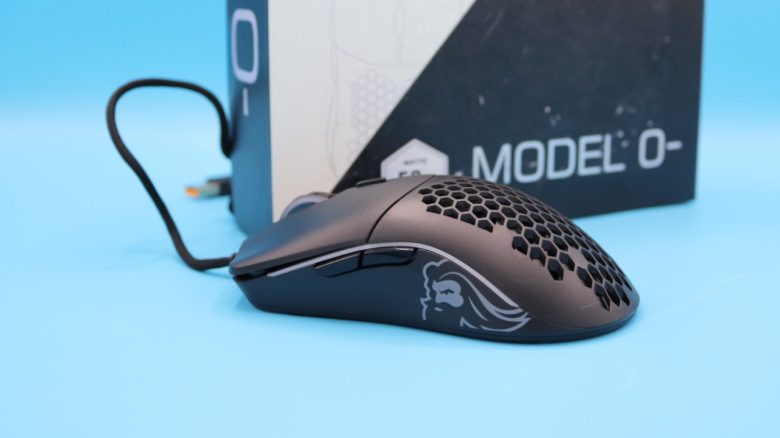
With the Glorious Model O- (Minus), there has long been a lightweight gaming mouse for shooter players on the market. The mouse is regularly available for around 30 euros on offer. But is the deal worth it? MeinMMO editor Benedikt Schlotmann has tested the mouse.
What device is this? The Glorious Model O- (Minus) is no longer the youngest product and has several years under its belt. However, you can still regularly get the mouse for around 30 euros or less on offer.
But is it worth it? Because the technology still makes a reasonable impression from today’s perspective. I tested the mouse in everyday use and will explain why I still find it recommendable today.
The test at a glance:
- Scope of delivery, design and construction
- Processing
- Software
- Weight and ergonomics
- Mouse buttons, scroll wheel and sensor
- Conclusion
Who tested it?
I currently own over 20 gaming mice and have tested over 15 keyboards. Privately, I also own over 10 sets of in-ear headphones. At MeinMMO, I have been testing hardware for our readers since 2019. In addition to the PC and PS5, I am now also on the Steam Deck.
I ordered our review copy privately on Amazon.

Benedikt Schlotmann
Hardware editor MeinMMO
Details
| Sensor | Pixart 3360 |
| Resolution | Up to 12,000 |
| Switches | Omron mechanical switches, up to 20 million clicks |
| Buttons | 6 buttons |
| Design | Black or white mouse. RGB lighting on the side, asymmetric right-handed mouse. |
| Glides | 4 |
| Cable | Fixed 2.0 m USB cable |
| Weight | 58 grams |
| Price (RRP) | 59.99 euros |
Scope of delivery, design and construction
What does the scope of delivery look like? Besides the gaming mouse, there are only a few stickers and a manual in the box.
How is the mouse constructed? You can buy the mouse in different colors, black and white are available.
- On the top of the mouse are the main buttons and between them the scroll wheel. On top of the scroll wheel, there is a button with which you can adjust the DPI.
- On the underside are four small mouse feet and a light indicator that shows how high you have set the DPI.
- The mouse cable is permanently installed, lightweight, and well stretchable. As a result, the cable only slightly interferes with the movement of the mouse.
What is special? The gaming mouse features a honeycomb design, which means “honeycomb” in German. This is supposed to make the mouse particularly lightweight, as this construction saves material and therefore weight.

Processing
The mouse cable is elastic and very flexible, but still firmly installed. Overall, the cable convinces me in everyday use and does not interfere when I have to move the mouse quickly.
The biggest criticism to keep in mind: The permeable honeycomb design of the mouse is sensitive to dirt: Those with pets or who like to eat crumbly meals at the desk while playing will likely find the mouse gets dirty quickly.
Another point to keep in mind: The switches under the mouse buttons are rated for “only” 20 million clicks. Modern mice offer rather 80 to 100 million clicks. However, if you don’t want to play 8 hours of competitive shooter titles every day, it will still take you a while to reach that durability.
Software
The software is probably the biggest limitation that you have to live with when using the Model O Minus. Unfortunately, the current software from Glorious, Core 2.0, can no longer be used with the mouse. Instead, you need to download the old software suitable for the Model O /Minus from the website.
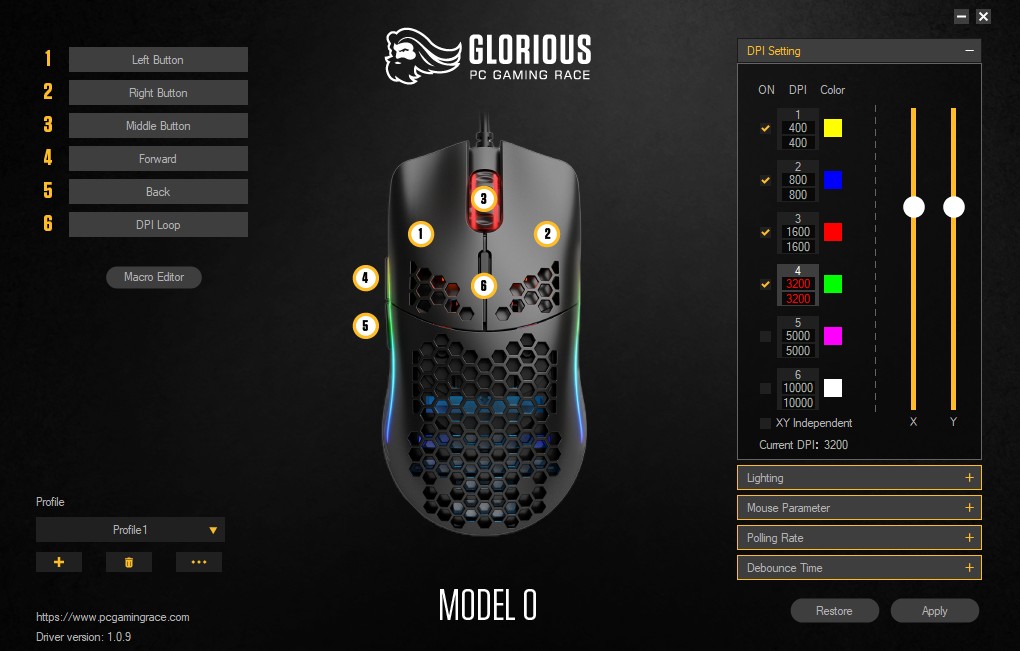
What is surprising: The old software runs much more performantly and smoothly than the modern 2.0 version that Glorious currently distributes with its new hardware. The software offers all important settings in an overview, no more and no less. The old legacy software isn’t super pretty, but it works very well.
The only drawback: On a large display, the settings appear very small, but I can live with that, and I don’t use the software that often in my everyday life.

Weight and ergonomics
The weight: In terms of weight, the O- (Minus) is one of the lightest mice you can currently buy. Even lighter are only the TurtleBeach Burst II Air at 47 grams and the Glorious O Eternal at 55 grams among the mice I was able to compare in the test.
- Turtle Beach Burst II Air: 47 g
- Glorious Model O Eternal: 55 grams
- Razer Viper V2 Pro: 58 g
- Glorious Model O-: 58 g
- Logitech G Pro X Superlight 2: 62 g
But I claim: You will hardly feel this 3-gram difference between the mice. At least in comparison, when you switch from a 120-gram mouse to a 100-gram mouse.
The ergonomics: With a hand size of 19 centimeters, I have very large hands. The Model O Minus is, according to the manufacturer, designed for small to medium-sized hands, and I am surprised at how well the Model O Minus fits in my large hand.

Mouse buttons, scroll wheel and sensor
The mouse buttons: Under the buttons are switches from Glorious, with durability rated at 20 million clicks. This is significantly below other manufacturers in comparison. However, I must say, I have hardly broken any mice based on the switches. At most the G903, which now has the notorious double-click issue.
The scroll wheel: The scroll wheel is soft but provides good feedback that can be clearly felt in daily use. A quick run through the scroll wheel is not possible. Because of this, you also cannot accidentally switch the weapon or ammunition type in quick combat if you have it on the scroll wheel.
Sensor: The Pixart PMW 3360 is built into the Model O- (Minus). This is an optical sensor that is used in many gaming mice and is known for its accuracy and responsiveness. It is praised for its ability to track small movements precisely, as well as for its low latency, making it suitable for competitive gaming. The same applies to Glorious’ gaming mouse.

Conclusion: A real insider tip under 30 euros, especially in 2025
Who is the mouse suitable for? With the Glorious Model O- (Minus) you get a really good gaming mouse with good ergonomics, pleasant haptics, and decent mid-range sensor. And the overall package is regularly available on offer for around 30 euros. Overall, the mouse is therefore a much better deal than the newer Glorious Eternal, which was released in 2025.
What alternatives are there?
- The HyperX Pulsefire Haste also features a honeycomb design, similar to the Model O- and is also very lightweight.
- The SteelSeries Aerox 5 Wireless (for the test) is also a lightweight and comfortable alternative. However, the battery life is below expectations and the buttons are sometimes too far forward.
More gaming mice on MeinMMO: If you are looking for further recommended gaming mice, then take a look at our purchasing advice on MeinMMO. Here you will find the best gaming mice that you can currently buy: The best gaming mice for shooters that you can currently buy

Your opinion is important to us!
Do you like the article? Then let us know!