

Dragon’s Dogma 2 allows you exactly one save game. How to delete your save file in order to start a new game, you can read in this guide.

Why delete a save game? Dragon’s Dogma 2 is a very large role-playing game that offers you many possibilities. Unfortunately, you can only have one save file at a time. So if you started an initial game to check the performance on your device or to play once, a restart may be desired.
For PC players via Steam, we now have our own trick on how you can restart without deleting a save game:
Delete save game in Dragon’s Dogma 2 – Here’s how on PC, PS5, and Xbox
How do I delete my save game on PC via Steam?
With the following steps, you can delete your save file on PC via Steam:
- Open the game settings in Steam – you can find them under the gear icon
Manage
on the game’s Steam page. - Disable cloud synchronization for the game under
General
.- If it is enabled, Steam will simply redownload deleted save files onto your hard drive.
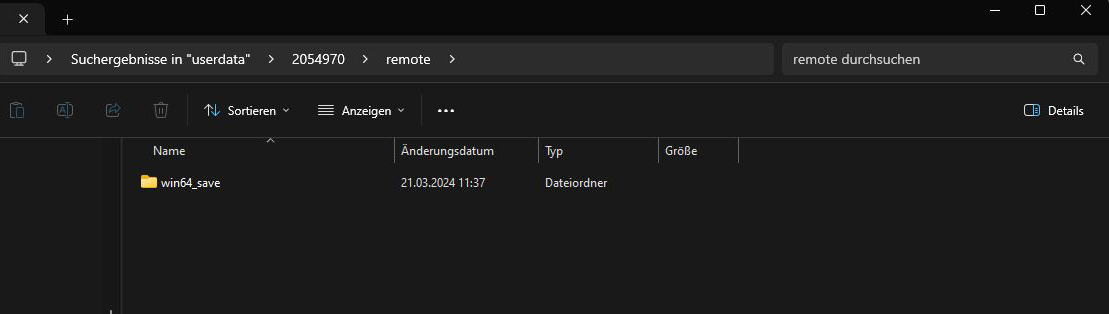
- Open the folder where you save your Steam files on your hard drive.
- Click on
userdata
. - Search for the folder with the number
2054970
and open it.- You may need to search for the folder using the folder search, as it is not directly located in userdata.
- There should be a folder named
Save
orwin64_save
. Delete this folder.
The next time you start Dragon’s Dogma 2, the game should prompt you to start a new save.
How do I delete my save game on PS5?
With the following steps, you can delete your save file on the PS5:
- Open the Settings in the PS5 menu.
- Select
Saved Data
. - Select
Upload or Delete from Console Storage
. - Select Dragon’s Dogma 2 and delete it.
This should prompt the game to ask you to start a new game upon restart.
How do I delete my save game on Xbox?
With the following steps, you can delete your save game on Xbox:
- Open My
Games & Apps
on the home screen. - Select Dragon’s Dogma 2 and press the options button on your controller.
- Select
Manage
. - You will now receive an overview of all available save files and can delete them.
If you have followed these steps, you should be able to start a new save game.

Create a new save game in Dragon’s Dogma 2
If you want to start a new game in Dragon’s Dogma 2, unfortunately, it’s not that easy. The game allows only one save file at a time per purchased game. So if you want to start over, you must first delete your old save file.
End the game on your respective platform and follow the steps described below for deleting a save file on PC via Steam, PS5, or Xbox.
Once you have deleted the old save file, you can restart the game. You will now be prompted to start a new game.
If you are still unsure what class you want to play in your new save file, we have our guide for you here: Dragon’s Dogma 2: The classes and paths – Everything you need to know

Your opinion is important to us!
Do you like the article? Then let us know!