

In Destiny, we introduce the “Destiny Item Manager” and its advantages over Bungie’s Companion App.

The Guardian of the world plays Destiny not only on the console: They always have their companion apps on the second screen at hand, which allow them to view their character, check progress, and manage their items. The official companion app from Bungie is the Companion App for iOS and Android. If you prefer to manage your Guardian on PC, you can use the features of this app directly on the Bungie website.

In addition to the official app, there are various alternatives from dedicated programmers in the community. Particularly well-known is the Destiny Item Manager. What advantages do these options offer?
What the Destiny Item Manager Can Do
The Destiny Item Manager (DIM) is an “Open Source” app for Google Chrome. According to the developers of this app, there are plans to release DIM for iOS, Android, and other browsers like Firefox, but currently, Chrome is the only way to use DIM.
It provides you with this main feature:
All items (weapons, armor, general items) can be quickly transferred from Guardian to Guardian or to the vault. If you want to transfer an item in Destiny from one Guardian to another, you need to log in with the first Guardian, fly to the Tower, place the item in the vault, log out the character, log in the other Guardian, fly back to the Tower, and retrieve the item from the vault.

With the Destiny Item Manager, you can do this in seconds, saving you time. You have all items displayed on the screen and can comfortably move them from Guardian to Guardian or to the vault. You simply click the item and drag it to the desired location.
There are (at most) four columns in the app: Your three Guardians and the vault. The rows contain the items, sorted by weapons, armor, and general items. You can see at a glance where your items are located.
Additional Features:
- With one click, you can display the entire vendor inventory.
- With a loadout builder, you can create loadouts.
- Extensive search and filter options: For example, if Arc Burn is active in the Nightfall strike, you can see all weapons with Arc damage.
- Features like “Max Light”: This automatically assigns the highest light-level items to the chosen Guardian.

By the way: You can set different languages – German is available.
App with Quality Display – the Great Advantage of DIM
Compared to Bungie’s companion app, the Destiny Item Manager has two major advantages:
- Clarity: In the Bungie app (or on the Bungie website), you only see the inventory of one Guardian when you want to move items. In DIM, the inventories of all Guardians are listed side by side. This way, you have everything in view. Since the page is well-structured, you won’t lose track.
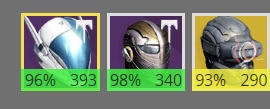
- Display of Armor Quality: In the endgame, the “Tiers” in Destiny become interesting. These are a measure of intellect, strength, and discipline of your Guardians that you gain through armor pieces. The goal of many Guardians is to reach Tier 12. You can find information on this in the provided link. In DIM, you can see for each piece of armor in percentage how close the item is to the maximum attributes. In-game or on the Bungie site, this percentage is not displayed.
Disadvantages of the Destiny Item Manager:
- You need Chrome. If you don’t have this browser, you have to download it specifically for this.
- You must log in on the Bungie site to use DIM. If you only want to transfer items, you can do this directly on Bungie.net.
Do you use Destiny companion apps on PC or smartphone?
Information on Tier 12 in Destiny is presented here.

Your opinion is important to us!
Do you like the article? Then let us know!