

Twitch Prime is especially interesting for gamers who want to get free items via drops or loot. However, the system also gives you the chance to subscribe to your favorite streamers in the form of Prime subs. We will show you how to connect your Twitch Prime and how to apply your free subscription.
These are the benefits you get with Twitch Prime: The streaming service Twitch offers great advantages for many of you gamers when you link your account with your “Amazon Prime” subscription. The benefits include:
- Special emotes, access to chats in streams, and a color choice for the chat
- Monthly Twitch loot and drops
- Discounts on various games
- One free subscription per month for a streamer of your choice
However, in order to access these benefits, you must link your Amazon account with Twitch. We will show you how to do that and how you can subscribe afterward.
Connect Amazon Prime with Twitch
This is how you can connect with Twitch: To use Twitch Prime on your account, you need an Amazon account and an active Amazon Prime subscription. This costs €8.99 per month or €89.90 per year.
Here you can subscribe to Amazon Prime.
If you have met all the requirements, proceed as follows:
- Click on this link Prime Gaming Link
- Now select “Link a Twitch account” and log in to your Twitch account
Just follow the instructions, and your account will be connected to your Amazon Prime account after completing the procedure. Your Twitch account will automatically be upgraded to Prime when linked.
If you are still looking for streamers, we have compiled a list here:

Complete a free subscription with Twitch Prime
This is how you complete a free subscription: Once you have connected your Twitch and Amazon accounts and have an active Prime subscription, you can now subscribe to a channel of your choice. Proceed as follows:
- Choose a channel of your choice
- Now select the “Subscribe” option directly under the stream on the channel page.
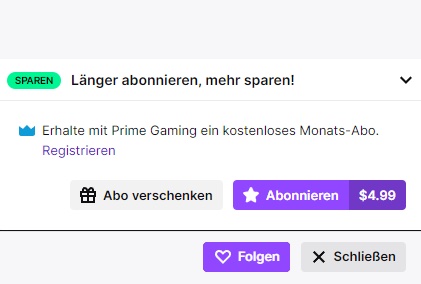
- Then select the “Subscribe” button with the Prime Gaming crown
- Now you have subscribed to your streamer.
A subscription lasts for one month, and the benefits it brings can only be used during this period. When your subscription expires, you can renew it in the next Prime month or give it to another channel.
This is how you get a free Amazon Prime subscription
This is how the trick works: If you have heard about Twitch and Amazon Prime for the first time but want to test this service, you can start a free trial subscription. Go to Gaming.amazon.com, register, and use the free trial offer. It lasts 30 days and can be canceled before its expiration.
However, you can only use the offer if you have not redeemed it with your account before.
Why is Twitch Prime worth it? If you often order a lot from Amazon and enjoy watching your streamers play on Twitch, then linking it is definitely worth it. You receive many items for games for free and have the chance for substantial discounts on constantly changing games monthly.
Sony allegedly brings new headphones for the PS5 and could fulfill a big wish for me

Your opinion is important to us!
Do you like the article? Then let us know!