

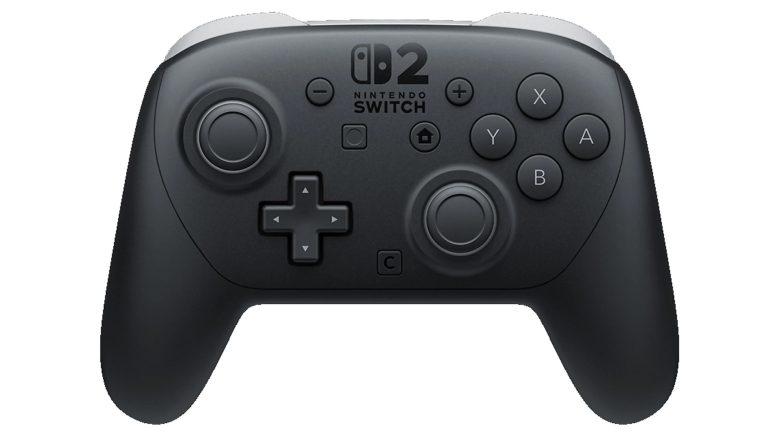
With the Nintendo Switch 2, the new official Pro Controller has also been released. MeinMMO explains how to connect your Switch 2 and Pro Controller.
A new controller for the Nintendo Switch 2 has been released with the Pro Controller. The device is the alternative if you do not want to play with the Joy-Cons that come with the Switch 2 package.
MeinMMO explains how you can connect the controller to your Switch 2 and what you need to consider.
Synchronizing Pro Controller with Switch 2
Here’s how to connect the Pro Controller to the Switch 2:
- You need both the Pro Controller and the USB cable from the controller’s packaging.
- Now connect the controller with the USB cable directly to the docking station of your Switch 2.
- You should now receive a notification that the controller has been synchronized with the Switch 2.
- Finally, you can detach the USB cable and use the controller wirelessly. Nintendo Switch 2 and Pro Controller should now be connected.
If you want to synchronize the controller with the Switch 2 in tabletop mode for the first time, you will need a different USB cable. Because the Switch 2 only has two USB-C ports and no USB-A port.
To end synchronization between Switch 2 and Pro Controller: Activate airplane mode in your Switch 2 settings and set the Bluetooth setting to “Off”. Once airplane mode is activated, the controller’s synchronization will be disabled.

The Nintendo Switch 2 will be released on June 5, 2025, and will bring a lot of innovations and features, especially compared to the original Switch. MeinMMO presents all the innovations you should know about what the Switch 2 has to offer: Nintendo Switch 2: All features and innovations at a glance

Your opinion is important to us!
Do you like the article? Then let us know!