

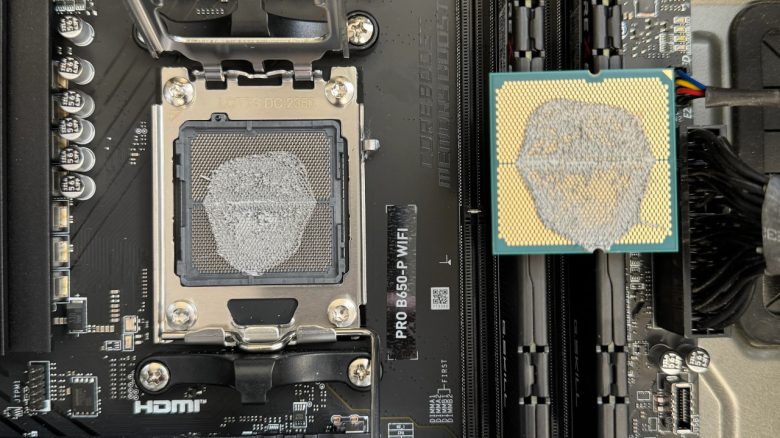
An IT expert uses thermal paste in a particularly creative way to cool his CPU. However, it didn’t work quite as well as planned. This is reported by a user who had the opportunity to repair the PC.
A user explains that he works in customer support and regularly has to check computers there. Recently, his department received a particularly special example of a gaming PC. The owner had applied thermal paste to the CPU socket and was puzzled as to why the computer was not functioning properly.
On reddit, the person from customer support explains that they initially did not notice the thermal paste when starting the computer:
The customer stated that he had not installed a CPU cooler because he did not know he needed one, and that
by the way, I put the thermal paste for cooling between the CPU and the motherboard.Believe it or not, the operating system actually loaded. We tried it before realizing that there was [thermal paste] under the CPU.
Can the processor and motherboard still be used? Yes, as long as you thoroughly clean the components with isopropanol, the components should continue to work without any issues. The condition is that it is not conductive paste, as that would short-circuit the motherboard immediately.
However, this is rather unlikely, as the user himself explained that the computer could already be started without any problems.
What are the reactions? Astounded and sometimes amused. Many wonder how someone can spend thousands of euros on their studies if they cannot even assemble a computer properly. Some find this quite strange. Thus, some write:
Imagine wanting to spend hundreds of thousands of dollars on a computer science degree and not even being able to look up on YouTube how to build a computer, even though there are thousands of videos showing you how to do it.
I have done IT work for all kinds of professionals using high-performance systems. Developers, 3D designers, video editors, etc. I have never met a group of people who knew so little about their tools.


Cooling and proper ventilation are an important part of a computer
Cooling offers many advantages: When the graphics card, processor, and co. start working, large amounts of heat are released. If your PC gets very hot, it throttles performance (“Thermal Throttling”) or, in the worst case, shuts down. This is ensured by fuses that manufacturers integrate into their components.
Gamers can rely on either pure air cooling or water cooling. Air cooling is easier to handle, while water cooling usually operates quieter and more calmly, as only the pump and the radiator fan generate noise.
Important tips on how to keep your gaming PC cool can also be found in the following article directly on MeinMMO:
8 tips to keep your gaming PC cool and faster in summer

Your opinion is important to us!
Do you like the article? Then let us know!