


With the extensive skill trees in Borderlands 4, it can quickly happen that you make a mistake. We show you how to easily reset your skill points and specializations if needed.

How can you reset your skill tree in Borderlands 4? If you made the wrong choice when selecting your skills or simply want to try something different, don’t despair: You can easily reset your skill trees at fixed locations. You can also change your specializations there.
At these locations, you will find respec machines that allow you to reset your points for in-game currency. The price varies depending on how many points you have already invested, ranging from a few dollars to 1.5 million. If you want to reset your specialization, it costs 5,000 Eridium.
Where to find the respec machines, you will find out right here.
All Locations for the Respec Machines
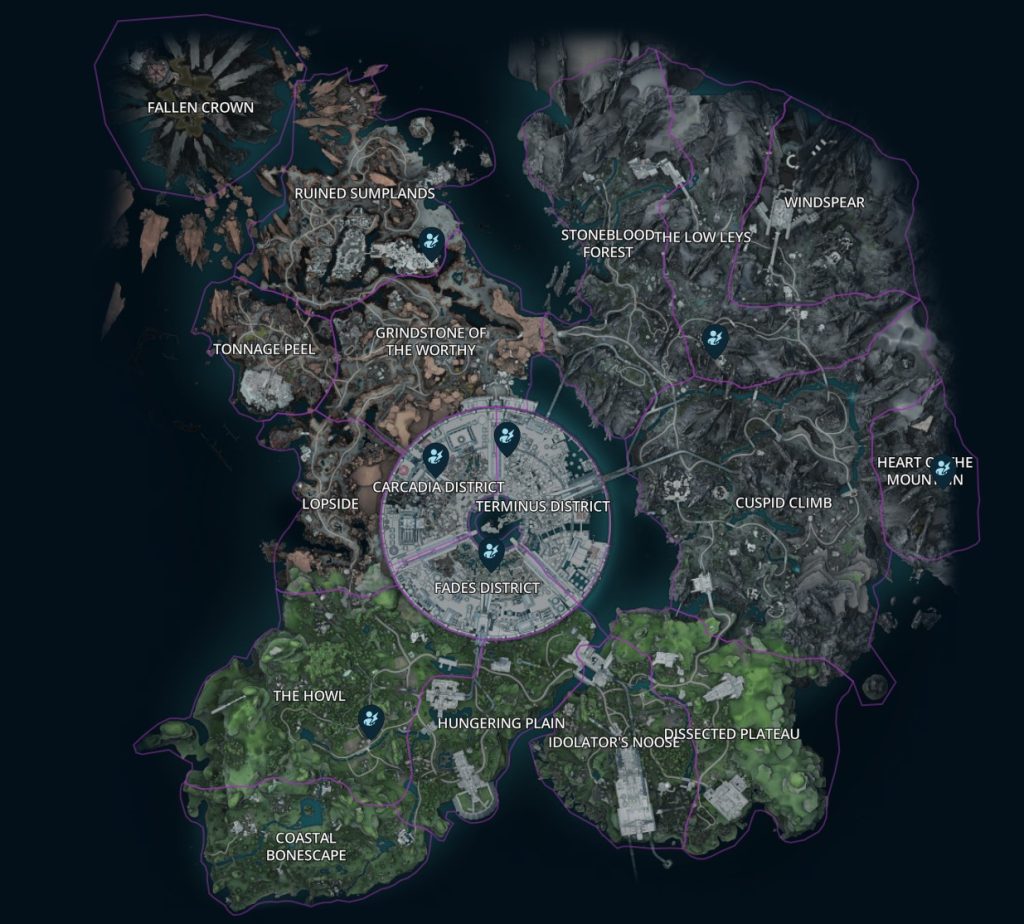
Currently, there are a total of 6 locations where you can reset your skills:
- The launch pad (The Howling, The Fungi Fields)
- Belton’s Drilling (The Lowrocks, Terminus Vastness)
- Carcadia (Devastated Swamp, Wasteland of Carcadia)
- Exclusion Zone (Carcadia District, Dominion)
- The Food Court (Terminus District, Dominion)
- Sumpview Falls (Fungi Fields District, Dominion)
Then just go to the marked machine there. It will show you the price for your respec. Then hold the respective button and you will enter the respec menu. Here you can choose whether you want to reset just the displayed skill tree or want all spent points back. You simply reset your specialization by holding the button down.
Here you can find the 6 locations on the map:
What else is there to consider? You can reset your skills and specializations as often as you like – as long as you have the necessary resources. You should also only leave the machine when you are really satisfied with your build, otherwise you’ll have to pay again. As long as you keep the window open, you can redistribute and experiment as you wish.



If you want to avoid a respec, you can use build planners that allow you to see the stats of various builds beforehand. We show you which tools are currently the best for this and how to use them: With a handy tool for Borderlands 4, you can build a powerful build even before the game starts

Your opinion is important to us!
Do you like the article? Then let us know!