


MeinMMO author Max Handwerk is currently playing Borderlands 4 only in split-screen. What is fun? And what is less enjoyable?

I am a typical console gamer, always have been. My brother and I started playing video games together on the PS2 after the Game Boy – always with two controllers. The idea of sitting together in front of a screen and gaming is my original understanding of video games.
This has changed in recent years, of course. On one hand, because you simply start playing more different games. But also because “2-person-on-one-console games” have become increasingly rare.
There are always exceptions, such as Split Fiction, Baldur’s Gate 3, or various Switch games. But also: Borderlands 4. This game series is one of the best for me when it comes to playing together on the screen.
So it’s logical that Borderlands 4 at my home has only been played in split-screen so far – this time in a duo with my wife. And what can I say? Borderlands 4 is just a blast in split-screen, even if there are a few issues.
What makes Borderlands 4 so good in split-screen?
Primarily, it’s the aspects that also ensure that solo players have fun with Borderlands 4. Those who enjoyed the Borderlands gameplay before will enjoy it in part 4 as well. And from my perspective, it’s actually a bit better.
Borderlands 4 is incredibly fast thanks to its improved movement, and it is diverse due to its variety of weapons and abilities. The main story captures me enough that I want to know what happens next, and there are a few laughs in the side stories.
And the best part about split-screen: You share everything together. You can laugh together when funny things happen, and you can empathize together when Claptrap concludes his past in a side mission – or helps a rocket to fulfill its destiny.

What I really like is that you can explore the open world on your own despite split-screen. You can do your own thing here and there, and then meet up again to take on the next big mission or challenge one of the world bosses in their arenas.
We often have that “Look here, I found something cool” moment. Then you just teleport over to see what’s hidden there together. This is also useful when the backpack is full and you want to sell stuff. One person can teleport quickly to the vending machine and then just return to the other player.
Furthermore, some gameplay aspects are designed to be played together. We play Amon and Vex and can support each other with certain abilities – it’s just fun. It’s also nice to revive each other in battle and avoid resetting the entire fight. Tension rises when a boss takes one of us down (usually me) and threatens to take out the other vault hunter as well. Then it’s always “Hurry up” to quickly rejoin the fight.
It’s actually quite good that loot is now instanced, and everyone gets their own stuff. So there’s no need to argue about who gets to use the cool new gun.
Overall, I simply notice that we often have that “come on, let’s play another round quickly” feeling in the evenings. Whether it’s a small side mission to complete together, a larger story mission, or just one of the points in the open world that needs to be conquered: For us, BL4 in split-screen is a game that can be played spontaneously for half an hour, but also for an entire evening. And that’s something that far too few games manage these days.
Where are the problems in split-screen?
I want to limit this directly: In the Borderlands titles, I could write articles about how clunky the Borderlands split-screen is and that the fun is significantly diminished because of it. From my subjective perspective, that is actually not the case this time. So, first of all, kudos:
- The menu is significantly clearer in Borderlands 4 than it was in Borderlands 3 or Wonderlands. Space is well utilized without losing too much information.
- You can play split-screen vertically or horizontally right from the start. We prefer vertical, which was missing at the beginning of Borderlands 3.
- For me, the performance is completely sufficient and does not diminish the enjoyment of the game. More on that shortly.
The problems are as follows:
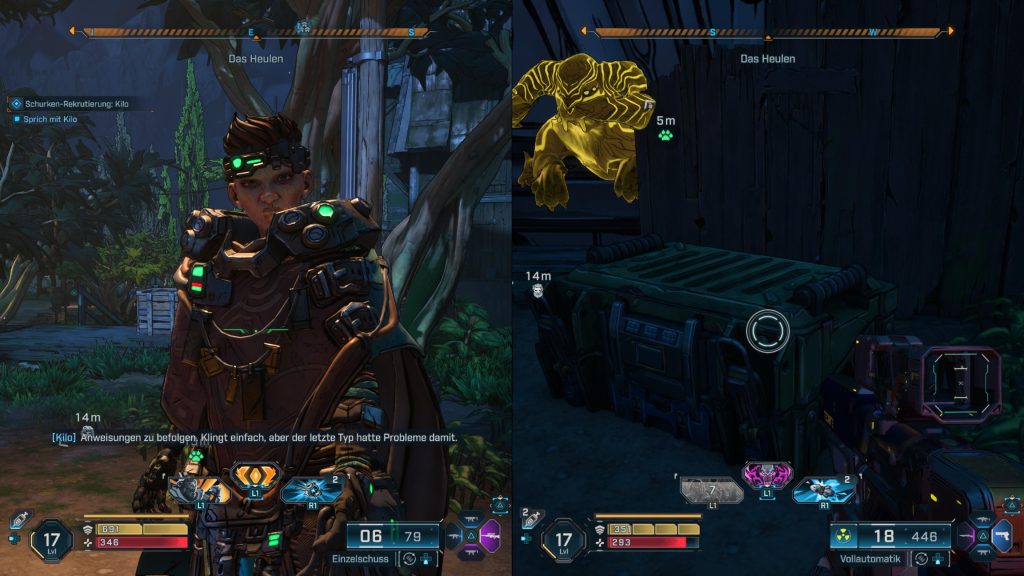
- The sound is bound to just one player. This is actually quite annoying. When Vex accepts a new quest or generally talks to NPCs, we only hear it if Amon is standing next to them.
- Subtitles can only be displayed on one of the split screens. Also frustrating, especially considering problem number 1. This means: One can simply follow the stories worse.
- Then of course the overview. But I guess you have to let that go since it’s only half a screen.
- And then: the performance. We have significantly lower FPS compared to solo mode. This bothers less on the small split screen than on the full width, but it is still noticeable.
- At first, this still bothered me, but you get used to it quickly. I read a tip online that suggested setting the session to “local” to achieve more stable performance. I’m not a hundred percent sure if it helped, but “it feels like” the game is indeed more stable since then.
These are the kinds of things I would be happy to see improvement on in upcoming updates. But overall, Borderlands 4 is a game that is just brutally fun in split-screen. So much so that I have put off playing it solo in a serious way so far.



Of course, you don’t have to play Borderlands 4 together on one screen. You can also play online! What is your experience with the Borderlands multiplayer? Tell us in the comments! And if you generally want more information about the options available in Borderlands 4 to play together, check here: Borderlands 4: Everything about crossplay, multiplayer, coop and split-screen

Your opinion is important to us!
Do you like the article? Then let us know!