

In Borderlands 4 you can choose from various audio options. We will explain to you what options you have and how to set them.

Where can I change the language? To change the audio output, you need to follow this path in the main menu: Options > Audio > Simple > Audio Language.
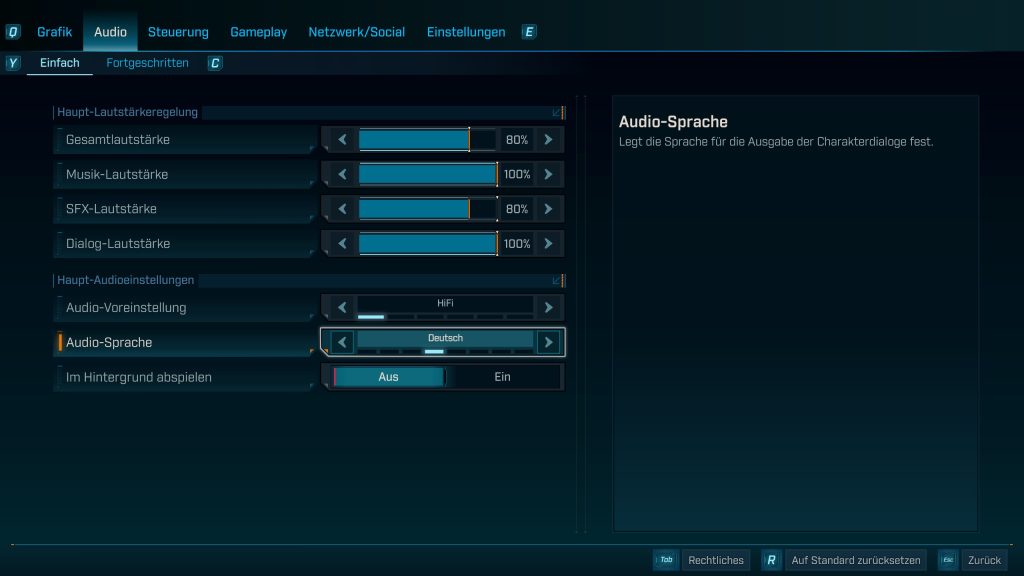
You have the choice of English, German, French, Italian, Spanish, Japanese, Korean, or simplified Chinese. To switch, you just need to cycle through with the arrows until you find the language you want.
The game is fully voiced, so you can hear your chosen language almost around the clock during your playtime.
But be careful: You can only make the language selection in the main menu. If you are currently in the game, you have to live with the language you selected. By default, English is set.
So if you want to change your language selection, you have to finish your run and return to the main menu. But as you can see, this is super quick and easy, even if the menu may be a bit hidden for that. This way, you can quickly get back into the fray with your newly selected language.
Can you also change the text language? Yes, you can. However, you have to do this either via Steam/Epic Games or your console itself. On consoles, you need to adjust the language of your entire system in the options. On Steam and Epic Games, you can easily set this by right-clicking on the game and adjusting the relevant tabs.



Are you looking for a suitable build to wipe out enemies or need a very specific guide because you’re stuck? In our overview, we have collected all our guides, tips, builds, and tricks for you: Borderlands 4: All guides, tips, and lists in overview

Your opinion is important to us!
Do you like the article? Then let us know!