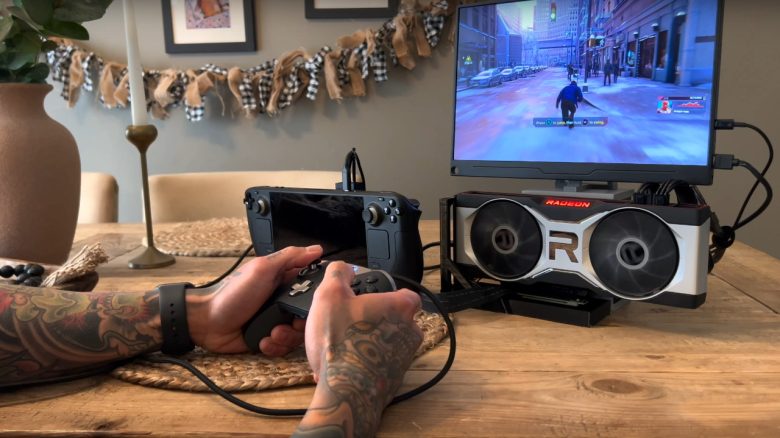
A player has shown a video of how he connected a Radeon RX 6700 XT to a Steam Deck. This works very well, but the Steam Deck is no longer truly portable.
What did the player do? The YouTuber “DiY Papi” upgraded a standard Steam Deck with an RX 6700 XT.
The YouTuber connected the graphics card via the m.2 socket of the Steam Deck. However, he had to remove the M.2 SSD for this. He powers the graphics card with an external power supply of 700 watts, which he mounted under a monitor.

Does the procedure have drawbacks? Yes, the bandwidth of the graphics card is limited to the m.2 connection in the Steam Deck. While this is not as relevant for an RX 6700 XT, it would quickly limit the performance for a much faster GPU, such as an RTX 4090.
Moreover, the Steam Deck is no longer as portable with this setup, and the M.2 SSD also had to be sacrificed. By the way, you can watch the entire video on YouTube:
Other gaming handhelds offer external graphics cards as a feature
Who offers something like this? ASUS offers the option to connect an external graphics card with the ROG Ally. For this purpose, the ROG Ally provides a so-called ROG XG Mobile Interface. Here you can connect an external graphics card and utilize the performance of the GPU.
The downside: The “ROG XG Mobile” models are all very expensive, and only a few ASUS devices, like the gaming convertibles of the Flow series, support the connection.
| Preview | Product | Rating | Price | |
|---|---|---|---|---|

|
ASUS ROG Ally Konsole | 7 Zoll FHD+ 120Hz IPS Display | AMD Ryzen Z1 Extreme | 16 GB RAM | 512GB SSD... | Zu Amazon |
*Affiliate-Links. Wir erhalten bei einem Kauf eine kleine Provision von Amazon. Vielen Dank für Eure Unterstützung!
Are there alternatives? Theoretically, you don’t necessarily need ASUS’s exclusive connection: If you have a Thunderbolt port, you can theoretically connect an external graphics card enclosure with Thunderbolt support to it. You can also insert and use a graphics card here. However, this is likely to be just as impractical for portable use as the YouTuber’s approach.
In this way, you can “upgrade” a convertible or a laptop with a faster graphics card.



Alternatives to the Steam Deck: If you are looking for an alternative to the Steam Deck, take a look at the following list. Here, we present the best options if you want a different handheld instead of a Steam Deck. And some also support Windows as an operating system.