

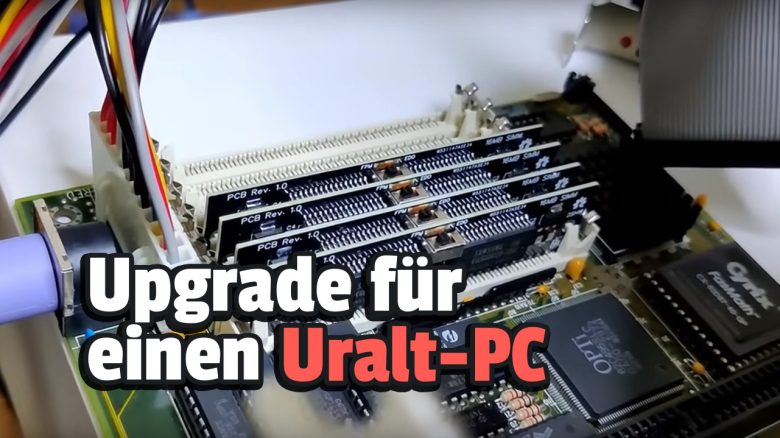
A YouTuber has equipped a 40-year-old computer with 64 MB of RAM. The biggest problem was finding working components.
The YouTuber Bits and Bolts specializes in retro hardware on his channel. In his videos, he disassembles ancient processors and motherboards and tests games on old graphics cards.
In his latest experiment, he equipped a 40-year-old computer with 64 MB of RAM. However, he had to design the RAM himself.
A small revolution for the 40-year-old computer
What kind of computer is this? Intel’s 386DX was released in 1986 and was Intel’s first 32-bit processor series. It could theoretically address up to 4 GiB of main memory (RAM), which was never utilized. Even 32 megabytes were a lot at that time. By comparison: a typical Windows 3.1 setup in the early 1990s required only 1 MB of RAM. The clock rate was 33 MHz.
What did the YouTuber do? The YouTuber Bits and Bolts created a step-by-step guide for building 16-MB SIMM modules with 30 pins from commercially available components. This may seem a bit unremarkable in 2024, but it would have been a real novelty in the 80s.
The biggest problem for the development of RAM was, according to the YouTuber, the search for usable components. He needed 30-pin SIMMs for the development, which cannot be bought today. Typically, with such old used components, one can never be sure how well-preserved the parts still are.
Eventually, he managed to install 64 MB of RAM into a system from the 1980s after testing and finding that the performance of the system had improved.
Why 64 MB? 30-pin SIMMs support a maximum of 16 MB per unit. Therefore, he wanted to test whether he could equip his system with 64 MB or 128 MB. In the end, it turned out to be 64 MB of RAM.



Old hardware is only worth it in a few cases
Is old hardware worth it at all? If you are considering upgrading an older system with hardware, it is rarely worthwhile. The problem with very old components is often that they limit themselves: You can only equip a 10-year-old processor with a similarly old motherboard and DDR3 RAM. Therefore, you will never enjoy modern features. Additionally, older CPUs often do not operate in a cost-efficient manner.
For modern hardware, you already have to replace the entire system (motherboard, RAM, and CPU). Upgrading old hardware with similarly old hardware is hardly ever worthwhile. A list of hardware that you should definitely not buy today can be found in the following article directly on MeinMMO: 7 Upgrades for your Gaming PC that you should definitely not buy

Your opinion is important to us!
Do you like the article? Then let us know!