A user constantly experiences crashes with their PC games. After 2 years, he finally opens his PC and realizes he should have done it much earlier.
A player reports that his games keep crashing. In another post, he explains that he hadn’t opened his PC for years and just decided to do it now.
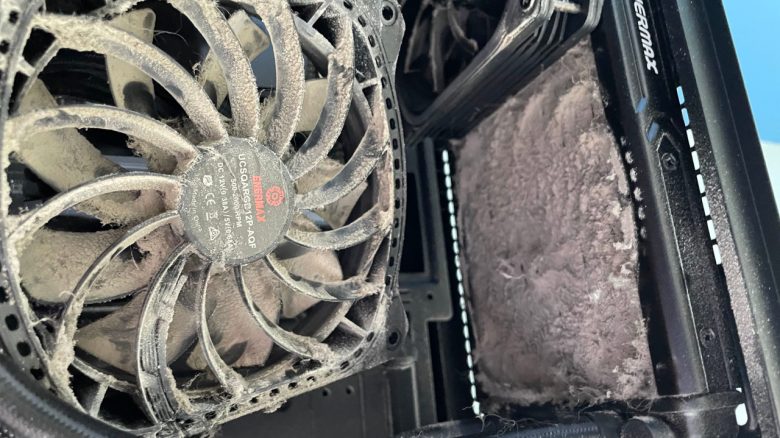
To illustrate, he posts a picture showing the entire “horror” inside his PC. Many community members are somewhat astonished at how a PC can look like that.
Gaming PC is completely dirty, even though it was on the table
How can the PC be so dirty? The community initially speculated that the heavy dirtiness must be because the owner had his PC standing on a carpet or similar surface. However, he explained that his PC had been on the table the entire time.
He mentioned that he had regularly cleaned the room itself, but he had never thought to clean the corner of his PC.
In hindsight, he feels somewhat silly for never considering it. Other gamers also have similar issues because they avoid cleaning their gaming PC for years.
Here you can find the corresponding Reddit thread:
Why should you clean your computer regularly? Dirt and dust clog airflow paths or your fans. This causes some components or parts to fail to dissipate heat properly, leading to overheating.
The processor and graphics card then throttle performance to cope with the heat or shut down in emergencies to protect components. Your PC will become slower as a result.
Even the “greatest gamer” and YouTube streamer Dr Disrespect has significant problems because he hasn’t cleaned his PC in a long time.
By the way, pollution can never be entirely avoided. Particles enter the house through ventilation, and furniture and clothing also shed small particles. Human skin sheds skin flakes and hair, which also contribute to dust formation. With a good dust filter or case, you can at least reduce pollution.


When games crash, there can be various causes
Why do games crash?
- The games are poorly optimized and aren’t compatible with your hardware.
- Your graphics card drivers are hopelessly outdated and can cause the game to crash.
- You have issues with temperatures in your computer that also affect performance.
- Hardware defects can also lead to crashes.
What can I do about it? In the best case, first check on Reddit or Steam if other players are reporting similar issues when your game crashes. If it indeed seems to be a game issue, then you’ll need to wait for a patch or lower your graphics settings. This can often work wonders.
However, if you are the only person experiencing problems, you should check your drivers and your hardware. Perhaps your hardware is overheating or a component is damaged or even broken.
When checking your graphics card, keep an eye out for the following signs that could indicate a defect:
5 signs that warn you that your graphics card is about to die