Many might know it: You think unclear for a few seconds and suddenly you permanently delete games from the Steam library. A player thus contacted support and was not disappointed.
What happened to the player? As 3lizardintrenchcoat shares on Reddit, he deleted many of his games permanently from his Steam library over the years during some hard phases of his life. Now he regrets it and reached out to support with his concern.
He additionally tried to find out which games he had deleted to tell support more specifically which games it would concern, but had the problem that only active and paid games were displayed in the purchase history. Thus, he could not determine which games were specifically missing from his library.
3lizardintrenchcoat asked support to either restore the deleted games or, if that was not possible, to provide him with a list of all deleted games. Either option would make him very happy. Shortly after his request, he already received a response from support that saved his day.
What did support do? A few hours after his request, the player received the response from Steam support that his library had been restored. He should check if he was missing anything and could also get a list of all deleted games if he still needed it.
The player is so grateful that he shares his request with the answer on Reddit and initiates it with “I think I’ve never experienced a company as nice as Steam… Thank you very much.” Over 40,000 upvotes and currently 747 comments (as of: December 1, 2025, 11:30 AM) celebrate with him, and many agree with him.
Many of them can relate to the feeling, having done similar things on other platforms during tough times. Whether out of anger, sadness, or to harm oneself, they give him encouragement and positive thoughts for his further journey.
However, some also point out to him that he can also restore deleted games himself if needed and bring them back into his library. How to do that, we will explain to you once, so that you can also help yourself in case of doubt.
Restore deleted games on Steam yourself – here’s how
Here’s how to get deleted games back on Steam: If you have permanently deleted a game from your library, you can also retrieve it through the same window you used to delete the game. However, if the deletion was a while ago, you must at least know that you deleted it before; there is currently no overview of all deleted games.
If you want to retrieve a specific game, follow these steps:
- Click on the “Help” tab and then on “Steam Support”
- Then search in the bar under the tabs for the game you want to retrieve

- Then select your desired game, and you should be able to select the field: “Restore the previously removed game/package”
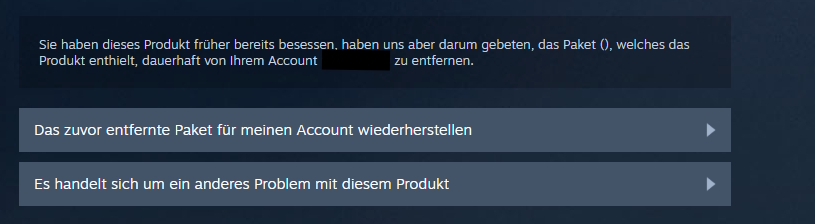
Click on it, and your game will return to your library. However, this only works if you know which game you deleted. If you do not know that, contacting support is the better option, as shown in the example of 3lizardintrenchcoat.



The Steam support often provides conversation topics and stories that touch players’ hearts in the community, like this one. Other stories spark discussions about curious events, like when a player sent his Steam Deck to support and received a game for free: Player sends his device to Steam support, asks for an update a few weeks later, receives RPG hit for free