

Scam No. 3: Overpayment and Refund Request
How does the scam work? You are contacted via a call or email, claiming that Amazon has accidentally overpaid you. To refund the “excess”, the scammer requests gift cards, such as for Google Play, Steam or Amazon. In some cases, remote access to your PC is also supposed to be set up to correct the alleged “error”.
How to protect yourself: First check your bank account or order overview. If everything is normal there, the alleged error is completely made up. Also, be particularly careful if someone asks you to grant access to your computer. This is a trick to install malware or gain full control of your PC. Amazon explicitly emphasizes that gift cards are never requested for refunds.
Scam No. 4: Mystery Packages (“Brushing”)
How does the scam work? You suddenly find a package at your door, containing an item you never ordered. Behind this is the so-called “brushing” scam. Merchants use your address to simulate fake purchases and leave fake product reviews in your name. According to LifeLock, it works like this: The scammers obtain your address, place an order that is delivered to you, and then leave a positive review. Often, a QR code is even included, a trick that can lead to harmful phishing sites.
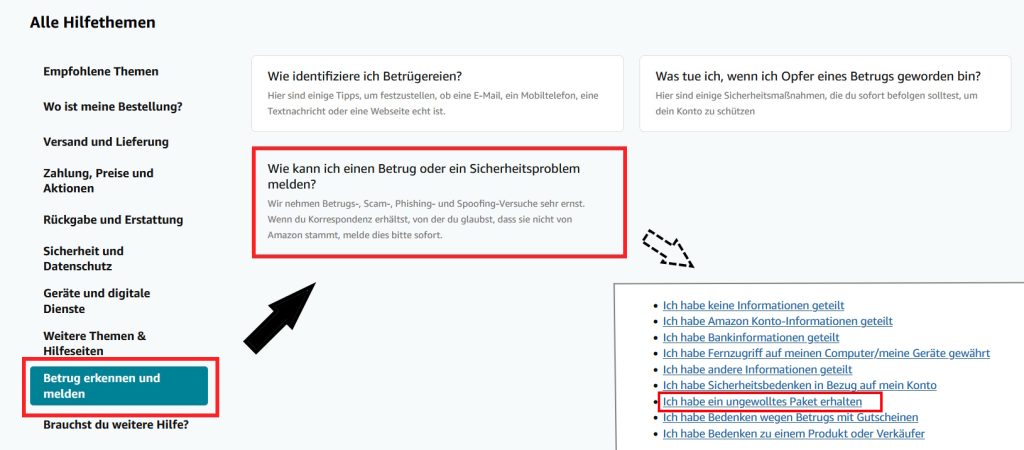
How to protect yourself: Report such packages immediately to the Amazon customer service. Scroll down a bit and look for “Recognizing and Reporting Fraud” and then go to “How can I report a fraud or security issue?” Then follow a list where you choose “I received an unwanted package”. At the same time, keep an eye on your personal data: Mystery packages can be an indicator that your personal information is already circulating. Therefore, regularly check your bank and credit card statements and strengthen your account security, for example by using strong passwords and two-factor authentication.
Scam No. 5: Account Locked via Email
How does the scam work? You receive an email supposedly from Amazon, with a message like “unusual activities detected” or “Your account has been locked”. Within a short period, you are supposed to update your payment details to unlock access. The message seems legitimate – until you check the sender’s address or the link more closely. As Chip reports, such fake emails that look convincingly real are on the rise.
How to protect yourself: Always watch for typical warning signs in emails, such as impersonal salutations (“Dear customer”), extremely short time frames, or unnecessary pressure. Such phrases are a clear indication of phishing, according to the consumer advice center. Also, never click on links in suspicious messages – real Amazon addresses always end with an official domain. Such as “amazon.de”, “amazon.com” or “amazon.co.uk”. For users in Germany, amazon.de is usually relevant, so always type the address directly in the browser or app. If you are unsure or have already reacted, change your password immediately to prevent identity theft.

Your opinion is important to us!
Do you like the article? Then let us know!